

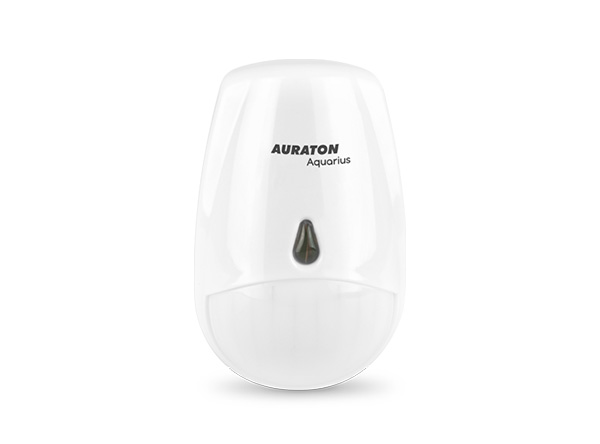
User manual ver. 20201021
This document collects information regarding the safety, installation and use of the AURATON Aquarius PIR device.
AURATON Aquarius PIR wireless motion sensor
The AURATON Aquarius PIR wireless motion sensor is designed to support "intelligent circulation" in the DHW circuit. The circulation pump connected to the AURATON Aquarius CR output is designed to activate only when the AURATON Aquarius PIR motion sensor detects DHW user activity in the room (e.g., bathroom). Additionally, the AURATON Aquarius CR activates the circulation pump only for a pre-set time (factory set to 2 minutes).
 |
The lithium battery used (CR 123A 3V) allows the motion sensor to operate continuously for many years. |
 |
Interference-free communication between devices. AURATON Aquarius PIR and AURATON Aquarius CR communicate on an 868 MHz frequency. Very short, encrypted transmission packets (approx. 0.004 s) ensure efficient and interference-free device operation. |
Description of the wireless motion sensor controlling the circulation pump in the Aquarius PIR domestic hot water system
(transmitter)

- Front of the sensor
- LED diode
- Back of the sensor
- CR123A 3V battery
- Pairing button
- Back cover
- Handle attachment
Removing the back cover of the sensor
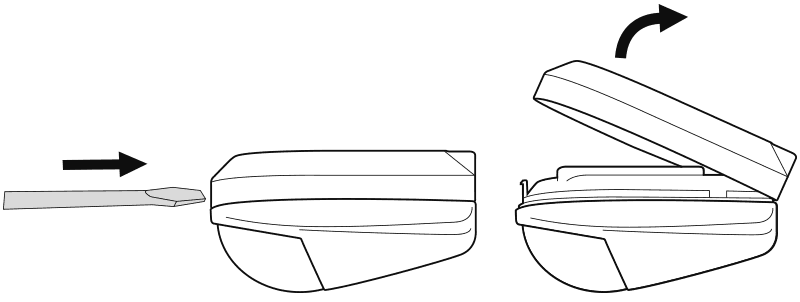
The AURATON Aquarius PIR motion sensor and the AURATON Aquarius CR pump controller purchased in the set are factory-paired with each other and do not require a pairing procedure.
Mounting the AUARTON Aquarius PIR to the wall
Before attaching the motion sensor to the wall, it must first be paired with the previously connected Aquarius CR pump controller. If the Aquarius PIR sensor and Aquarius CR pump controller are purchased together as a set, the pairing procedure is not necessary as the devices are paired at the factory.
To attach the motion sensor to the wall:
- Drill two 5 mm diameter holes in the wall (measure the hole spacing using the mounting bracket – included in the Aquarius PIR kit).
- Insert the expansion plugs (included) into the drilled holes.
- Screw the mounting bracket to the wall.
- Place the motion sensor on the mounting bracket until it clicks into place.
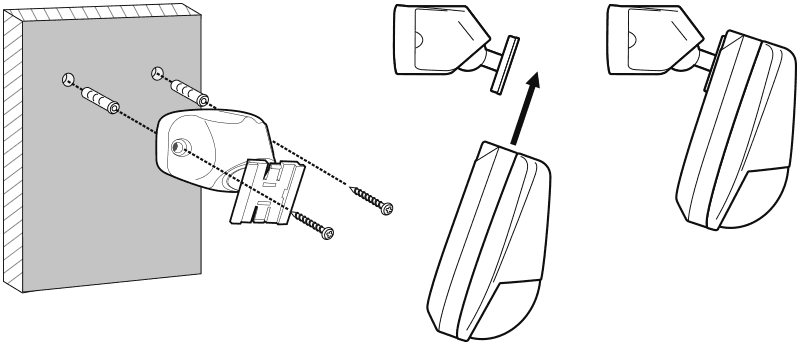
If the wall is wooden, there is no need to use expansion bolts. Drill 2.7mm holes instead of 5mm and drive the screws directly into the wood.
Choosing the right location for the wireless motion sensor controlling the circulation pump in the AURATON Aquarius PIR domestic hot water system
The motion sensor should be mounted in a location that allows it to easily detect user movement. It should not be mounted behind obstacles or built into the wall. Avoid mounting too low (minimum 0.5 m above the ground). These sensors are typically mounted on the ceiling at a height of approximately 2.5 m.

Pairing AURATON Aquarius PIR with AURATON Aquarius CR
The AURATON Aquarius PIR sold with the AURATON Aquarius CR is already paired. Devices purchased separately require "pairing."
- Pairing the Aquarius PIR with the Aquarius CR is initiated by pressing the pairing button ( D ) on the Aquarius CR pump controller – a single beep – and holding it for at least 3 seconds until the LED flashes green (double beep), then releasing the button.
The AURATON Aquarius CR waits 120 seconds for pairing. After this time, it will automatically return to normal operation. - On the Aquarius PIR, press the pairing button (. ) located on the back of the housing for at least 2 seconds, until the LED on the front of the motion sensor lights up red. Release the button.
- Successful pairing is indicated by the LED on the Aquarius CR stopping flashing green. The green LED turns off for 1 second and then indicates the currently set pump run time (default: 2 minutes – 2 green LED flashes every 0.5 seconds), after which the Aquarius CR resumes normal operation.
If an error occurs during pairing, repeat steps 1 and 2. If further errors occur, unsubscribe all devices by RESETting the Aquarius CR (see "RESET – returning to factory settings") and try pairing the devices again.
Once paired, the device cannot be paired again with AURATON Aquarius CR, as it is already saved in the memory.
AURATON Aquarius CR allows you to pair up to 20 AURATON Aquarius PIR motion detectors.
Evaporation of AURATON Aquarius PIR with AURATON Aquarius CR
- To evaporate the AURATON Aquarius PIR from the AURATON Aquarius CR, press the evaporation button ( E ) on the pump controller for at least 2 seconds until the LED flashes red, then release the button.
The AURATON Aquarius CR waits 120 seconds for evaporation. After this time, it will automatically return to normal operation. - On the AURATON Aquarius PIR, press the pairing button (. ) located on the back of the housing for at least 2 seconds, until the LED on the front of the sensor lights up red. Release the button.
- Correct completion of evaporation is indicated by the LED on the AURATON Aquarius CR pump controller stopping flashing red and switching to normal operation.
If an error occurs during pairing, repeat steps 1 and 2. If further errors occur, unpair all devices by RESETTING AURATON Aquarius CR (see "RESET – returning to factory settings") and try pairing the devices again.
RESET – return to factory settings
To unpair all paired devices in the AURATON Aquarius CR, simultaneously press and hold both the unpair and pair buttons ( D and E ) for at least 5 seconds until the LED indicator changes to alternating green and red flashing. Then release both buttons.
Successful completion of pairing of all devices is indicated after approximately 2 seconds by the light changing to green and then briefly turning off.
If after RESET we disconnect the AURATON Aquarius CR from the power supply and then reconnect the power supply, the AURATON Aquarius CR will automatically enter the "pairing" mode.
Signaling of operation and receipt of data packets
Each time the AURATON Aquarius CR receives a radio transmission from a paired AURATON Aquarius PIR, the LEDs momentarily change color.
When the relay is turned on, the LED is green; when the relay is turned off, the LED is red.
Change of work/break time and operation algorithm
Changing the DHW pump operating time:
A short press of the evaporation button ( E ) sets the pump operating time to the number of minutes equal to the number of times pressed. From 1 to 5 minutes. Pressing a sixth time sets it back to 1 minute.
Changing the DHW pump pause time:
Shortly pressing the pairing button ( D ) sets the pump pause time in the sequence of 1, 5, 10, 15 minutes, depending on how many times the button is pressed (from 1 to 4 and in a circle).
At the end, AURATON Aquarius CR will show the DHW pump operation time with the appropriate number of green flashes and the DHW pump pause time with the appropriate number of red flashes.
Resetting the Aquarius CR to factory settings restores the circulation pump operating time to 2 minutes.
Pressing each button once will set the time to the initial position.
After the circulation pump is turned off (after a pre-set time), the AURATON Aquarius CR will not turn the pump on for 15 minutes, despite receiving motion detection signals from the AURATON Aquarius PIR. This is to prevent the DHW pump from turning on too frequently. It will only turn on again after receiving another motion signal from the AURATON Aquarius PIR.
Unique features of AURATON Aquarius PIR
- The lithium battery used (CR 123A 3V) allows for many years of uninterrupted operation.
- Switching the pump on when movement is detected provides significant savings in energy consumption by the DHW pump and DHW water cooling compared to other systems.
Additional information and notes
- AURATON Aquarius PIR must be installed at least 1 meter from AURATON Aquarius CR (too strong a signal from the transmitters may cause interference).
- The number of minutes that must pass between subsequent relay activations is determined by the operating and pause times of the DHW pump.
- Data is transmitted from the AURATON Aquarius PIR to the AURATON Aquarius CR whenever motion is detected in the room. If no motion is detected, the Aquarius PIR transmits data every 5 minutes (this is indicated by flashing LEDs on the Aquarius CR pump controller).
- In the event of a power outage, the AURATON Aquarius CR will turn off. When power is restored, the controlled device will automatically turn on, and the AURATON Aquarius CR will wait for the next signal from the paired AURATON Aquarius PIRs (this signal should arrive no later than 5 minutes after power is restored). After receiving the signal, the AURATON Aquarius CR will resume normal operation.
- Do not place AURATON Aquarius CR in metal housings (e.g. mounting box, metal furnace housing) so as not to interfere with the operation of the pump controller.
Cleaning and maintenance
- Clean the exterior of the device with a dry cloth. Do not use solvents (such as benzene, thinner, or alcohol) .
- Do not touch the device with wet hands. This may result in electric shock or serious damage to the device.
- Do not expose the device to excessive smoke or dust.
- Do not touch the screen with a sharp object.
- Avoid contact of the device with liquids or moisture.
Technical data
| Operating temperature range: | 0 – 40 °C |
| Duty cycle: | daily |
| Operating status check: | LED diodes |
| Power supply: | CR123A 3V lithium battery (included) replaceable battery |
| Degree of protection: | IP20 |
| Humidity: | ≤85% non-condensing |
| Radio frequency: | 868.850 MHz 869.000 MHz |
| Range of action: | in a typical building, with standard wall construction – approx. 30 m; in open areas – up to 300 m |
| Signal strength: | up to 11 dBm |
| Dimensions [mm]: | 60.89 x 94.84 x 50.72 |
Disposal of the device
O
Devices are marked with a crossed-out waste bin symbol. In accordance with European Directive 2012/19/EU and the Waste Electrical and Electronic Equipment Act, this marking indicates that this equipment, after its useful life, must not be disposed of with other household waste.
Users are obligated to dispose of it at a collection point for used electrical and electronic equipment.
LARS Andrzej Szymański hereby declares that the AURATON Aquarius PIR radio equipment type complies with Directives 2014/53/EU and 2011/65/EU. The full text of the EU declaration of conformity is available in the download section below.
Manufacturer's address
Lars
ul. Świerkowa 14
64-320 Niepruszewo
Poland
www.auraton.pl