


User manual ver. 20220902
This document collects information on the safety, installation and use of the AURATON Aquila Mini SET device.
Wireless temperature controller with AURATON Fornax heating device controller (set)
AURATON Aquila Mini SET is a set of a wireless temperature regulator with an AURATON Fornax heating device controller, designed to work with a gas or electric heating device.
| î | Factory-installed lithium battery. The AURATON Aquila Mini R wireless temperature controller features a top-quality lithium battery, ensuring up to 10 years of continuous operation. Commercially available controllers typically require battery replacement once a year. Therefore, a standard controller typically requires 10 to 20 batteries in a single period. This incurs additional costs and releases harmful substances into the environment. |
| 16A | Operation under load up to 16 A/10 A The AURATON Fornax receiver is equipped with a relay that can operate under load up to 16 A/10 A. The low-spark technology of switching the mains voltage causes negligible wear of the relay contacts. |
| ô | Interference-free communication between the AURATON Aquila Mini R and AURATON Fornax devices communicates at a frequency of 868 MHz. Very short, encrypted transmission packets (approx. 0.004 s) ensure efficient and interference-free operation of the device. |
| ó | LED diodes LED diodes clearly inform about the operating status of devices. |
Description of the AURATON Aquila Mini R regulator
wireless temperature controller
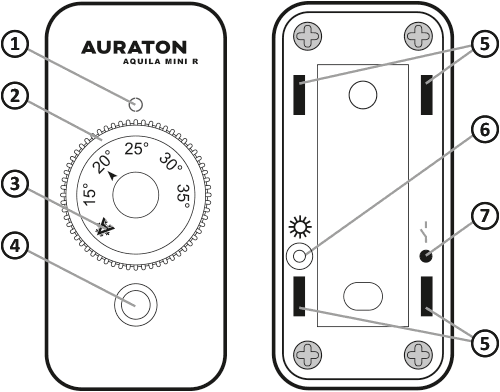
- Data transmission indicator diode.
- Temperature setting knob.
- Anti-freeze temperature setting (7 °C).
- Temperature sensor.
- Holes for mounting bracket.
- Pairing indicator light.
- Pairing button with the AURATON Fornax receiver.
The AURATON Aquila Mini R is equipped with a factory-installed lithium battery. The battery has an expected lifespan of up to 10 years.
NOTE: The battery is non-replaceable.
Choosing the right location for the AURATON Aquila Mini R
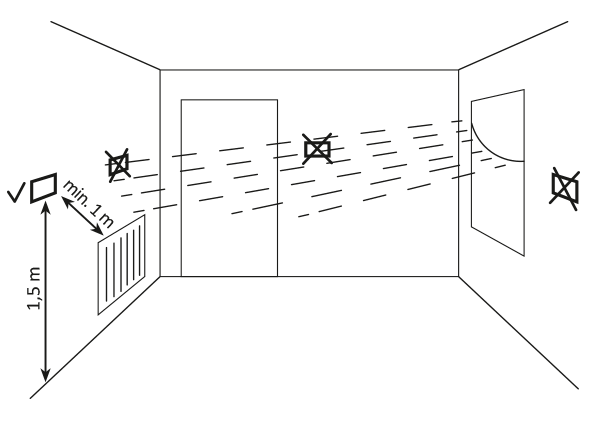
The proper operation of the AURATON Aquila Mini R is significantly affected by its location. Siting it in a location lacking air circulation or exposed to direct sunlight may result in improper temperature control. The AURATON Aquila Mini R should be installed on an interior wall (partition wall), in an environment with free air circulation. Avoid proximity to heat-emitting devices (TV, radiator, refrigerator) or locations exposed to direct sunlight. Proper operation may be impaired by proximity to doors, which expose the AURATON Aquila Mini R to potential vibration.
Mounting the regulator to the wall
Before mounting the controller to the wall, you must first pair it with the previously connected receiver. If the controller and receiver were purchased together, the pairing procedure is not necessary as they are factory-paired.
To attach AURATON Aquila Mini to the wall:
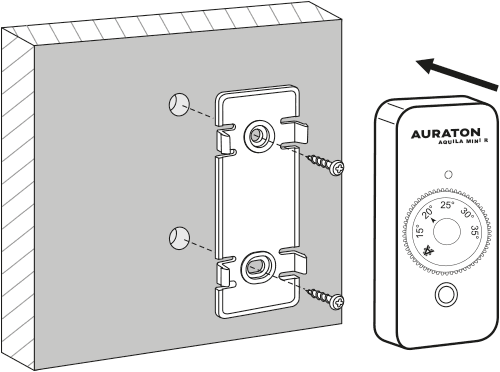
- Drill two 5 mm diameter holes in the wall (measure the hole spacing using the mounting bracket – included in the set with the AURATON Aquila Mini R regulator).
- Insert the expansion bolts (included).
- Screw the mounting bracket to the wall.
- Press the AURATON Aquila Mini R regulator onto the mounting bracket so that the holes on the rear wall of the regulator fit into the latches on the bracket.
If you have a wooden wall, there is no need to use expansion bolts. Simply drill 2.7mm holes (instead of 5mm) and drive the screws directly into the wood.
Description of AURATON Fornax
wireless controller of a heating or air conditioning device (receiver)
The AURATON Fornax (receiver) works with the AURATON Aquila Mini R wireless controller (transmitter). The receiver is mounted on the heating or air conditioning device and can operate under loads up to 16A/10A .
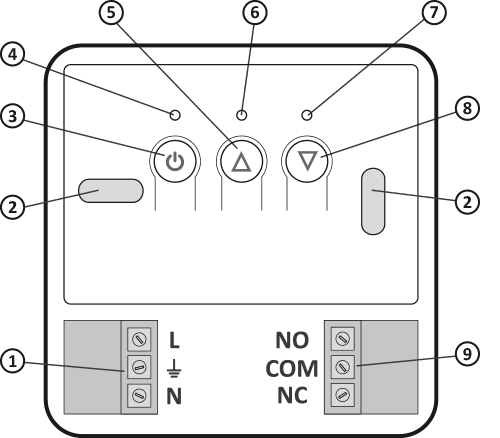
- Detachable 230V AC power connector terminals.
- Mounting hole.
- Power button.
- Power LED.
- Button to unpair paired devices.
- Diode indicating that the actuator is switched on.
- Diode indicating that the actuator is turned off.
- Device pairing button for AURATON Fornax.
- Detachable terminals (voltage-free contacts COM–NC, COM–NO).
Legend – description of the diode signaling
| D G | The diode is green – the actuator is turned off (COM and NC contacts closed). |
| E I | The diode lights red – the actuator is switched on (COM and NO contacts closed). |
| D H | The diode flashes green – the AURATON Fornax receiver is waiting for the device to be paired – chapter: "Pairing the AURATON Aquila Mini R wireless regulator (transmitter) with the AURATON Fornax – wireless controller of a heating or air-conditioning device (receiver)". |
| E J | The diode flashes red – the AURATON Fornax receiver is waiting for the previously paired device to be unpaired – chapter: "Unpairing the regulator from AURATON Fornax – wireless controller of a heating or air-conditioning device (receiver)". |
| K | The LED flashes alternately red and green: ALARM – the AURATON Fornax receiver has lost connection with the paired device – chapter: "Special Situations" RESET – the AURATON Fornax receiver. Removing all devices paired with the AURATON Fornax – wireless controller of the heating or air conditioning device (receiver) |
| F | Green power LED – AURATON Fornax receiver turned on. |
Installation method of AURATON Fornax – wireless heating device controller (receiver)
Q
The cables supplied with the AURATON Aquila Mini SET are designed to carry a maximum load of 2.5 A.
If you connect devices with higher power, replace them with cables of appropriate cross-section.
Do not use twisted pair cables or teletechnical cables.
The power supply should be turned off when installing the AURATON Fornax receiver. It is recommended that the AURATON Fornax be installed by a specialist.
The building's permanent installation must include a circuit breaker and overcurrent protection.
For ease of installation, the connectors are equipped with removable terminals. Before making cable connections, they can be disconnected from the AURATON Fornax. Cables can be routed through the bottom of the AURATON Fornax by breaking out the holes in the mounting plug, or through the back of the AURATON Fornax if the cables are led out of the wall. To connect from the back, break out the plug.
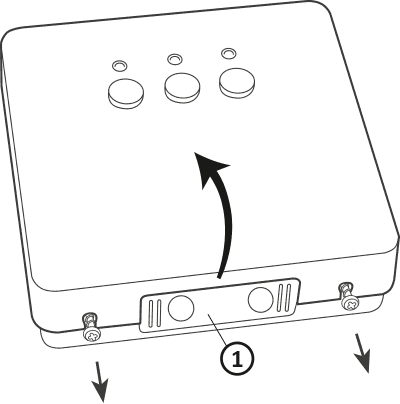
- Mounting plug
Remove the front cover of the AURATON Fornax by unscrewing the screws halfway.
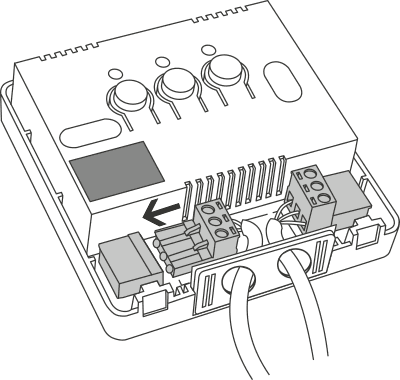
Connect the heating device to the AURATON Fornax receiver's control connector terminals. Follow the heating device's service manual. The most commonly used terminals are COM (common) and NO (normally open).
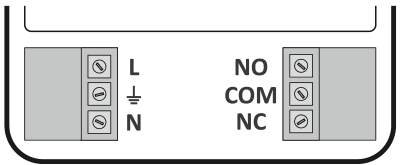
Connect the power cables to the power connector terminals of the AURATON Fornax receiver while observing safety rules.
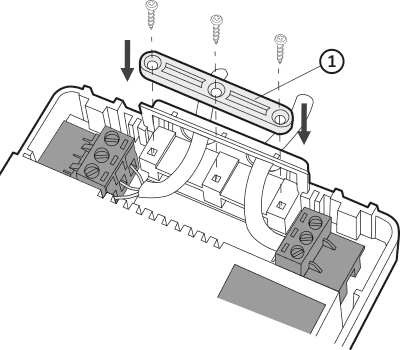
- Cable mounting bracket.
After connecting the cables, secure them with the "cable retaining clip" and re-screw the cover to the AURATON Fornax receiver.
Mounting the AURATON Fornax – wireless heating device controller (receiver) to the wall
To attach the AURATON Fornax receiver to the wall:
- Remove the cover of the front part of the receiver , see the section "Installation method of the AURATON Fornax receiver - heating device controller (receiver)" .
- Mark the position of the mounting screw holes on the wall.
- In the marked places, drill holes with the diameter of the dowels included in the kit (5 mm).
- Insert expansion bolts into the drilled holes.
- Screw the AURATON Fornax receiver to the wall with screws so that they hold the device securely.
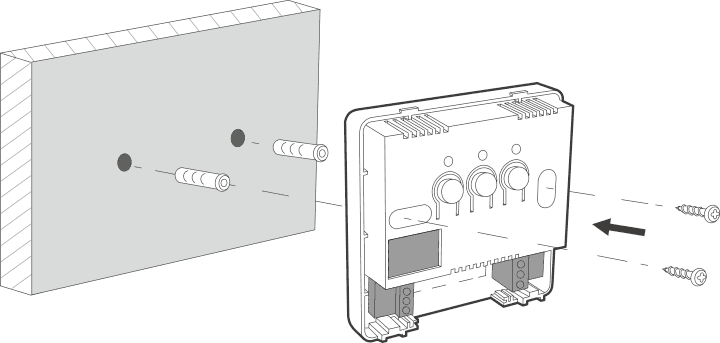
If the wall is wooden, there is no need to use expansion bolts. Drill 2.7mm holes instead of 5mm and drive the screws directly into the wood.
Do not place the AURATON Fornax receiver in metal housings (e.g. mounting box, metal stove housing) so as not to interfere with the operation of the AURATON Aquila Mini R.
Starting and pairing the AURATON Aquila Mini R controller with the AURATON Fornax receiver
After connecting to the mains, turn on the receiver by briefly pressing the power button ( F ). When the device is turned on, the green power LED will illuminate and a single beep will sound. To turn off the AURATON Fornax, e.g., outside the heating season, hold the power button for 3 seconds until you hear a beep and the green power LED turns off, turning off the heating device.
The AURATON Aquila Mini R wireless controller (transmitter) sold together with the AURATON Fornax – wireless heating device controller (receiver) in the AURATON Aquila Mini SET is already paired. Devices purchased separately require "pairing."
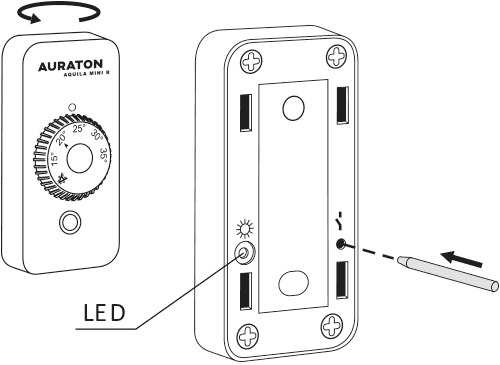
- Pairing the AURATON Aquila Mini R (transmitter) with the AURATON Fornax is initiated by pressing the right pairing button ( D ) – a single beep on the AURATON Fornax receiver – and holding it for at least 3 seconds until the LED starts flashing green (double beep), then releasing the button.
The AURATON Fornax receiver waits 120 seconds for pairing. After this time, it will automatically return to normal operation. - On the AURATON Aquila Mini R controller, press the pairing button (ö ) located on the back of the housing for at least 2 seconds, until the LED ( S ) starts flashing red. Release the button.
- Successful completion of pairing is indicated by the LED on the AURATON Fornax receiver stopping flashing green, by a single sound signal and by the receiver switching to normal operation.
If an error occurs during pairing, repeat steps 1 and 2. In case of subsequent errors, unpair the device by RESETting the AURATON Fornax receiver, see "RESET - Unpairing the device from the AURATON Fornax - wireless controller of a heating or air-conditioning device (receiver)" and try pairing the devices again.
The AURATON Fornax receiver can only be paired with one AURATON Aquila Mini R controller.
Uninstalling the AURATON Aquila Mini R from the AURATON Fornax receiver
- Unpairing the AURATON Aquila Mini R (transmitter) from the AURATON Fornax receiver is initiated by pressing the left unpairing button ( E ) on the receiver for at least 3 seconds, until the LED flashes red, then releasing the button. The sound signal works in the same way as pairing; i.e., pressing the button is signaled by a short beep, followed by a double short beep after 3 seconds.
The AURATON Fornax receiver waits 120 seconds for the device to be paired. After this time, it will automatically return to normal operation. - On the AURATON Aquila Mini R controller, press the pairing button (ö ) located on the back of the housing for at least 2 seconds, until the LED ( S ) starts flashing red. Release the button.
- Successful completion of the write-back is indicated by the LED on the AURATON Fornax receiver stopping flashing red, a single sound signal and the receiver switching to normal operation.
If an error occurs during unsubscribing, repeat steps 1 and 2. In case of subsequent errors, unsubscribe the paired device, see "RESET – Unsubscribing the device paired to the AURATON Fornax heating device controller (receiver)" .
RESET – Resetting devices assigned to the receiver
To unpair a paired device (e.g., AURATON Aquila Mini R) from AURATON Fornax, simultaneously press and hold both the pairing and unpairing buttons ( D and E ) for at least 5 seconds until the LED indicator changes to alternating green and red flashing. Then release both buttons. Audible signal: pressing the button – a short beep – after 5 seconds – a double short beep.
Successful unpairing is indicated after approximately 2 seconds by the indicator changing to green and then briefly fading.
If you disconnect the AURATON Fornax receiver from the power supply after a RESET and then reconnect it, the receiver will automatically enter "pairing" mode for 120 seconds. A newly purchased AURATON Fornax receiver (not included with the AURATON Aquila Mini R) that does not have factory-paired devices will behave identically.
Signaling of operation and receipt of data packets
Each reception of a radio transmission is signaled by the AURATON Fornax receiver with a momentary alternating color change of the LEDs. When the relay is turned on, the LED is red; when the relay is turned off, the LED is green.
Pressing any button is signaled by a short beep.
Antifreeze temperature
The T-1 controller is equipped with a U . This setting maintains an anti-freeze temperature of 7°C. The anti-freeze temperature setting is used during extended absences from the facility and is intended to prevent water from freezing in the heating system.
Special situations
- If we lose three consecutive transmissions (after 15 minutes) from the AURATON Aquila Mini R (transmitter), a failure will be signaled on the AURATON Fornax receiver (the LED will continuously flash alternately red and green). Until the problem is resolved, the receiver will revert to the memorized on/off cycle from the last 24 hours.
- When the signal from AURATON Aquila Mini R returns, the error is cleared and the AURATON Fornax receiver resumes normal operation.
Unique features of AURATON Aquila Mini SET
- The factory-built lithium battery ensures uninterrupted operation of the controller for up to 10 years.
- The relay's switching is synchronized with the 230V mains supply voltage so that the relay's armature contacts always close and open at the zero crossing of the mains voltage. This prevents arcing and significantly increases the relay's durability.
- The AURATON Fornax receiver is equipped with a unique on/off cycle analysis algorithm. The entire heating cycle from the last 24 hours is saved in the receiver's memory. In the event of a loss of communication with the AURATON Aquila Mini R (transmitter), the Fornax receiver will automatically perform the memorized on/off cycle from the last 24 hours. This allows time to restore transmission (eliminate interference) or repair the AURATON Aquila Mini R without significantly compromising thermal comfort in the controlled facility.
Additional notes
- AURATON Aquila Mini R (transmitter) must be installed at least 1 meter from the receiver (too strong a signal from the transmitter may cause interference).
- Data is transmitted from the AURATON Aquila Mini R (transmitter) to the AURATON Fornax receiver whenever the ambient temperature changes by 0.2 °C. If the temperature does not change, the AURATON Aquila Mini transmits control data every 5 minutes (this is manifested by a momentary alternating change in the LED color).
- In the event of a power outage, the AURATON Fornax receiver will turn off. When power is restored, the heating device will automatically turn on, and the AURATON Fornax receiver will wait for a signal from the paired AURATON Aquila Mini R (transmitter) for a maximum of 5 minutes after power is restored. Once the signal is received, the AURATON Fornax receiver will resume normal operation.
- Placing the AURATON Fornax receiver in a metal housing (e.g. mounting box, metal furnace housing) will interfere with the operation of the AURATON Aquila Mini R.
AURATON Fornax connection diagram
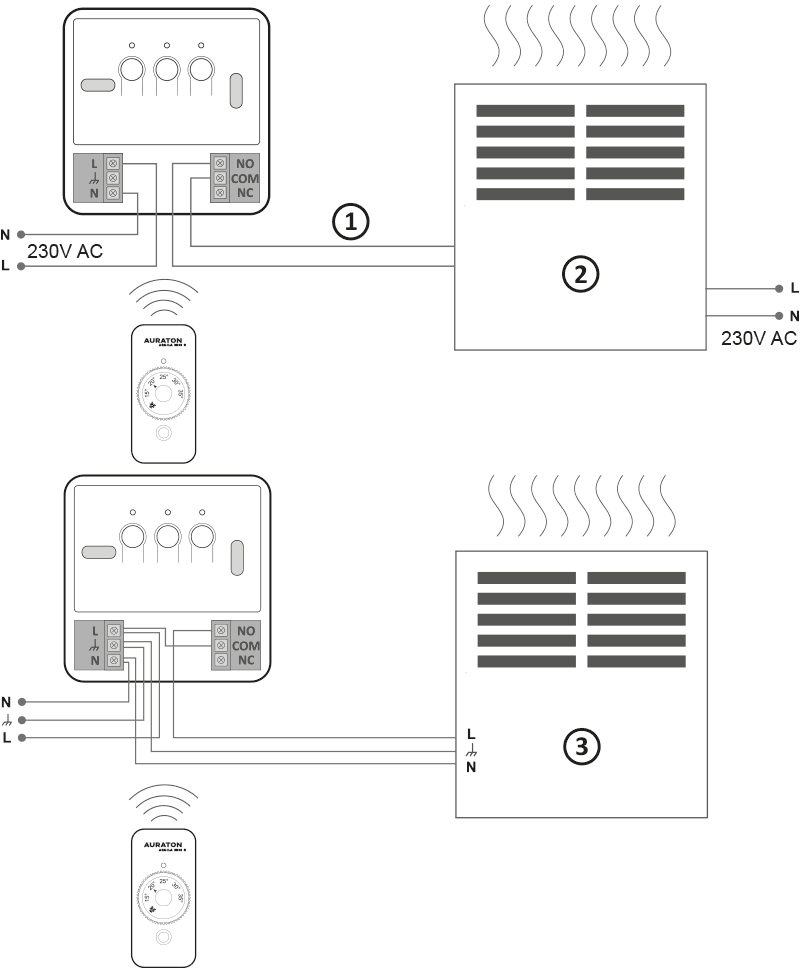
- Control
- A heating device , e.g. a gas furnace
- Electric heating device (MAX 230 V AC, 16 A)
Cleaning and maintenance
- Clean the exterior of the device with a dry cloth. Do not use solvents (such as benzene, thinner, or alcohol).
- Do not touch the device with wet hands. This may result in electric shock or serious damage to the device.
- Do not expose the device to excessive smoke or dust.
- Do not touch the screen with a sharp object.
- Avoid contact of the device with liquids or moisture.
Technical data
| Operating temperature range: | 0 – 45°C |
| Range of action: | in a typical building, with standard wall construction – approx. 30 m; in open areas – up to 300 m |
| Radio frequency: | 868.850 MHz 869.000 MHz |
| Radio signal strength: | Up to 11 dBm |
| Degree of protection: | IP20 |
AURATON Aquila Mini R:
| Power supply: | lithium battery (built-in at the factory). Battery not replaceable. |
| Number of temperature levels: | 1 |
| Antifreeze temperature: | 7 °C |
| Temperature control range: | 7 °C; 15 – 35 °C |
| Operating status indication: | LED diode |
| Dimensions [mm]: | 75 x 35 x 14 |
AURATON Fornax:
| Power supply: | 230V AC, 50Hz, 1.5W |
| Operating status indication: | LED diodes, sound |
| Relay load capacity: | Max. 250 V AC, max. 16 A |
| Receiver category: | 2 |
| Suggested mounting location: | Near the boiler, boiler pump |
| Dimensions [mm]: | 100 x 100 x 29 |
Disposal of the device
O
Devices are marked with a crossed-out waste bin symbol. In accordance with European Directive 2012/19/EU and the Waste Electrical and Electronic Equipment Act, this marking indicates that this equipment, after its useful life, must not be disposed of with other household waste.
Users are obligated to dispose of it at a collection point for used electrical and electronic equipment.
LARS Andrzej Szymański hereby declares that the radio equipment type AURATON Aquila Mini SET is in compliance with Directive 2014/53/EU and 2011/65/EU. The full text of the EU declaration of conformity is available in the download section below.
Manufacturer's address and contact details:
LARS, ul. Świerkowa 14
64-320 Niepruszewo
www.auraton.pl