

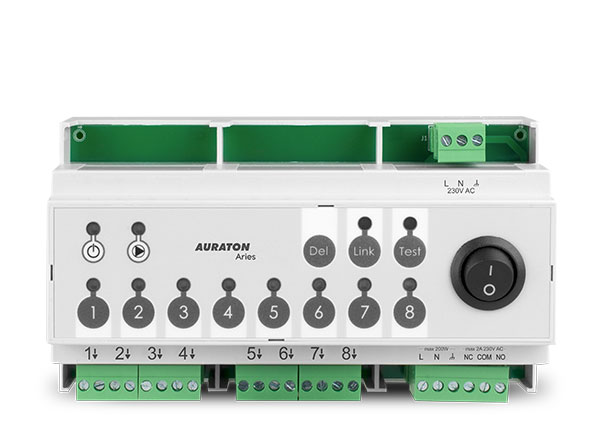
User manual ver. 20200817
This document collects information regarding the safety, installation and use of the AURATON Aries device.
Wireless underfloor heating control strip
AURATON Aries is an 8-zone wireless underfloor heating control strip designed for use with AURATON Vela actuators, a central heating pump, and a heating device. Individual heating zones are controlled via AURATON wireless temperature controllers.
| Q | All connections must be made with the power source disconnected. |
| P | The AURATON Aries is designed for DIN rail mounting in installation cabinets. Metal cabinets should not be used due to poor radio communication. |
Action
AURATON Aries supports 8 separate heating zones and can also perform the following functions:
- control of the central heating circulation pump,
- controlling the central heating furnace via a relay with potential-free contacts,
- connecting with other AURATON Aries (up to 10 units in the system) in order to synchronize the control of the central heating pump and the central heating furnace, testing the radio signal strength from AURATON wireless regulators.
Description of the device, buttons and controls
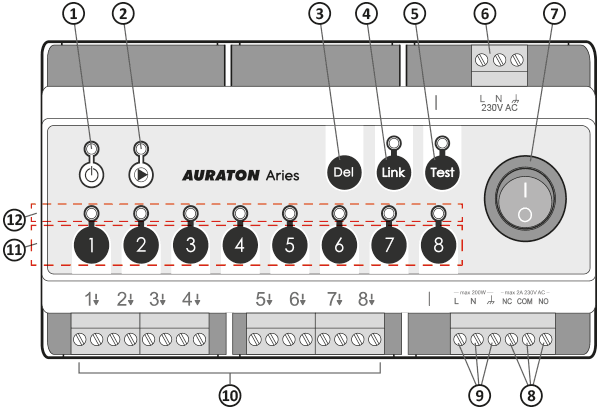
- Power status indicator light.
- Indicator light indicating the operating status of the central heating pump
- (Del) button to remove controls or return to factory settings.
- Button (Link) synchronizes Aries devices with each other
- (Test) button with indicator light of the tester function operating mode.
- L, N, $ – 230V AC power connection
- Power switch
- NC, COM, NO – potential-free relay contacts
- Central Heating Pump Control (L, N, $)
- Connections for heating zones 1-8 (actuators)
- Heating zone buttons 1-8
- Indicator lights for zones 1-8
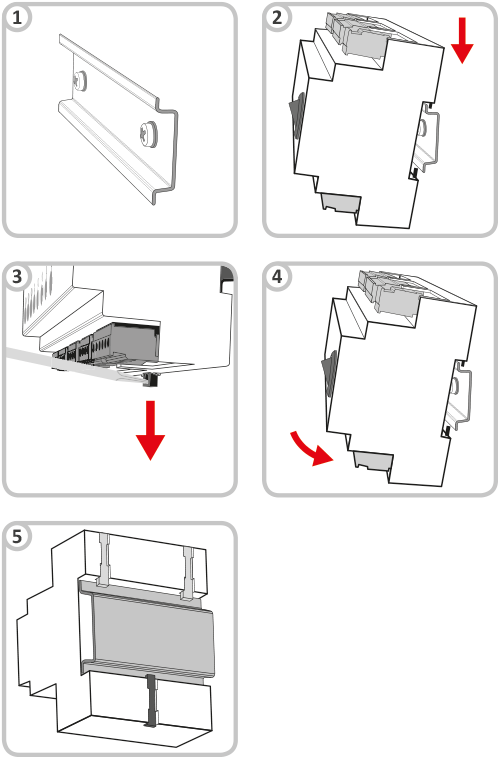
DIN rail mounting
- DIN rail.
- Hook the AURATON Aries onto the DIN rail using the upper hooks.
- Pull the lower tab down using a flat-head screwdriver.
- Place AURATON Aries in the correct place.
- Release the lower catch.
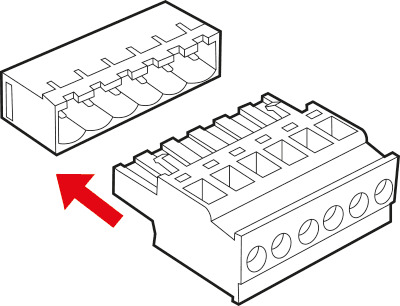
For ease of installation, the connectors are equipped with removable terminals. These terminals can be disconnected from the AURATON Aries before making cable connections.
Q
All connections must be made with the power source disconnected.
AURATON Aries operation signaling
AURATON Aries indicates operating states using LED diodes.
- Power status indicator light (red):
Power light off AURATON Aries disabled Power light is on AURATON Aries is in normal operation mode - Indicator light indicating the operating status of the central heating pump (green):
The indicator light is off No central heating pump control The light is flashing Waiting for the pump to turn on (3-minute delay) The indicator light is on Central heating pump on - Indicators indicating the operation of heating zones:
The indicator light is off The heating is off The indicator light is on Heating on The indicator light flashes slowly (every 0.5 seconds) Zone in pairing mode The indicator light is flashing rapidly Zone in check-out mode - LINK indicator light:
The indicator light is off No pairing with the next AURATON Aries The indicator light is on at 10% Auraton Aries paired with another AURATON Aries (AURATON Aries in LOCAL mode) The indicator light is on at 100% Auraton Aries paired with another AURATON Aries (AURATON Aries in GLOBAL mode)
Control of the central heating pump and relay
(single AURATON Aries)
The central heating pump or furnace is activated when heating is activated in any of the heating zones – the central heating pump operation indicator light will illuminate.
The central heating pump or relay is deactivated when no heating zone is active – the central heating pump operation indicator light will be off.
To improve the operation of the heating system, the AURATON Aries is equipped with a time delay system for switching on the central heating pump.
When the heating is turned on, the actuators are first activated, and then, after a 3-minute delay, the central heating pump and relay are activated. The waiting time for the pump and relay to be activated is indicated by the pump indicator light flashing. After this time, the pump and relay are activated, and the indicator light remains lit.
This operation of the AURATON Aries is designed to rationally manage the heating and prevent excessive load on the central heating pump, which could lead to premature wear.
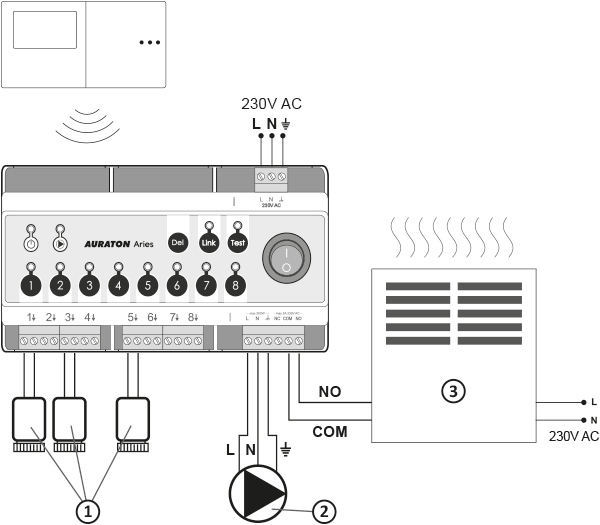
- Actuators
- Central heating pump
- A heating device, e.g. a gas furnace
Information and comments
- Only one thermostat can be paired to each zone. The thermostat transmits two parameters to the AURATON Aries via an independent channel:
– current temperature,
– setpoint temperature. - If AURATON Aries loses contact with a given zone's controller, it switches to AUTO24 automatic operation in that zone. AURATON Aries will perform the memorized heating cycles from the last 24 hours.
NOTE:
The manufacturer recommends pairing at least one AURATON weekly controller for more precise AUTO24 operation. - AURATON Aries is turned on and off via the mains switch.
Pairing wireless controllers to a zone
- Press the appropriate zone button for 3 seconds, wait for a single beep, then release the button. When the zone enters pairing mode, the zone's indicator light flashes (0.5s/0.5s).
- Once one zone has entered pairing mode, you can also enter other zones by briefly pressing the button for another zone. This allows you to pair the same controller and/or thermometer to more than one zone simultaneously. Briefly pressing the button for a zone that was already in pairing mode deactivates pairing mode for that zone. Deactivating pairing mode for all zones causes the AURATON Aries to revert to normal operation.
- To pair a wireless controller to a zone (or several zones), you must enable pairing mode in the desired zones and then start pairing in the controller by pressing the pairing button for more than 5 seconds (a detailed description of pairing AURATON wireless controllers can be found in the controller's user manual).
- Successful pairing of the controller is confirmed by a single 1-second acoustic signal. Once the wireless device is paired, the AURATON Aries enters normal operation mode.
- If you know the zone to which the device was paired, press the button for that zone for more than 5 seconds. After 3 seconds, you'll hear a single pairing beep – do not release the button. After another 2 seconds, you'll hear a double beep, and the zone automatically enters deletion mode (the indicator light flashes faster).
- Press the pairing button on the wireless controller you want to remove from the zone (see the controller's user manual). After three short acoustic signals, the controller has been removed and the AURATON Aries will resume normal operation.
- Press the DEL for more than 5 seconds. After a double beep, all zones to which any wireless controllers were paired enter deletion mode. The indicator lights of all zones to which wireless controllers are paired flash.
- Press the pairing button on the controller (see the controller's user manual) for the zone(s) you want to remove. AURATON Aries will automatically detect which zone(s) the controller was paired to and remove it from all zones currently in removal mode. If the LED in a given zone stops flashing rapidly, the controller has been successfully removed from that zone.
- If the indicator lights of any zone are still flashing rapidly after removal, it means that AURATON Aries is waiting for further regulators to be removed.
- If all lights stop flashing rapidly, the Auraton Aries will return to normal operation.
- To do this, select the zone you want to remove and hold the corresponding zone button for 5 seconds. After the double beep, release the button (the LED will flash rapidly) and, if necessary, briefly press the button to select the next zone.
- Then hold down the DEL , which will remove the controller from the given zone, which will be confirmed by a sound signal.
- LOCAL mode for controlling the central heating pump and the furnace relay,
- GLOBAL 1 mode for controlling the central heating pump and furnace relay,
- GLOBAL 2 mode of furnace relay control.
- Actuators
- Central heating pump
- Central heating furnace
- Actuators
- Central heating pump
- Central heating furnace
- Actuators
- Central heating pump
- Central heating furnace
- Activation of the GLOBAL 1 mode is signalled by a single sound signal and the LINK LED flashing.
- Activation of the GLOBAL 2 mode is signalled by a double sound signal and the LINK LED flashing twice.
- Activation of the LOCAL mode is signalled by a three-time beep and the LINK LED flashes three times.
- Press and hold the TEST button for 5 seconds . Activation of the function is indicated by the TEST and the heating zone indicator lights flashing alternately.
- Then, to check the signal level from a particular controller, hold down the pairing button on it (see the controller's manual) for 5 seconds to force the sending of a pairing signal.
- If the AURATON Aries successfully receives a signal from the controller (confirmed by a long beep), the signal level is indicated by the heating zone indicator lights. Indicator light 1 indicates insufficient signal level, while all indicator lights, up to 8, indicate an excellent signal. During the test, each received signal from the controller is confirmed by a short beep.
- To turn off the tester function, hold the TEST for 5 seconds.
- The greater the distance of the tested regulator, the fewer indicator lights will light up.
- It should be assumed that if only 2 LEDs are lit, it is recommended to use the AURATON Lepus radio signal repeater (amplifier).
- If only one LED is lit, it should be assumed that the AURATON Lepus is necessary for stable system operation.
- Wireless controllers may be located in locations where radio signal propagation is very difficult. In such cases, using an AURATON Lepus radio signal repeater (amplifier) between the controllers and the AURATON Aries will ensure proper system operation.
- In extreme cases (long distances, metal obstacles, more than one floor, etc.) it may be necessary to use more than one AURATON Lepus to transmit the signal correctly.
- More information about the capabilities of AURATON Lepus can be found on the manufacturer's website at www.auraton.pl
- The AURATON Aries is equipped with a function for testing actuators during operation. When the actuators are connected and the device is turned on, the AURATON Aries checks whether the actuators are connected and stores this information in memory. If any actuator is damaged during operation, a double audible alarm will sound, accompanied by a flashing indicator light for the corresponding zone. The actuators are tested every 30 minutes by disconnecting them for 3 seconds and then reconnecting them.
The pairing mode is automatically turned off 60 seconds after the last zone has been entered into pairing mode or after the controller has been paired correctly or after briefly pressing the DEL button.
In order to pair AURATON wireless regulators to a zone, you should:
Pairing operations must be performed appropriately for all desired zones.
Please note that when you pair a new controller to a zone, the previous controller for that zone will be deleted.
Removing wireless controllers from a zone
Removing a Wireless Controller from a Single Channel
Removing the wireless controller from all channels
The delete mode in a given zone is automatically deactivated 60 seconds after the last zone has been entered into delete mode, or after the controller has been deleted from the given zone, or after a short press of the DEL button.
Removing the regulator without using it
Removing all regulators (factory reset)
After turning off the AURATON Aries using the power switch, press and hold the DEL and turn the device back on. The factory reset will be confirmed by a triple beep.
Connecting AURATON Aries into one central heating pump and relay control system
AURATON Aries can operate in three modes:
LOCAL mode
AURATON Aries controls the central heating pump and furnace relay depending on the status of its heating zones.
In this case, the LINK function is not used.
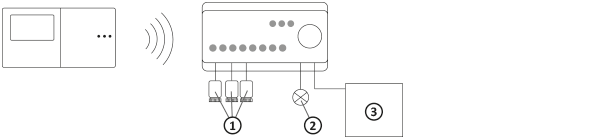
GLOBAL Mode 1
A system using multiple AURATON Aries strips and one AURATON Aries central heating pump controls the central heating pump and the furnace relay depending on the status of its heating zones and the status of the heating zones of the controller/regulators paired with it.
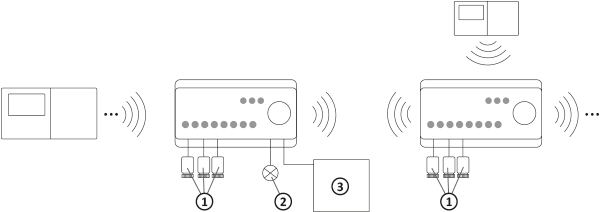
GLOBAL Mode 2
A system using multiple AURATON Aries control strips and multiple pumps for each zone.
The AURATON Aries controls the central heating pump depending on the status of its heating zones, and the furnace relay depending on the status of its heating zones and the status of the heating zones of the controller(s) paired with it.
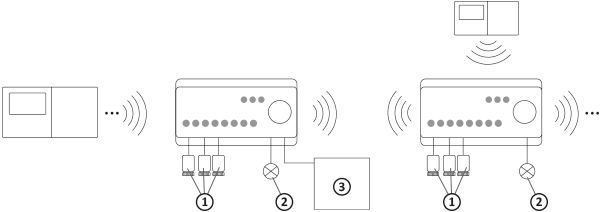
GLOBAL 1 or 2 mode should be set in the AURATON Aries, which will control the central heating boiler via a potential-free relay. If the boiler is equipped with a main central heating pump, the AURATON Aries should operate in GLOBAL 1 mode.
With the AURATON Aries on in normal operation mode, press the LINK button for 3 seconds. You will hear a single acoustic signal and the LINK (0.5/0.5 sec.). Then, within 60 seconds, perform the same operation on the second AURATON Aries device. Successful pairing is indicated by an acoustic signal and the LINK on both or more devices.
For the devices to communicate with each other, one of them must be set to GLOBAL mode (see the "Switching operating mode" section).
If AURATON Aries devices are to operate independently, there is no need to pair them.
If more than two AURATON Aries devices are to be used, each additional device must be paired to the AURATON Aries by setting it as GLOBAL.
A maximum of 10 AURATON Aries can be paired.
Switching the operating mode
Switching between GLOBAL 1, GLOBAL 2 and LOCAL modes is done by pressing the LINK button 5 times .
Only one AURATON Aries in a given set can operate in GLOBAL mode. Enabling GLOBAL mode on one AURATON Aries and attempting to enable this mode on another will automatically switch to the next AURATON Aries.
If you need to remove an AURATON Aries from the set, press the LINK for at least 5 seconds. After hearing a double beep (the LED flashes rapidly), release the button and then press and hold the DEL for 5 seconds. Successful removal is indicated by a triple beep.
An AURATON Aries set to GLOBAL should be connected to the furnace to control it. It then receives signals from other AURATON Aries operating in LOCAL mode and reporting heat demands.
Radio signal test
The AURATON Aries is equipped with a radio signal tester. To enable this feature, proceed as follows:
If the tester function is not turned off by the user, AURATON Aries will do it automatically after 10 minutes from the last time any button was pressed.
The activated test mode does not affect the heating control process.
Additional notes
A maximum of 3 AURATON actuators can be connected to each zone.
| Q | All connections must be made with the power source disconnected. It is recommended that Auraton Aries be installed by professionals. |
| P | For proper operation and radio signal shielding, it is necessary to mount the controller in PLASTIC electrical cabinets on a DIN rail. |
Technical data
| Power supply: | 230V AC, 50Hz, 1.5W |
| Operating temperature range: | 0 – 45°C |
| Operating status indication: | LED diodes, sound |
| Number of independently controlled heating zones: | 8 |
| Relay load capacity: | Max. 250V AC, max. 2 A (potential-free contacts COM, NO, NC) |
| Load capacity of 230V head control outputs: | Max. 30 W, up to 3 AURATON Vela actuators, per zone |
| Load capacity of the 230V central heating pump output: | Max 200 W |
| Delay in switching on the relay and pump: | About 3 minutes |
| Range of action: | In a typical building with standard wall construction – approx. 30 m, in open spaces – up to 300 m |
| Radio frequency: | 868.850 MHz 869.000 MHz |
| Receiver category: | 2 |
| Radio signal strength: | Up to 11 dBm |
| Suggested mounting location: | On the DIN rail of the distribution box |
| Dimensions [mm]: | 158.90 x 90.00 x 58.50 |
Disposal of the device
O
Devices are marked with a crossed-out waste bin symbol. In accordance with European Directive 2012/19/EU and the Waste Electrical and Electronic Equipment Act, this marking indicates that this equipment, after its useful life, must not be disposed of with other household waste.
Users are obligated to dispose of it at a collection point for used electrical and electronic equipment.
LARS Andrzej Szymański hereby declares that the AURATON Aries radio equipment type is in compliance with Directives 2014/53/EU and 2011/65/EU. The full text of the EU declaration of conformity is available in the download section below.
Manufacturer's address and contact details:
LARS, ul. Świerkowa 14
64-320 Niepruszewo
www.auraton.pl