


User manual ver. 20211225
This document collects information on the safety, installation and use of the AURATON Auriga device.
Daily, wired temperature controller
AURATON Auriga is a daily, wired temperature controller designed to work with a gas or electric heating device.
| U | The "FrostGuard" function protects the room from freezing. |
| & | Possibility of temporarily lowering the programmed temperature for a period of 6 hours, every day, at the same time. |
| LCD | Illuminated LCD display The illuminated display allows you to monitor the device's operation even in poorly lit rooms. |
Description of AURATON Auriga
daily, wired temperature controller
The front of the housing features a backlit LCD display and four function buttons.

- LCD display
- confirmation button or controller on/off
- temperature reduction button
- timed temperature reduction mode button
- temperature increase button
| d |
|
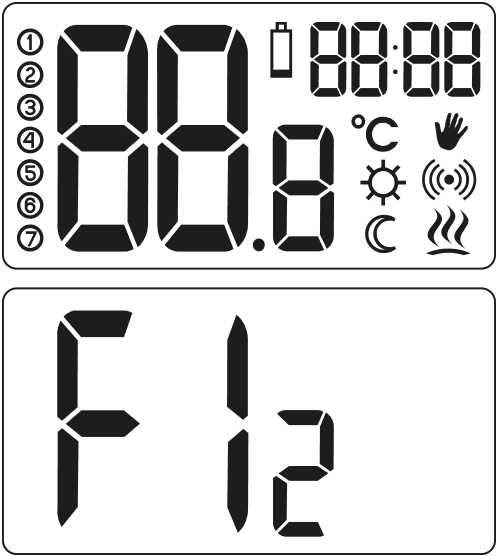
Display
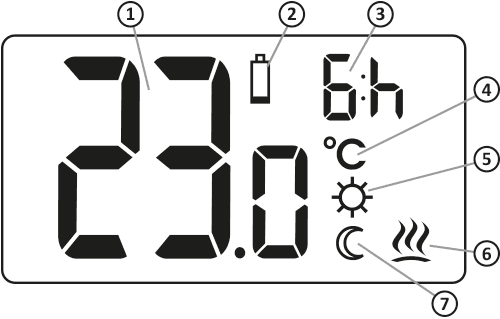
- Temperature
In normal operation mode, AURATON Auriga displays the temperature of the room in which it is currently installed. - Low Battery (
X ) This indicator is visible when the minimum permissible battery voltage level has been exceeded. The batteries should be replaced as soon as possible.
NOTE: To maintain the AURATON Auriga settings, replacing the batteries should take less than 30 seconds. - "Temporary temperature reduction" duration indicator
Indicates how long the "temporary temperature reduction" mode will remain active. - Temperature unit (
R ) Indicates whether the temperature is displayed in degrees Celsius. - Temporary temperature reduction programming mode indicator (
S ) Indicates the user-programmed "temporary temperature reduction" mode. Appears when the mode is not currently being implemented, but the "temporary temperature reduction" function is active (more information in the "Setting the temporary temperature reduction" mode section). - AURATON Auriga power indicator (
a ) Pictogram informing about the device's operating status. Visible when the controlled device is turned on. - Temporary temperature reduction mode indicator (
T ) Appears when the timed temperature reduction program is in progress.
Choosing the right location for AURATON Auriga
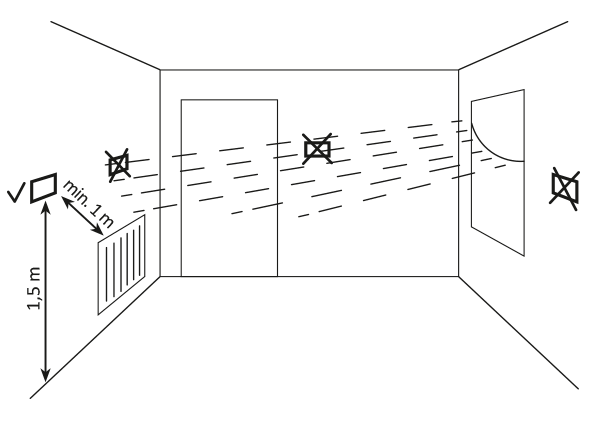
The proper operation of the AURATON Auriga is significantly affected by its location. Siting it in a location lacking air circulation or exposed to direct sunlight may result in improper temperature control. The AURATON Auriga should be installed on an interior wall (partition wall), in an environment with free air circulation. Avoid proximity to heat-emitting devices (television, radiator, refrigerator) or locations exposed to direct sunlight. Proper operation may be impaired by proximity to doors, which expose the AURATON Auriga to potential vibrations.
Connecting the cables to AURATON Auriga
To connect the cables, remove the housing as shown below:
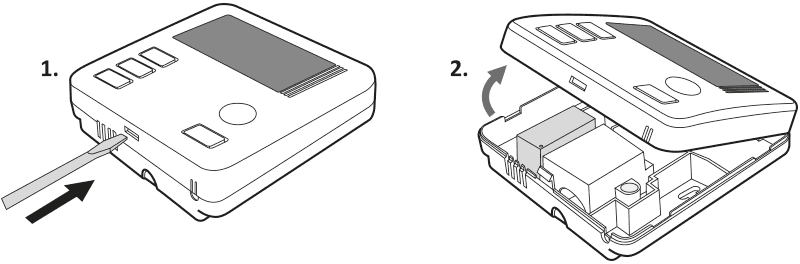
The cable terminals are located on the rear wall of the AURATON Auriga, under a plastic cover.
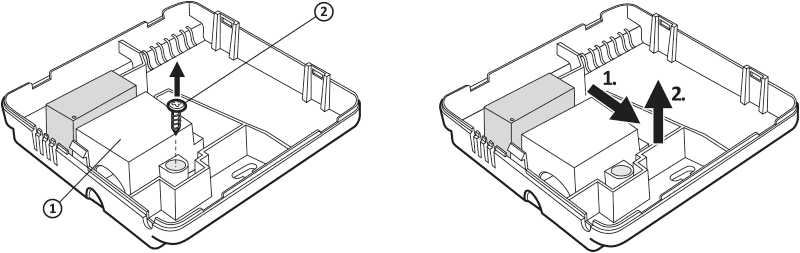
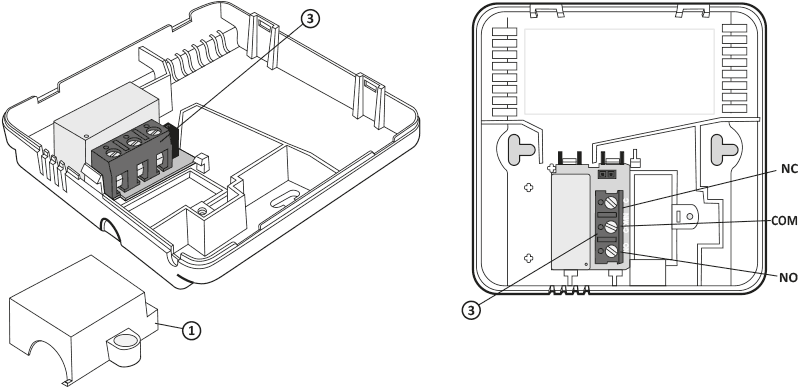
- cover
- screw
- cable clamps
This is a typical single-pole, two-state relay. In most cases, the NC terminal is not used.
After connecting the wires, reinstall the plastic cover.
Battery installation/replacement
The battery compartment is located inside the controller on the front of the housing. To install the batteries, remove the controller housing as shown in the "Connecting Wires to the AURATON Auriga" section.
We recommend alkaline batteries for powering AURATON controllers. Rechargeable batteries should not be used due to their low rated voltage.
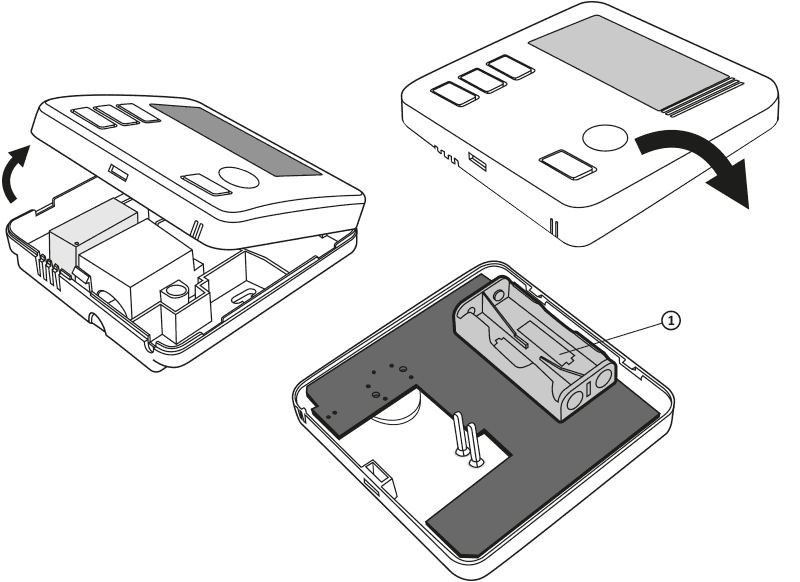
1 – battery compartment 2 x AAA 1.5V
Insert two 1.5V AAA batteries into the battery compartment, paying attention to the correct polarity of the batteries.
After replacing the batteries and reassembling the housing, we recommend pressing the g to stabilize the relay operation.
Mounting the AURATON Auriga – a daily, wired temperature controller
To attach the AURATON Auriga regulator to the wall:
- Remove the casing (as shown in the section "Connecting the cables to AURATON Auriga").
- Drill two 6 mm diameter holes in the wall (mark the hole spacing using the rear part of the controller housing).
- Insert the expansion bolts into the drilled holes.
- Screw the rear part of the controller housing to the wall using the screws included in the kit.
- Put on the regulator housing.
If you have a wooden wall, there is no need to use expansion bolts. Simply drill 2.7mm holes (instead of 6mm) and drive the screws directly into the wood.
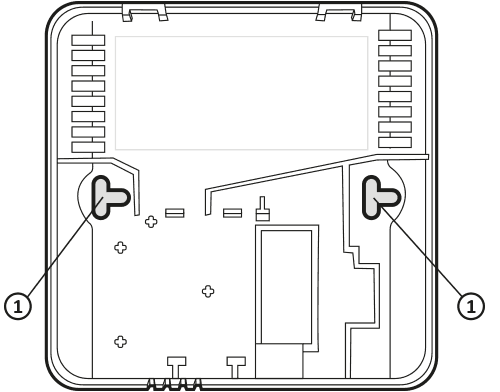
1 – hole for mounting screw.
Attaching the casing: NOTE
When putting the front part of the housing back onto the back, pay attention to the pins that control the relay.
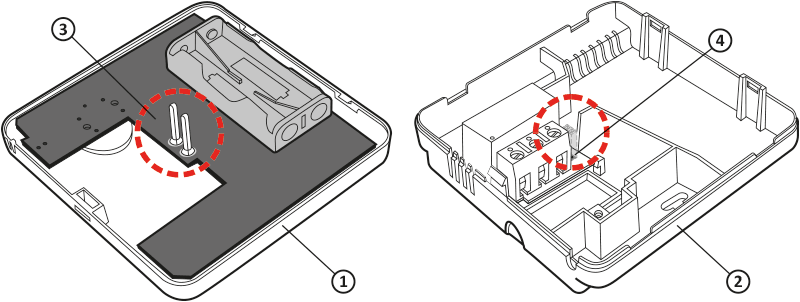
- Front cover
- Back cover
- Pins
- Pin connector socket or the point where the pins contact the board
When assembling the housing, ensure that the connection pins are not bent and that they fit correctly on the relay board. This is crucial for the proper operation of the AURATON Auriga.
First launch of AURATON Auriga
Once the batteries are properly inserted, the LCD display will show all segments for a second (display test), followed by the software version number. After a moment, the current room temperature will automatically be displayed. The AURATON Auriga is ready for operation.
Temperature setting
The first press of any function button always turns on the backlight, and only the next press activates the button function.
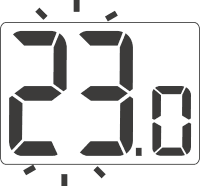
- Press the e or f . The temperature display segment will enter edit mode and start flashing.
- e and f buttons to set the desired temperature with an accuracy of 0.2°C.
- Confirm your selection by briefly pressing the g
Setting the "temporary temperature reduction" mode
If you'd like to lower the room temperature by 3°C at the same time each day, you can temporarily reduce it for 6 hours. To do this, follow these steps:
- & button for 3 seconds T ) and the hour indicator (6:h) will appear on the display
- AURATON Auriga switches to the "temporary temperature reduction" mode and every day at the same time it will lower the temperature programmed in the normal mode by 3°C for a period of 6 hours.
After 6 hours, the AURATON Auriga will return to the basic temperature setting. Instead of the moon symbol ( T ), the sun symbol ( ) will appear on the screenS .
The "temporary temperature reduction" mode always begins when the function is enabled. This means that any temporary temperature reduction must be programmed at the time you want it to occur.
Turning off the "temporary temperature reduction" mode
& button again for 3 seconds . The display will only show the room temperature and the AURATON Auriga will return to normal operating mode.
FrostGuard function
The AURATON Auriga is equipped with a special "FrostGuard" function that protects the room from freezing. This function activates when the AURATON Auriga is turned off .
! ) and a symbols appear on the display and the relay engages. When the temperature rises to 2.2°C, the display turns off again and the relay disconnects.
Hysteresis change
Hysteresis is designed to prevent the actuator from switching on too frequently due to minor temperature fluctuations.
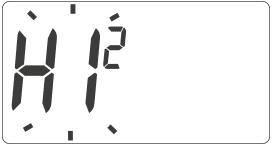
For example, for HI 2 , with the temperature set to 20°C, switching on will occur at 19.8°C and switching off at 20.2°C. For HI 4 , with the temperature set to 20°C, switching on will occur at 19.6°C and switching off at 20.4°C.
HI 2 – ±0.2°C (factory set)
HI 4 – ±0.4°C
HI P – PWM operating mode (chapter "PWM operating mode").
Confirm your selection with the g . AURATON Auriga will return to normal operation.
PWM operating mode
(Pulse-Width Modulation)By changing the hysteresis settings (see the "Configuration Settings" section), you can enable PWM operation.
In this mode, the AURATON Auriga periodically turns on the heating device to minimize temperature fluctuations. The AURATON Auriga checks the temperature rise and fall times.
Knowing these values, the AURATON Auriga turns the heating device on and off in cycles to maintain the temperature as close to the setpoint as possible.
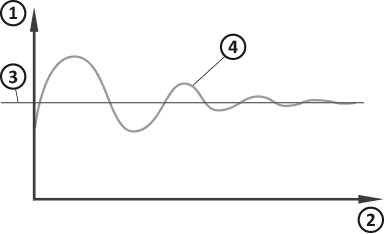
- Temperature
- Time
- Set temperature
- Room temperature
In PWM mode, the AURATON Auriga may turn on the heating device even if the room temperature is higher than the setpoint temperature. This is due to the PWM algorithm, which aims to maintain the setpoint temperature and anticipate the heating system's behavior.
Delay in switching on the relay
After switching off the heating device, the relay will be switched on again no earlier than after 90 seconds .
Comments
- AURATON Auriga can be turned on or off at any time by momentarily holding the g .
- The first press of any function button always turns on the backlight, and only the next press activates the button function.
- When programming any function, not pressing any button for 10 seconds is equivalent to pressing the g .
AURATON Auriga connection diagram
Auraton Auriga can work with a gas OR electric heating device
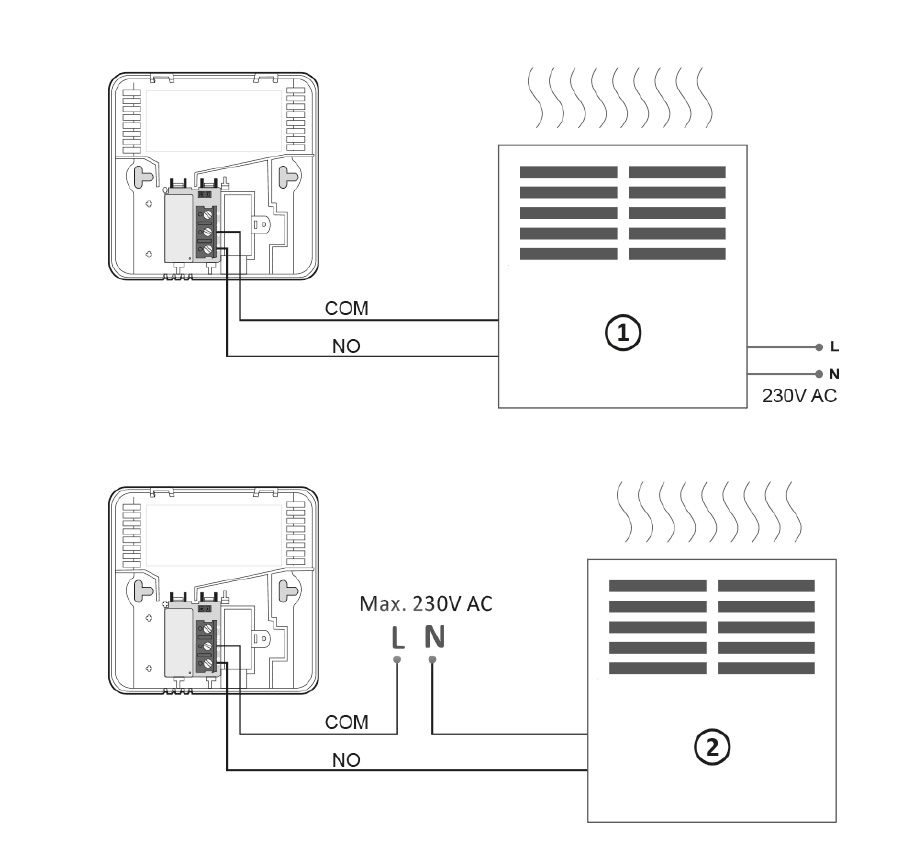
- A heating device , e.g. a gas furnace
- Electric heating device (MAX 230V AC, 16 A)
Cleaning and maintenance
- Clean the exterior of the device with a dry cloth. Do not use solvents (such as benzene, thinner, or alcohol).
- Do not touch the device with wet hands. This may result in electric shock or serious damage to the device.
- Do not expose the device to excessive smoke or dust.
- Do not touch the screen with a sharp object.
- Avoid contact of the device with liquids or moisture.
Technical data
| Power supply: | 2 x AAA (2 x 1.5 V), alkaline |
| Operating temperature range: | 0 – 45 °C |
| Operating status indication: | LCD display |
| Number of temperature levels: | 1 |
| Antifreeze temperature: | 2 °C |
| Temperature measurement range: | 0 – 35 °C (measurement error +/- 1 °C) |
| Temperature control range: | 5 – 35 °C |
| Temperature setting accuracy: | 0.2 °C |
| Hysteresis: | ±0.2 °C/±0.4 °C/PWM |
| Relay load capacity: | Max. 250 V AC, max. 16 A |
| Duty cycle: | Daily |
| Degree of protection: | IP20 |
| Dimensions [mm]: | 90 x 90 x 36 |
Disposal of the device
O
Devices are marked with a crossed-out waste bin symbol. In accordance with European Directive 2012/19/EU and the Waste Electrical and Electronic Equipment Act, this marking indicates that this equipment, after its useful life, must not be disposed of with other household waste.
Users are obligated to dispose of it at a collection point for used electrical and electronic equipment.
Manufacturer's address and contact details:
LARS, ul. Świerkowa 14
64-320 Niepruszewo
www.auraton.pl