

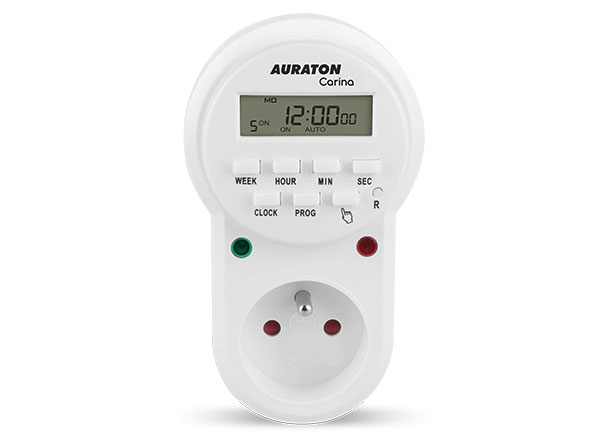
User manual ver. 20200908
This document collects information regarding the safety, installation and use of the AURATON Carina device.
Weekly multi-function timer
The AURATON Carina is a multifunctional weekly timer designed to control a domestic hot water pump in a circulation system. The AURATON Carina can also be used to switch any device with a voltage of 230 V AC and a maximum current of 16 A.
- 8 on and off programs per day, up to 56 repeated on and off programs per week with time specified to an accuracy of 1 second.
- Simple programming using a few buttons identified by appropriate symbols displayed on the LCD screen.
- Random on/off function.
- Manual on and off function.
- A red LED indicates the output status. The LED lights up when the output signal is ON.
- A green LED indicator indicates that the timer is powered correctly (230V).
- Function of maintaining the screen and programs after a power outage or when the timer is removed from the socket (approximately a week).
Display
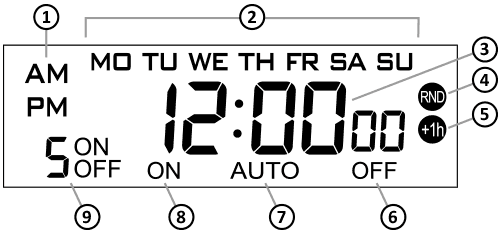
- Clock in 12-hour mode
- Days of the week:
MO – Monday
TU – Tuesday
WE – Wednesday
TH – Thursday
FR – Friday
SA – Saturday
SU – Sunday - Clock
- Random mode
- Daylight saving time
- Output status OFF
- Automatic mode
- Output status ON
- Program number:
ON – turned on
OFF – turned off
Setting the clock
To set the clock:
- Press and hold the CLOCK button.
- Then use the buttons:
WEEK – set the day of the week,
HOUR – set the hour,
MIN – set the minutes,
SEC – set the seconds.
By default, the clock operates in 24-hour mode. To switch to 12-hour mode (AM, PM), press the MIN and SEC buttons simultaneously.
Device description
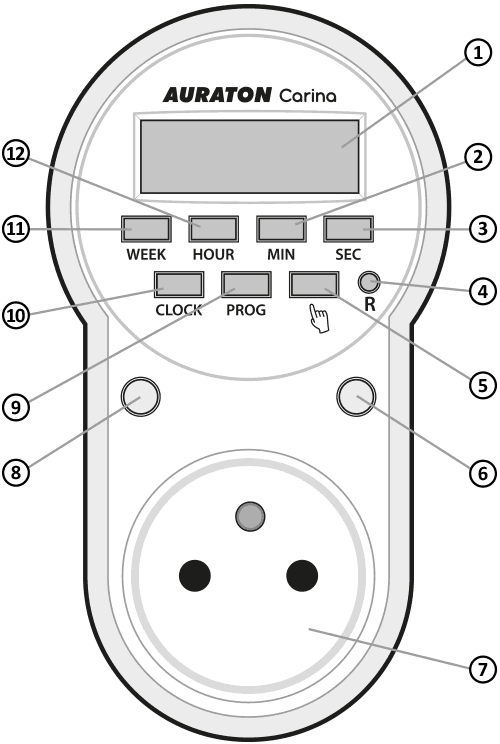
- Multifunction display
- Minute setting button
- Seconds setting button
- Device reset
- Manual mode button
- On indicator light (red)
- Actuator control socket (type E or F socket)
- Power indicator light (green)
- Program setting button
- Time setting button
- Day of the week setting button
- Hour setting button
Programming
The timer can be set to a maximum of 8 programs. Each program is set sequentially. To enter programming mode:
- Press the PROG button.
- The program number icon "1" and the "ON" symbol will appear on the screen. This indicates that the time for program "1" must be set.

- WEEK button sets the day or days of the week on which the program will be activated. You can select each day individually, the entire week, weekdays, weekends, or every other day. Use the HOUR (hours), MIN (minutes), and SEC (seconds) buttons to set the exact time the program will activate.
- Press the PROG button again. The word "OFF" will appear on the screen next to the program number. This indicates that the program should be turned off at a specific time. Settings are made using the WEEK (day of the week), HOUR (hour), MIN (minutes), and SEC (seconds) buttons.

- After setting the program's shutoff time, press the PROG to proceed to setting the next program. To set another program, repeat steps 2-4.
To exit programming mode, press the CLOCK or wait 10 seconds.
Deactivating the program
If you want to remove a previously set program, you should:
- Press the PROG as many times as necessary until the display shows the program number you want to delete and the word "ON" next to the program number.
- Press button A. Dashes will appear on the display in place of the time, indicating that the program has been deleted.
Automatic operation mode
If you want the timer to automatically turn the output power on and off (power supply to any device) according to the established programs, you must activate the automatic mode.
To do this, press button A repeatedly until the automatic mode icon "ON AUTO" or "AUTO OFF" appears.
Random work mode
BWhen this function is enabled, the Auraton Carina will randomly turn the actuator on and off, simulating your presence at home, such as a nightlight. To do this, press the WEEK and HOUR B will appear on the display .
To turn off random mode, press the WEEK and HOUR .
Manual operation mode
To permanently turn on the output power, press the button marked A "ON" icon appears on the display . To turn off manual mode, press the button A "OFF" icon appears on the display .
Daylight saving time
CTo enable daylight saving time without having to reset the clock, press the HOUR and MIN C will appear on the display , and the clock will automatically advance one hour. To disable daylight saving time, press the HOUR and MIN .
Device reset
To reset the device, press the "R" .
Resetting the device will restore factory settings and erase all programs.
If the display does not show the clock due to prolonged non-use, connect the device to the power supply for a few hours to charge the internal battery.
Technical data
| Power supply: | 230V AC, 50Hz, 1.5W |
| Operating temperature range: | 0 – 50°C |
| Load: | Max. 16 A (res.), max. 6 A (ind.) |
| Memory backup: | about 1 week |
| Degree of protection: | IP20 |
| Suggested mounting location: | Electrical socket |
| Socket type: | E or F |
| Plug type: | E/F |
| Dimensions [mm]: | 125 x 70 x 70 |
Disposal of the device
O
Devices are marked with a crossed-out waste bin symbol. In accordance with European Directive 2012/19/EU and the Waste Electrical and Electronic Equipment Act, this marking indicates that this equipment, after its useful life, must not be disposed of with other household waste.
Users are obligated to dispose of it at a collection point for used electrical and electronic equipment.
Manufacturer's address and contact details:
LARS, ul. Świerkowa 14
64-320 Niepruszewo
www.auraton.pl