

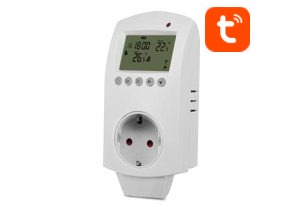
User manual ver. 20250313
This document collects information on the safety, installation and use of the AURATON Carina WiFi device.
Weekly, multi-function WiFi socket thermostat
The AURATON Carina WiFi is a modern socket thermostat that offers precise temperature control with minute accuracy. Thanks to its Wi-Fi module, the device connects to your home network, enabling remote control using the Tuya Smart and Smart Life apps. The thermostat is an ideal solution for those who want to conveniently manage the temperature in their home without having to manually adjust settings.
Functions
- Child lock to prevent misuse.
- Weekly programming modes include: 5+2, 6+1, and 7 days. You can program it yourself.
- Vacation mode allows you to save energy while on vacation.
- Temporary Manual Mode: After setting the temperature in programming mode, the temperature controller will operate at the set temperature temporarily and then return to programming mode.
Display
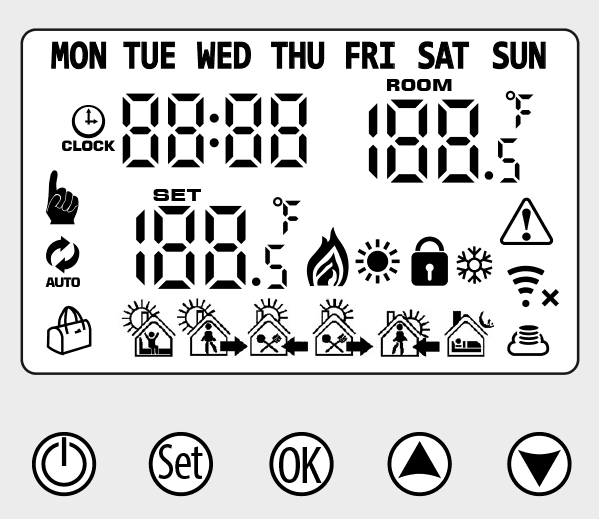
- Ý – Programming mode
- ê – Manual mode
- Ýê – Temporary manual mode
- Ú – Heating, the icon disappears when the heating is turned off
- Û – Cooling, the icon disappears when the cooling is turned off
- å – Cloud icon: flashing AP distribution network mode
- åá – Wi-Fi connection, EZ distribution mode flashing
- Î – Child Lock
- õ – Vacation mode
- Þ – Wi-Fi Status: Disconnected
- Ù – Clock
Button description
| Ñ | On/Off button: short press to turn the device on/off |
| Ò |
|
| Ô |
|
| Ò+Ô | Device on: long press simultaneously to enter the Wi-Fi distribution network |
| × |
|
| Õ |
|
Programming
5+2 (factory default), 6+1, and 7 days. 6 user-selectable temperature changes. You can select a different mode in the advanced settings.
In power-on state, press and hold the Ò for 3-5 seconds to enter the programming mode settings, then briefly press the Ò to select: hour, minute, and time period, and press × and Õ to adjust the data. After approximately 10 seconds, the thermostat will automatically save the settings.
 |
|---|
 |
|---|
 |
|---|
 |
|---|
 |
|---|
 |
|---|
The optimal comfortable temperature is 18-22 °C.
Advanced settings
Turn off the thermostat, press and hold Ò for 3-5 seconds to enter the advanced settings. From A1 to AC, short press Ò ” to select an option and adjust the data with Õ and × ”, short press Ò . After approximately 10 seconds after completing the settings, they will be saved.
| NR | Settings options | Data setting function | Factory settings |
|---|---|---|---|
| A1 | Calibration of measured temperature | +/-9 °C | -1 |
| A2 | Hysteresis | 0.5-2.5 °C | 1 °C |
| A3 | Child Lock Settings | 0: half lock; 1: full lock |
0 |
| A4 | Protection against low temperatures | Õ button is pressed, ä will be displayed , indicating that the low temperature protection is canceled | 5 |
| A5 | protection against low temperatures | 1~10 °C | 5 |
| A6 | Setting the maximum temperature range | 20~70 °C | 35 °C |
| A7 | On/off state memory after power cut | 0: Thermostat memory state before power off 1: Thermostat off after power on 2: Thermostat on after power on |
0: Thermostat memory state before power off |
| A8 | Weekly programming selection | 0:5+2 1:6+1 2:7 |
0 |
| A9 | Heating or cooling mode | 0: cooling 1: heating |
1 |
| AA | Window function | 5-25 °C. When the temperature setting is 5 °C, if the × , – will be displayed, indicating that the window function has been canceled. | — |
| AB | Window function operation time | 5~60 minutes | 15 |
| AC | Factory reset | “Ao” symbol displayed, hold Ô until LCD display is fully displayed and restore advanced option AC parameter as default |
Installation instructions
- Please read these instructions carefully. Failure to follow these instructions may result in product damage or a hazardous situation.
- Please check the maximum load stated in the instructions and product to ensure the product is suitable for your application.
- The installer must be a trained and experienced service technician.
- Once the installation is complete, follow the instructions.
Technical data
| Power supply: | 230V AC, 50 Hz, 1.5 W |
| Operating temperature range: | 0 – 50 °C |
| Duty cycle: | weekly |
| Load: | max. 16 A (res), max. 6 A (indium) |
| Degree of protection: | IP 20 |
| Humidity: | ≤85% non-condensing |
| Suggested mounting location: | electrical socket |
| Dimensions [mm]: | 140 x 67 x 40 |
Disposal of the device
O
Devices are marked with a crossed-out waste bin symbol. In accordance with European Directive 2012/19/EU and the Waste Electrical and Electronic Equipment Act, this marking indicates that this equipment, after its useful life, must not be disposed of with other household waste.
Users are obligated to dispose of it at a collection point for used electrical and electronic equipment.
Manufacturer's address and contact details:
LARS, ul. Świerkowa 14
64-320 Niepruszewo
www.auraton.pl