

User manual ver. 20220222
This document collects information on the safety, installation and use of the Auraton Draco R device.
Weekly wireless temperature controller
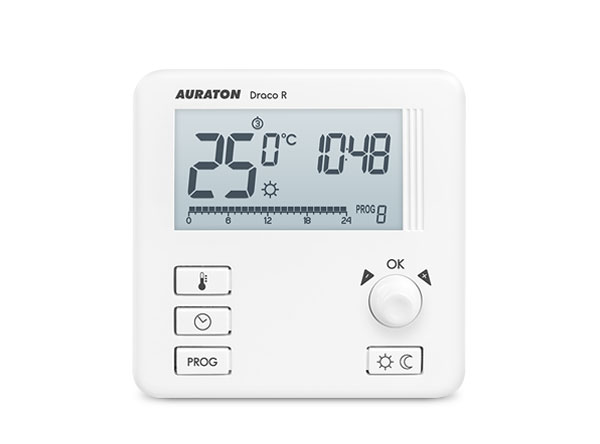
AURATON Draco R is a weekly, wireless temperature controller designed to work with the AURATON Aries strip and the AURATON Fornax heating or air conditioning device controller.
| U | 3 independently adjustable temperatures: Day, night, anti-freeze. |
| & | 9 independent temperature programs , including 6 user-modifiable. |
| LCD | Illuminated LCD display The illuminated display allows you to monitor the device's operation even in poorly lit rooms. |
Description of AURATON Draco R
weekly, wireless temperature controller (transmitter)
The front of the AURATON Draco R housing features a backlit LCD display, four function buttons and a temperature setting knob with an OK .
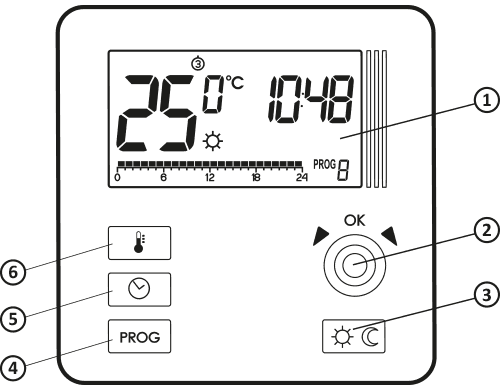
- LCD display
- Settings knob with integrated button (
- Mode selection button: S – day mode, T – night mode
- Program selection button
- Button to set the time, day and week
- Temperature setting button
Display
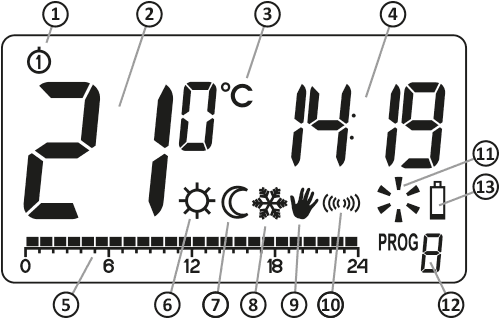
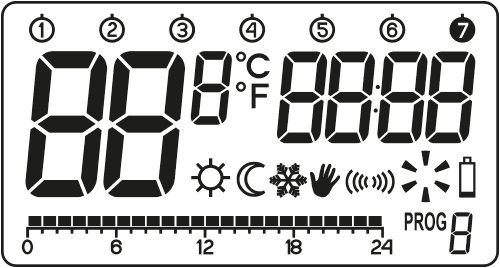
- Day of the week (8 ) – Indicates what day of the week it is. Each day is assigned a number.
- Temperature – In normal operation mode, AURATON Draco R displays the temperature of the room in which it is installed.
- Temperature Unit – Indicates whether the temperature is displayed in degrees Celsius (°C).
- Clock
The time is displayed in a 24-hour system. - Timeline:
Program progress indicator. This line is divided into 24 segments, each representing one hour. It shows how a given program is being executed. (See the "Timeline" section.) - Day mode indicator ( S )
Indicates that AURATON Draco R is operating in day mode. (see chapter: "Temperature programming") - Night mode indicator ( T )
Indicates that the AURATON Draco R is operating in night mode. (see chapter: "Temperature programming") - Anti-freeze mode indicator ( U )
Indicates that the AURATON Draco R is operating in anti-freeze mode. (see section: "Anti-freeze mode") - Manual control indicator ( V )
Appears when you exit programmed operation. (see section: "Manual control mode") - Transmit Symbol ( W )
Indicates communication with the receiver. - Y )
On Indicator Segment informing about the device's operating status. Visible when the controlled device is turned on. - Program number
Indicates the number of the program currently running. (See chapters: "Factory programs" and "Weekly programming") - Battery drain (X)
This indicator appears when the battery voltage exceeds the minimum allowable level. The batteries should be replaced as soon as possible.NOTE:
To maintain the programmed parameters, the battery replacement operation time should not exceed 30 seconds.
Choosing the right location for AURATON Draco R
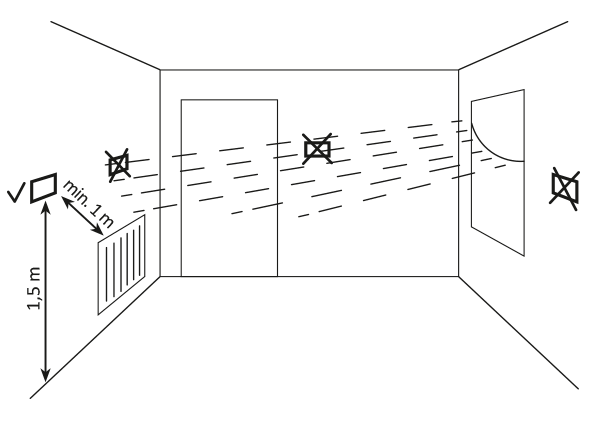
The proper operation of the AURATON Draco R is significantly affected by its location. Siting it in a location lacking air circulation or exposed to direct sunlight may result in improper temperature control. The AURATON Draco R should be installed on an interior wall (partition wall), in an environment with free air circulation. Avoid proximity to heat-emitting devices (TV, radiator, refrigerator) or locations exposed to direct sunlight. Proper operation may be impaired by proximity to doors, which may expose the AURATON Draco R to potential vibration.
Battery replacement
The battery compartment is located inside the AURATON Draco R on the front of the housing. To install the batteries, remove the AURATON Draco R housing as shown in the figure below:
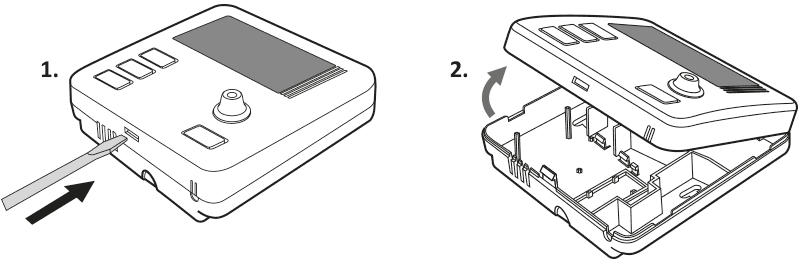
We recommend alkaline batteries for powering AURATON controllers. Rechargeable batteries should not be used due to their low rated voltage.
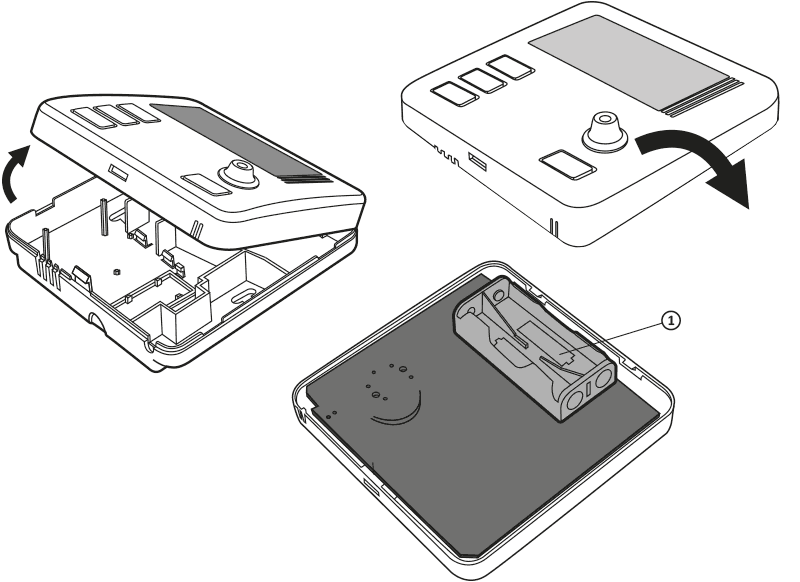
- – 1.5V AAA battery slot
Insert two 1.5V AAA batteries into the battery compartment, paying attention to the correct polarity of the batteries.
Mounting the AURATON Draco R – a weekly, wireless temperature controller
To attach AURATON Draco R to the wall:
- Remove the cover (as shown in the "Replacing the Battery" section)
- Drill two 6 mm diameter holes in the wall (mark the hole spacing using the rear part of the AURATON Draco R housing).
- Insert the expansion bolts into the drilled holes.
- Screw the rear part of the AURATON Draco R housing to the wall using the screws included in the kit.
- Put the casing on.
If you have a wooden wall, there is no need to use expansion bolts. Simply drill 2.7mm holes (instead of 6mm) and drive the screws directly into the wood.
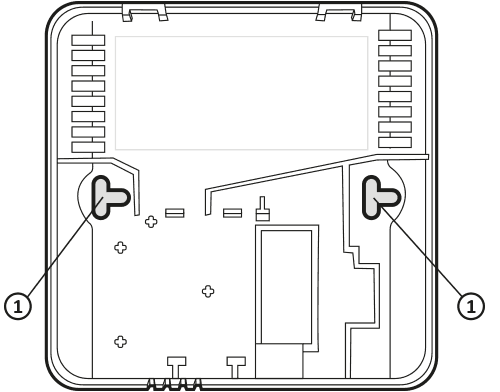
- hole for the mounting screw
First launch of AURATON Draco R
Once the batteries are properly inserted into the slots, the LCD will display all segments for one second, followed by the software version number.
After a moment, the AURATON Draco R will automatically enter the time setting mode. A flashing element on the screen indicates that it is currently in edit mode. Turn the knob left or right to set the desired time and confirm with the button. (.
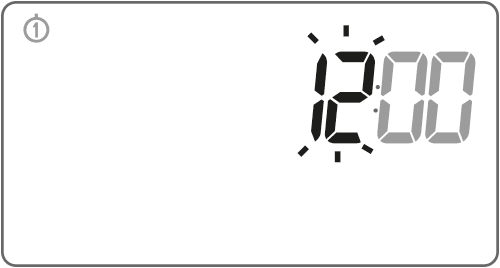
By turning the knob left or right, we set the correct value in the minute segment and confirm it again with the button. (.
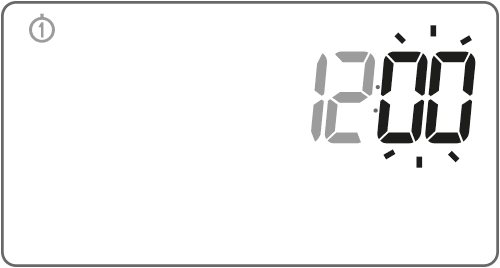
A flashing day of the week symbol appears in the upper left corner. Turn the knob left or right to set the desired day and confirm your selection with the button. (.
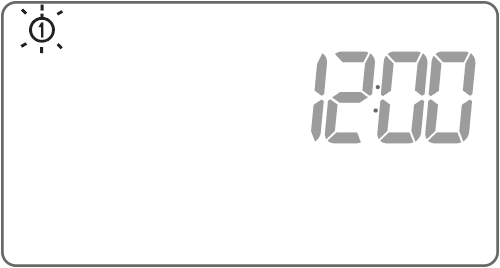
If no button is pressed for 60 seconds in the initial edit mode, the time will automatically default to 12:00 and Monday as the day of the week.
When programming any other functions, not pressing any button for 10 seconds is equivalent to using the button( .
Setting the clock and day of the week
To set the clock you need to:
-
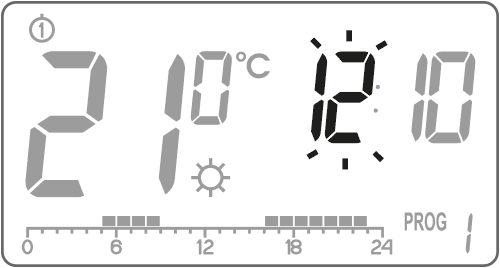
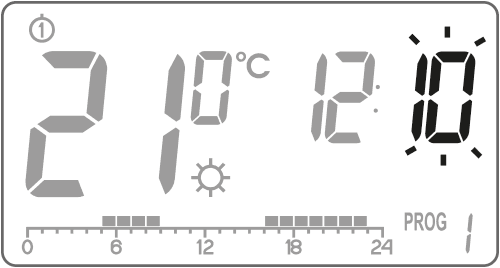
Press the buttonm . The hour segment will start flashing on the display.
-
By turning the knob left or right, you set the desired hour and confirm with the button. (.
-
By turning the knob left or right, we set the correct value in the minute segment and confirm it again with the button. (.
-
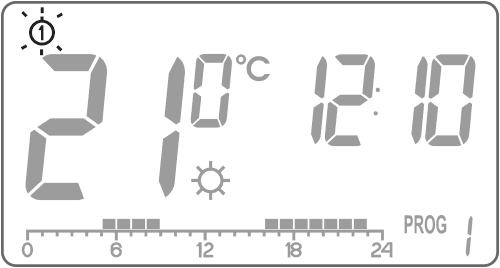
A flashing day of the week symbol appears in the upper left corner. Turn the knob left or right to set the desired day and confirm your selection with the button. (.
 NOTE:
NOTE:
You can also switch using the buttonm .Default program settings
- Monday - Friday:
the heating device operates at the day temperature ( S ) from 05:00 to 08:00 and from 15:00 to 23:00 - Saturday - Sunday:
the heating device operates at the day temperature ( S ) from 06:00 to 23:00 - default temperature settings:
S day temperature – 21.0°C
T night temperature – 19.0°C
U anti-freeze temperature – 7.0°C
Programming day and night temperatures
AURATON Draco R allows you to programmatically set 2 types of temperature:
- Daytime temperature ( S ) – from 5 to 30°C
- Night temperature ( T ) – from 5 to 30°C
To set one of the above temperatures:- Press the buttonn .
-
The display will show the currently set temperature with the symbol:
S – day temperature;
T – night temperature.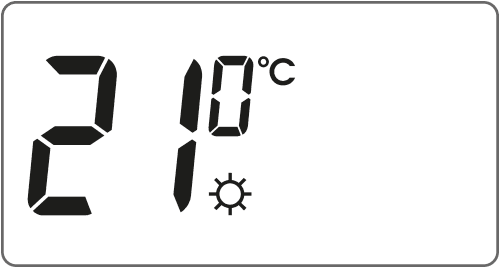
- By turning the knob left or right we set the desired temperature value.
- Pressing the buttonn will switch the editing mode between day and night temperature ( S , T ).
- After setting the temperatures, confirm everything with the button. (.
NOTE:
The night temperature setting must be lower than the day temperature. It is not possible to set the night temperature higher than the day temperature.Introduction to programming
Timeline
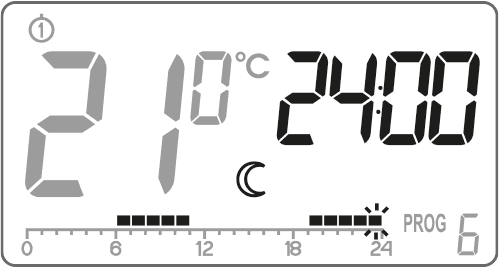
The timeline on the LCD display is divided into 24 sections, each representing one hour of the day.
Black rectangles above the timeline indicate that the program has set the daytime temperature for that time; their absence indicates that the program has set the nighttime temperature.Example:

The figure above shows that from 6:00 a.m. to 11:00 p.m., the AURATON Draco R will control the heating or air conditioning device to maintain the room at day temperature ( S ). From 11:00 p.m. to 6:00 a.m., the AURATON Draco R will switch to night temperature ( T ).
Factory programs
To ensure the AURATON Draco R knows when to switch to the day and night temperatures, you need to set a specific program for each day of the week. To do this, you can use one of three preset programs (from 0 to 2):
Program No. 0 – Anti-freeze. U
This factory program cannot be modified. Designed for setting the anti-freeze temperature all day long.Program No. 1 – Weekly
. Non-modifiable factory program. Sets the daily temperature from 5:00 to 8:00 and from 15:00 to 23:00.Program No. 2 – Weekend
. This factory program cannot be modified. It sets the daily temperature from 6:00 a.m. to 11:00 p.m.Program No. 3, 4,…, 8 – User
Programs No. 3 through No. 8 are user programs. They can be freely modified and adapted to your requirements.Programming
Weekly programming
Programming the AURATON Draco R involves specifying the hours for a given day of the week during which the daytime temperature should be maintained. The nighttime temperature then applies.
Example AURATON Draco R from Monday to Sunday. Outside the time periods specified below, the AURATON Draco R will maintain a lower night-time temperature.
Day Daytime temperature Monday 5:00 – 8:00; 15:00 – 23:00 
Tuesday 5:00 – 8:00; 15:00 – 23:00 Wednesday 5:00 – 8:00; 15:00 – 23:00 Thursday 5:00 – 8:00; 15:00 – 23:00 Friday 5:00 – 8:00; 15:00 – 23:00 Saturday 8:00 – 23:00 
Sunday 8:00 – 23:00 Program selection
To set up the program:
-
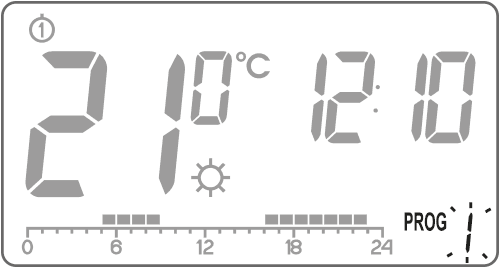
Press the buttonh . The program number segment will begin flashing.
-
Press the buttonm as many times as necessary to select the day of the week on which the program is to be carried out.
-
Press the button several timesh and select the desired program number. Programs 0-2 are factory-set, programs 3-8 can be modified.
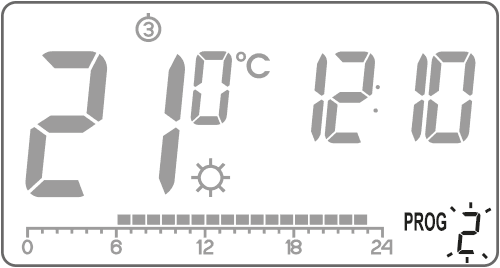
- Confirm your selection with the button (.
- Repeat the procedure for the next days of the week.
Modifying a user program
To set up the program:
-
Press the buttonh . The program number segment will begin flashing.
-
Press the buttonm as many times as necessary to select the day of the week on which the program is to be carried out.
-
Press the button several timesh and select the desired program number. Programs 0-2 are factory-set, programs 3-8 can be modified.
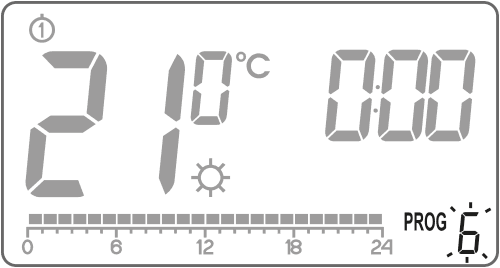
-
All 24 black rectangles on the timeline will be lit, each representing one hour. A visible rectangle indicates that the daytime temperature is to be achieved at that hour. The absence of a rectangle above the timeline indicates that the nighttime temperature is scheduled.
The flashing rectangle indicates where on the timeline we are making changes.
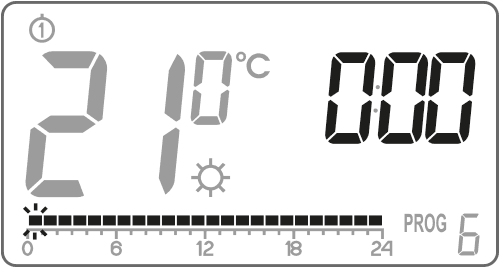
-
Use the buttonr to select the day temperature (light rectangle) or night temperature (light rectangle). Then, use the knob to select the time interval for the given temperature.
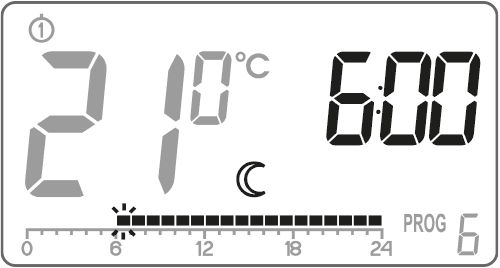
-
By pressing the buttonr and selecting the time interval, we modify the entire program.
- We confirm everything with the button (
NOTE:
A modified program for a specific day can be selected and implemented also on another day of the week.Manual control
VOption 1:
If for any reason you wish to interrupt the current program and extend the day or night temperature, you can do so manually, but for no longer than 24 hours. To do this:Hold the buttonr for 3 seconds. Then use the knob to select the number of manual operation hours (maximum 24 hours) and confirm the setting by pressing the button( .
The AURATON Draco R will wait for you to set the desired temperature (day or night). Changes can be made using the buttonr or the knob. Confirm your selection by pressing the button( .
Option 2:
If you would like to suspend the program, e.g., due to a prolonged party, and the AURATON Draco R has already started lowering the temperature to the night temperature (the T ), and you would like to maintain the comfortable temperature until the end of the party, proceed as follows:
Press the buttonr the V and S symbols will appear on the display . The day temperature will then be maintained until the next temperature change implemented by the program.
To cancel this function, press the button( ; the symbol will disappearr from the display.Similarly, if the program is maintaining the day temperature, and you want to immediately enter the night temperature, then:
Press the buttonr V and T symbols will appear on the display . The night temperature will then be maintained until the next temperature change implemented by the program. To cancel this function, press the button( ; the symbol will disappearr from the display.Antifreeze temperature
UIn the event of an extended absence, you can activate the anti-freeze temperature mode. This prevents the unpleasant consequences of water freezing in the heating system by automatically setting the temperature to 7°C. To set the anti-freeze program, simply select program 0 on the desired day of the week.
Evaporation
AURATON Draco R weekly, wireless temperature controller (transmitter) with AURATON Fornax receiver, controller of a heating or air-conditioning deviceAfter connecting to the mains, turn on the receiver by briefly pressing the power button ( F ). When the device is turned on, the green power LED will light up and you will hear a single beep. To turn off the receiver, e.g., outside the heating season, hold the power button for 3 seconds until you hear a double beep and the green power LED turns off, turning off the heating device.
NOTE:
The wireless AURATON Draco R (transmitter) sold together with the AURATON Fornax wireless heating or air conditioning controller (receiver) in the AURATON Draco SET is already paired. Devices purchased separately require "pairing."- Pairing the AURATON Draco R (transmitter) with the AURATON Fornax is initiated by pressing the right pairing button ( D ) – a single beep on the AURATON Fornax receiver – and holding it for at least 3 seconds until the LED starts flashing green (double beep), then releasing the button.
The AURATON Fornax receiver waits 120 seconds for pairing. After this time, it will automatically return to normal operation. - On the AURATON Draco R (transmitter), press the buttonh for 5 seconds until the transmitting symbol (W ) lights up on the display. Release the button – the AURATON Draco R transmits a pairing signal for 5 seconds.
- Successful completion of pairing is indicated by the LED on the AURATON Fornax receiver stopping flashing green, by a single sound signal and by the receiver switching to normal operation.
If an error occurs during pairing, repeat steps 1 and 2. In case of subsequent errors, unpair the device by RESETting the AURATON Fornax receiver, see "RESET - Unpairing the device from the AURATON Fornax - wireless controller of a heating or air-conditioning device (receiver)" and try pairing the devices again.
NOTE:
The Auraton Fornax receiver can only be paired with one AURATON Draco R.Signaling of operation and receipt of data packets
Each time a radio transmission is received from a paired device, the AURATON Fornax receiver signals this with a momentary alternating color change of the LEDs. When the relay is turned on, the LED is red; when the relay is turned off, the LED is green.
NOTE:
Pressing any button is signaled by a short beep.Writing off AURATON Draco R – a weekly, wireless temperature controller from AURATON Fornax
- Unlinking the AURATON Draco R (transmitter) from the AURATON Fornax receiver is initiated by pressing the left unlink button ( E ) on the receiver and holding it for at least 3 seconds until the LED flashes red, then releasing the button. The sound signal works in the same way as pairing, i.e., pressing the button is signaled by a short beep, followed by a double short beep after 3 seconds.
The AURATON Fornax receiver waits 120 seconds for the device to be unlinked. After this time, it will automatically return to normal operation. - On the AURATON Draco R (transmitter), press the buttonh for 5 seconds until the transmitting symbol ( W ) lights up on the display. Release the button.
- Successful completion of the write-back is indicated by the LED on the AURATON Fornax receiver stopping flashing red, a single sound signal and the receiver switching to normal operation.
If an error occurs during unsubscribing, repeat steps 1 and 2. In case of subsequent errors, unsubscribe the paired device, see "RESET – Unsubscribing a device paired to AURATON Fornax – wireless controller of a heating or air-conditioning device (receiver)" .
RESET – Unpairing the device paired with the AURATON Fornax receiver – wireless controller of a heating or air conditioning device (receiver)
To unpair a paired device (e.g., a controller) from AURATON Fornax, simultaneously press and hold both the pairing and unpairing buttons ( D and E ) for at least 5 seconds until the LED indicator changes to alternating green and red flashing. Then release both buttons. Audible signal: pressing the button produces a short beep – after 5 seconds, a double short beep.
Successful unpairing of the device is indicated after approximately 2 seconds by the indicator changing to green and then briefly fading.NOTE:
If you disconnect the AURATON Fornax receiver from the power supply after a RESET and then reconnect it, the receiver will automatically enter "pairing" mode for 120 seconds. A newly purchased AURATON Fornax receiver (not included with the AURATON Draco R) that does not have factory-paired devices will behave identically.RESET AURATON Draco R
Reset is performed by removing the battery until the data disappears from the display.
MASTER RESET AURATON Draco R
MASTER RESET is performed by pressing and holding the button( while inserting the batteries. This returns the AURATON Draco R to its factory settings.
NOTE:
All user programs are deleted!Configuration settings
Configuration settings are made sequentially:
heating mode/
air conditioning mode
hysteresis change
offset change
To enter the configuration settings change mode, hold down theh and( for 3 seconds until the settings menu is displayed.
Heating mode/Air conditioning mode
AURATON Draco R can operate in two modes:

Heating mode (factory set) – set it when AURATON Draco R is to cooperate with heating devices. 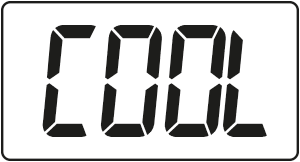
Air conditioning mode – set it when AURATON Draco R is to cooperate with air conditioning devices. Turn the knob left or right to set the desired mode. Confirm your selection by pressing the button( . AURATON Draco R will move on to the next parameter.
Hysteresis change
Hysteresis is designed to prevent the actuator from switching on too frequently due to minor temperature fluctuations.
For example, for HI 2 hysteresis, with the temperature set to 20°C, the boiler will turn on at 19.8°C and turn off at 20.2°C. For HI 4 hysteresis, with the temperature set to 20°C, the boiler will turn on at 19.6°C and turn off at 20.4°C.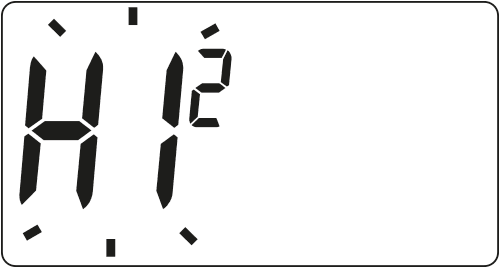
The hysteresis change mode is indicated by the flashing HI sign. Turn the knob left or right to set the desired hysteresis.
HI 2 – ±0.2 °C (factory setting),
HI 4 – ±0.4 °C.
Confirm the selection by pressing the button( . AURATON Draco R will move on to changing the next parameter.Offset change
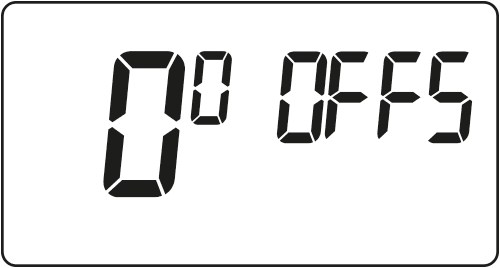
Offset allows you to calibrate temperature readings with a tolerance of ±3°C. For example, the AURATON Draco R indicates that the room temperature is 23°C, while a standard room thermometer hanging next to it reads 24°C. By changing the offset by +1 degree, the AURATON Draco R will display the same temperature as the room thermometer.
Offset change mode is indicated by the flashing OFFS sign. Turn the knob left or right to set the desired value within the range of -3.0 to 3.0 (factory setting – 0.0). Confirm the selection by pressing the button( . AURATON Draco R returns to normal operation.
 NOTE:
NOTE:
If you do not press any button for 10 seconds while changing the configuration settings, AURATON Draco R will return to normal operating mode.NOTE:
The first press of any function button always turns on the backlight, and only the next press activates the button function.Special situations
- If we lose three consecutive transmissions (after 15 minutes) from the AURATON Draco R (transmitter), a failure will be signaled on the AURATON Fornax receiver (the LED will continuously flash alternately red and green). Until the problem is resolved, the receiver will revert to the memorized on/off cycle from the last 24 hours.
- When the signal from AURATON Draco R returns, the error is cleared and the AURATON Fornax receiver switches to normal operation.
Additional notes
- AURATON Draco R (transmitter) must be installed at least 1 meter from the receiver (too strong a signal from the transmitter may cause interference).
- At least 30 seconds must pass between the next switching off and switching on of the relay.
- Data is transmitted from the AURATON Draco R (transmitter) to the AURATON Fornax receiver whenever the ambient temperature changes by 0.2°C. If the temperature does not change, the AURATON Draco R transmits control data every 5 minutes (this is indicated by a flashing orange LED on the receiver).
- In the event of a power outage, the AURATON Fornax receiver will turn off. When power is restored, the heating device will automatically turn on, and the AURATON Fornax receiver will wait for a signal from the paired AURATON Draco R (transmitter) for a maximum of 5 minutes after power is restored. Once the signal is received, the AURATON Fornax receiver will resume normal operation.
- Placing the AURATON Fornax receiver in a metal housing (e.g. mounting box, metal furnace housing) will interfere with the operation of the AURATON Draco R.
- In AURATON Draco R (transmitter) you can turn the control functions on or off at any time (e.g. after the heating season) by briefly (approx. 5 seconds) holding the button( (AURATON Draco R will only show the current time and room temperature – no "timeline").
- The first press of any function button always turns on the backlight, and only the next press activates the key's function. When using the knob, each step keeps the backlight on.
- When programming any function, not pressing any button for 10 seconds is equivalent to pressing the button. (.
Cleaning and maintenance
- Clean the exterior of the device with a dry cloth. Do not use solvents (such as benzene, thinner, or alcohol).
- Do not touch the device with wet hands. This may result in electric shock or serious damage to the device.
- Do not expose the device to excessive smoke or dust.
- Do not touch the screen with a sharp object.
- Avoid contact of the device with liquids or moisture.
Technical data
Power supply: 2 x AAA (2 x 1.5 V), alkaline Operating temperature range: 0–45 °C Operating status indication: LCD display Number of temperature levels: 2 Antifreeze temperature: 7 °C Temperature control range: 5–30 °C (measurement error +/- 1 °C) Hysteresis: ±0.2 °C/±0.4 °C Duty cycle: Weekly programmable Range of action: in a typical building, with standard wall construction – approx. 30 m;
in open areas – up to 300 mRadio frequency: 868.850 MHz
869.000 MHzRadio signal strength: Up to 11 dBm Degree of protection: IP20 Dimensions [mm]: 90 x 90 x 36 Disposal of the device
O
Devices are marked with a crossed-out waste bin symbol. In accordance with European Directive 2012/19/EU and the Waste Electrical and Electronic Equipment Act, this marking indicates that this equipment, after its useful life, must not be disposed of with other household waste.
Users are obligated to dispose of it at a collection point for used electrical and electronic equipment.
LARS Andrzej Szymański hereby declares that the AURATON Draco R radio equipment type is in compliance with Directives 2014/53/EU and 2011/65/EU. The full text of the EU declaration of conformity is available in the download section below.
Manufacturer's address and contact details:
LARS, ul. Świerkowa 14
64-320 Niepruszewo
www.auraton.pl
Downloads
- Monday - Friday: