

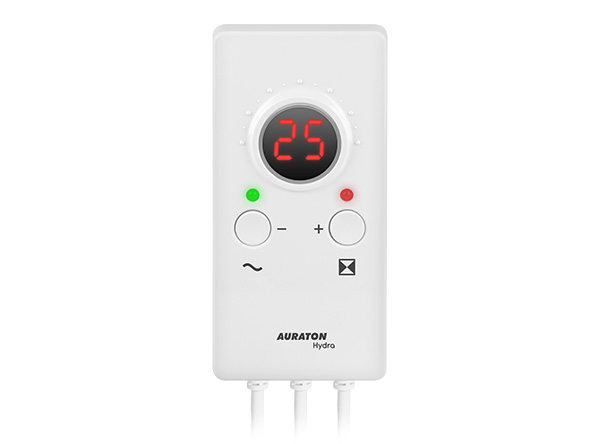
User manual ver. 20210116
This document collects information on the safety, installation and use of the AURATON Hydra device.
Device description
AURATON Hydra is designed to control a three-way valve – it closes and opens the valve within a hysteresis range of 10°C. AURATON Hydra can operate both actuators with limit switches (AUTO function) and without limit switches (MANUAL function).
When using actuators with limit switches, use the AUTO (AURATON Hydra will automatically select the valve opening and closing time), while when using an actuator without limit switches, use the MANUAL (manually select the operating time specified by the actuator manufacturer).
Installation
Mounting the temperature sensor
- Install the sensor on a bare pipe.
- Press the sensor against the pipe with a clamp.
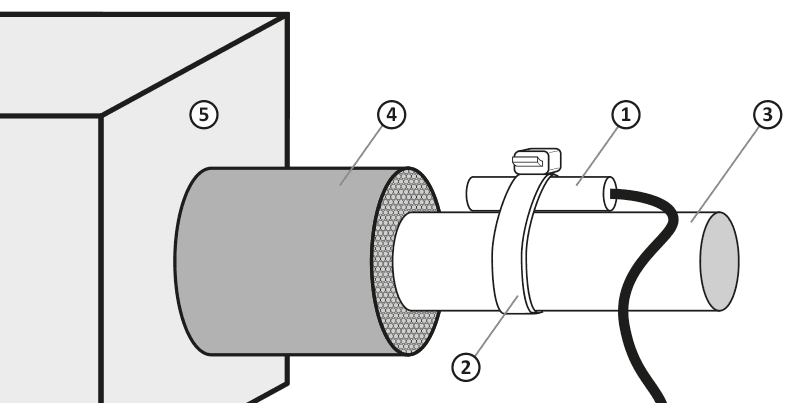
- temperature sensor
- cable tie
- pipe
- pipe insulation
- central heating furnace
Connecting the power cable to the valve
- On the controller side, the blue wire is the common wire (in the actuator, the common wire may be different depending on the manufacturer).
- The brown and black wires are control wires, depending on the operating direction these two wires can be interchanged.
Connecting the AURATON Hydra
After securing the wires against accidental breakage, connect the power cord to a 230 V AC mains socket.
AURATON Hydra mount:
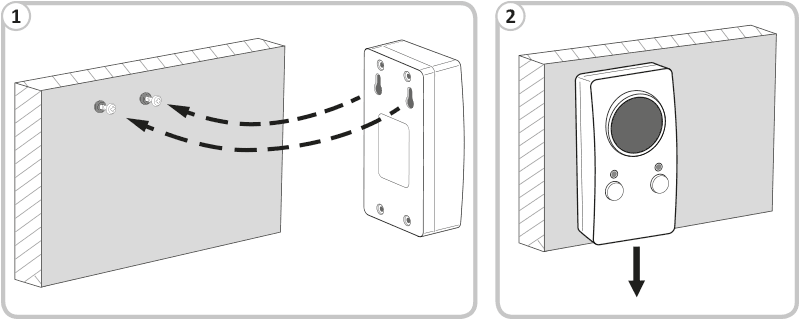
- Mount AURATON Hydra on a wall or bracket using two screws (wall plugs included).
- Attach the cables from the AURATON Hydra to the wall.
AURATON Hydra action
Setting the return temperature to 60°C causes the valve to open and close within a hysteresis range of ±5°C. This means that when the sensor installed in the return reaches 65°C, the valve will be fully closed, and at 55°C, it will be fully open. When the temperature set by the user on the controller, 60°C, is reached, the valve will be halfway open (50%). The controller controls the valve like a stepper motor, gradually opening or closing the valve depending on the return temperature. Each 1°C change in temperature causes the valve to open or close by 10%.
Description of AURATON Hydra
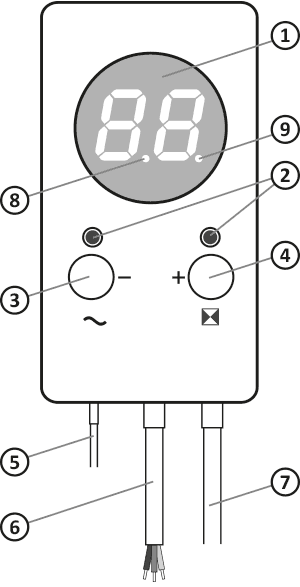
- LED display
- operation lights
- function button / power switch
- function button / operating mode
- temperature sensor
- pump control output
- power cord
- valve opening indicator light
- valve closing indicator light
opening and closing indicator lights are used to visualize actuator operation. Flashing indicator lights indicate valve operation in the left or right direction.
First launch of AURATON Hydra
On the left side, below the display, is the power button ( ® ). Holding it for 2 seconds turns the AURATON Hydra on or off. When the AURATON Hydra is off, the LED lights red, and when the AURATON Hydra is on, the LED lights green.
Upon startup, AURATON Hydra automatically calibrates the valve's opening and closing times (the display shows ¤ ). This involves fully opening and closing the valve and measuring its time. This value is stored in memory. For accurate measurement, calibration is performed twice.
Once the calibration process is complete, the current sensor temperature is displayed. The controller is ready to set the appropriate operating temperature.
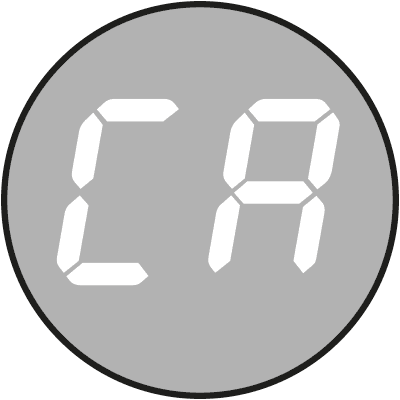
Temperature setting
Briefly pressing the left or right button activates the temperature setting function.
The temperature on the display will flash for 3 seconds. During this time, use the ( – ) or ( + ) buttons to set the appropriate temperature.
After selecting AURATON Hydra, it will automatically save this value, and the display will show the current sensor temperature.
If the actuator has limit switches, the AURATON Hydra is already ready for operation. If using an actuator without limit switches, the operating time setting specified by the actuator manufacturer is required.
Setting the actuator operating time
Holding the right button (µ ) for 2 seconds will start editing the actuator's operating time.
The display will show ´ (automatic operation).
Then use the ( – ) or ( + ) buttons to set the appropriate time value:
- 01 – 10 seconds (minimum value)
- 40 – 400 seconds (maximum value)
- ´ – automatic operation
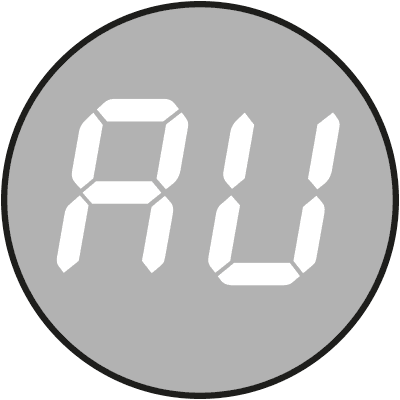
Setting the value to ´ means that the AURATON Hydra will once again operate in automatic mode (actuator with limit switches).
After editing, the AURATON Hydra will remember the entered values, and after 10 seconds, the display will show the current temperature instead of the flashing time setting.
The most common value is 150 seconds (15).
After a power failure and reconnection, the inscription ¶ (manual setting of the actuator operating time).
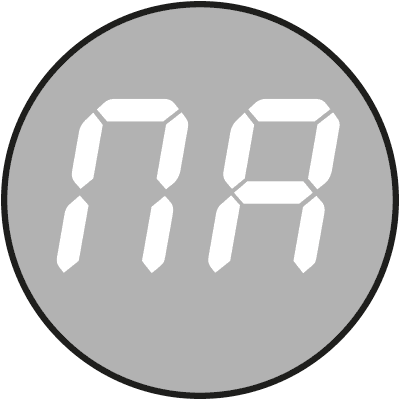
In the event of a temporary power outage, the AUTOCALIBRATION function is activated. After calibration is complete, the AURATON Hydra resumes normal operation.
The display will show the following in sequence: display test, software version (e.g. F1.2 ), ´ (automatic actuator operating time) or ¶ (manually set actuator operating time), then ¤ , which indicates that the calibration function is enabled.
Shutting down AURATON Hydra
The controller can be turned off in two ways:- During normal operation, hold the ( ® ) button for 2 seconds; the display will turn off and the LED will change from green to red. You can also turn off the AURATON Hydra during calibration using the same method. The display will also turn off and the LED will change from green to red, although the actuator direction indicator will flash. This completes the calibration and sets the valve to the center 50% position (right orange LED).
- The second method is to completely turn off the AURATON Hydra at any time. This is accomplished by simultaneously holding both buttons ( ® andµ ) for 2 seconds. In this case, the GUARD system will not be active. Complete shutdown of the AURATON Hydra is signaled by the left and right LEDs glowing red. To turn the controller back on, press the ( ® ) button.
Error information codes
| · | Valve calibration time too short in either direction (valve damage, bad connection). | Valve stop, waiting for the fault to be removed (message only in ´ ), after the fault has been removed, press any button. |
| « | Limit switch not activated for more than 4 minutes (valve damage, bad connection). | Valve stop, waiting for fault to be removed (message only in ´ ), after removing the fault, press any button. NOTE: If this message appears when starting the AURATON Hydra for the first time, it may be necessary to switch the AURATON Hydra to ¶ (manual setting of the actuator operating time). |
| ° | No network synchronization signal to protect the relay | Valve stop, waiting for fault to be removed (waiting for momentary power disconnection). |
| ± | There is a short circuit on the sensor | Stopping the valve, waiting for the fault to be removed (replacement of the temperature sensor), after removing the fault, press any button. |
| ¬ | No sensor, sensor damaged | Stopping the valve, waiting for the fault to be removed (replacement of the temperature sensor), after removing the fault, press any button. |
| § | Sensor temperature below 2°C | Valve stop, waiting for fault to be removed (temperature increase). |
| ¦ | Sensor temperature above 90°C | Warning about too high temperature in the installation. |
Any faults should be repaired with the power supply disconnected from the mains socket.
The occurrence of the above alarms is signaled by an intermittent audible signal until the fault is repaired or the AURATON Hydra is turned off. After the fault is repaired, the AURATON Hydra calibrates and resumes normal operation.
Error codes are displayed alternately with the current sensor temperature (does not apply to codes ± and ¬ .
Other information codes
| ¤ | AURATON Hydra in valve calibration mode. |
| ´ | AURATON Hydra set to automatic actuator operation time. |
| ¶ | AURATON Hydra set to manual actuator operation time. |
GUARD function
The AURATON Hydra is equipped with a GUARD . It automatically self-calibrates every 14 days . This improves the actuator's precision while preventing the valve from seizing up when not in use.
GUARD function also works when the AURATON Hydra is turned off, but only after full calibration. This is indicated by only the left LED lighting up red.
AURATON Hydra operating modes
AURATON Hydra turned on (GUARD system working)
- left green LED
- display on
- right LED in color depending on valve opening:
green – valve closed,
orange – valve at 50%,
red – valve open.
AURATON Hydra on standby/off (GUARD system is running)
- left red LED,
- display off,
- right diode off.
AURATON Hydra completely disabled (GUARD system not working)
- left red LED,
- display off,
- right red LED.
Connection diagram
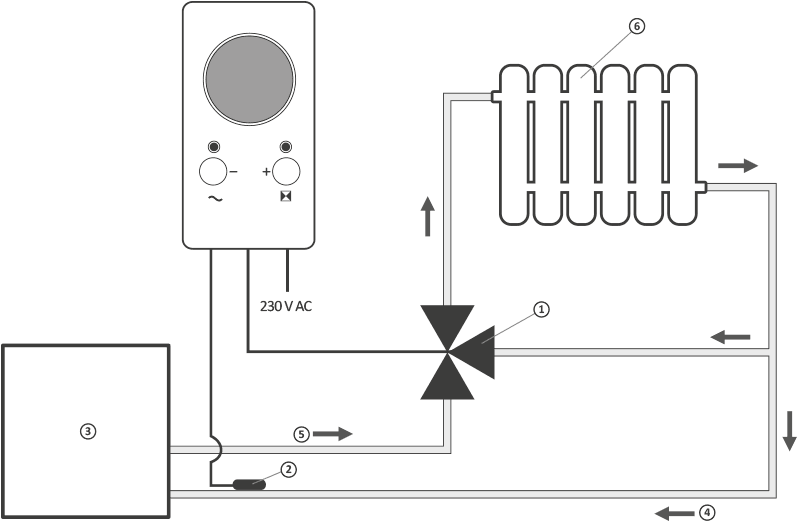
- mixing valve with actuator
- return temperature sensor
- central heating furnace
- cold water
- warm water
- heat receiver (e.g. radiator)
4-way valve connection diagram
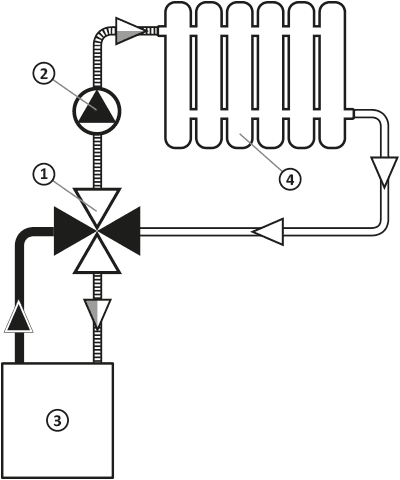
- 4-way valve with actuator
- pump
- central heating furnace
- heat receiver (e.g. radiator)
Cleaning and maintenance
- Clean the exterior of the device with a dry cloth. Do not use solvents (such as benzene, thinner, or alcohol).
- Do not touch the device with wet hands. This may result in electric shock or serious damage to the device.
- Do not expose the device to excessive smoke or dust.
- Do not touch the screen with a sharp object.
- Avoid contact of the device with liquids or moisture.
Technical data
| Power supply: | 230V AC, 50Hz, 1.5W |
| Operating temperature range: | 0 – 40°C |
| Operating status indication: | LED display, sound |
| Temperature control range: | 10 – 90°C |
| Temperature measurement range: | 2 – 99°C |
| Setting range of actuator operating time: | 10 – 400 seconds |
| Hysteresis: | ±5°C |
| Relay load capacity: | Max. 250 V AC, max. 1 A |
| Degree of protection: | IP20 |
| Dimensions [mm]: | 69.5 x 139.5 x 39 |
Disposal of the device
O
Devices are marked with a crossed-out waste bin symbol. In accordance with European Directive 2012/19/EU and the Waste Electrical and Electronic Equipment Act, this marking indicates that this equipment, after its useful life, must not be disposed of with other household waste.
Users are obligated to dispose of it at a collection point for used electrical and electronic equipment.
Manufacturer's address and contact details:
LARS, ul. Świerkowa 14
64-320 Niepruszewo
www.auraton.pl