

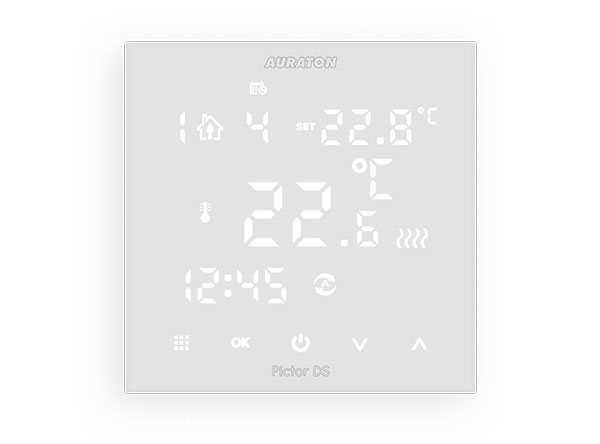
User manual ver. 20211130
This document collects information on the safety, installation and use of the AURATON Pictor DS device.
Weekly wired temperature controller (dual sensor)
AURATON Pictor DS is a weekly, wired temperature controller with an additional external temperature sensor, designed to work with a gas or electric heating device.
|
é
|
6 Independent Temperatures per Day: The AURATON Pictor DS allows you to set up to six independent temperatures per day, with one-minute accuracy. Users can select time intervals for different temperatures depending on their needs. |
 |
Calibration of temperature readings (offset) Allows you to correct the temperature with a tolerance of ±3 °C. |
| LED | LED display Thanks to the backlit display, we can monitor the operation of the device even in a dimly lit room. |
Description of AURATON Pictor DS
weekly, wired temperature controller
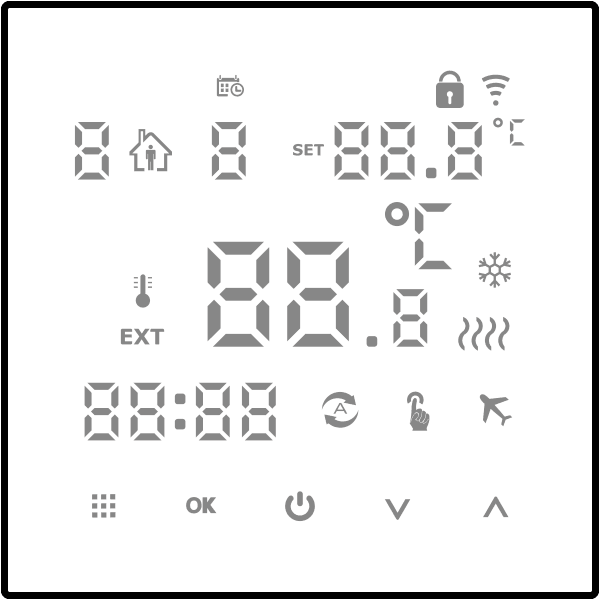
On the front of the controller housing there is an LED display and five touch-sensitive function buttons.
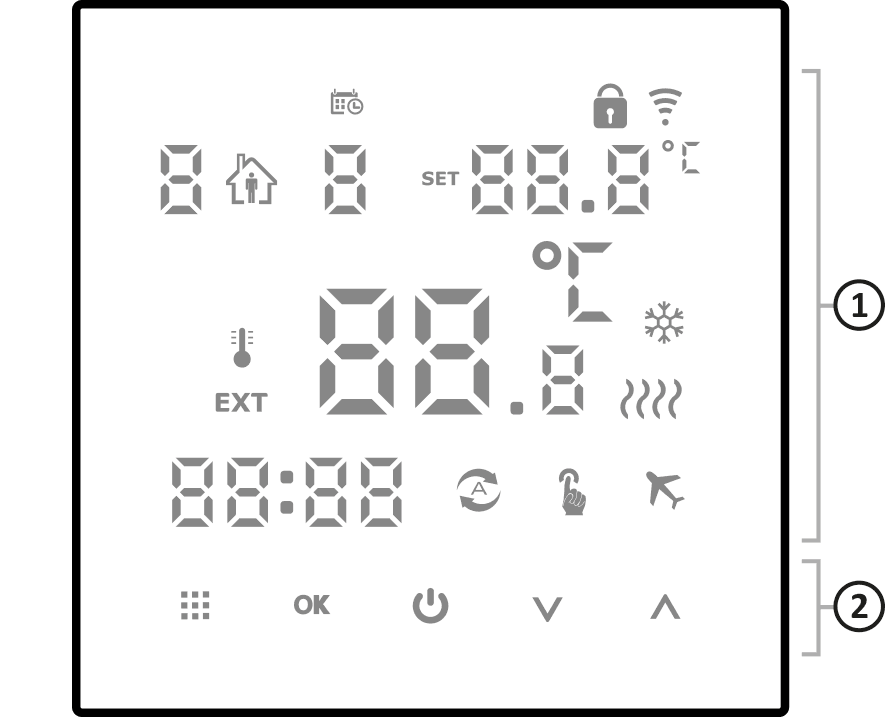
- display
- function buttons
Display
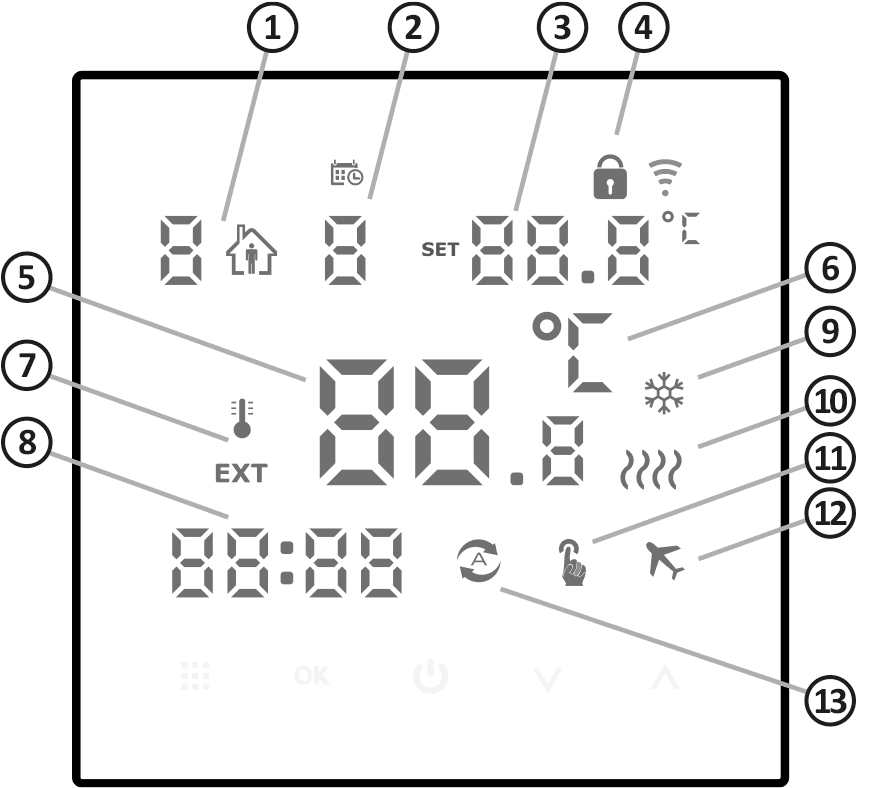
- Program number – Indicates the number of the program currently being run. (see chapters: "Factory programs" and "Weekly programming").
- Day of the week (1-7) – Indicates the day of the week. Each day is assigned a number. Program schedule (programming).
- Program Temperature – indicates the currently running temperature.
- Lock ( Î ) – indicator that the key lock function is enabled.
- Temperature – In normal operation mode, AURATON Pictor DS displays the temperature of the room in which the external sensor is installed, or the temperature of the external sensor.
- Temperature Unit – Indicates whether the temperature is displayed in degrees Celsius (°C).
- Displayed temperature source indicator:
é – internal sensor
EXT – external sensor. - Clock – time is displayed in 24-hour format.
- Cooling mode indicator ( Ë ) – indicates that the AURATON Pictor DS is operating in air conditioning mode.
- Controller on indicator ( ç ) – segment informing about the operating status of the AURATON Pictor DS. Visible when the controlled device is turned on.
- Manual control indicator (Ö ) – appears when you abandon programmed operation (see chapter: "Manual control mode").
- Vacation mode indicator ( Ç )
- Automatic operation indicator ( Ü )
Function buttons
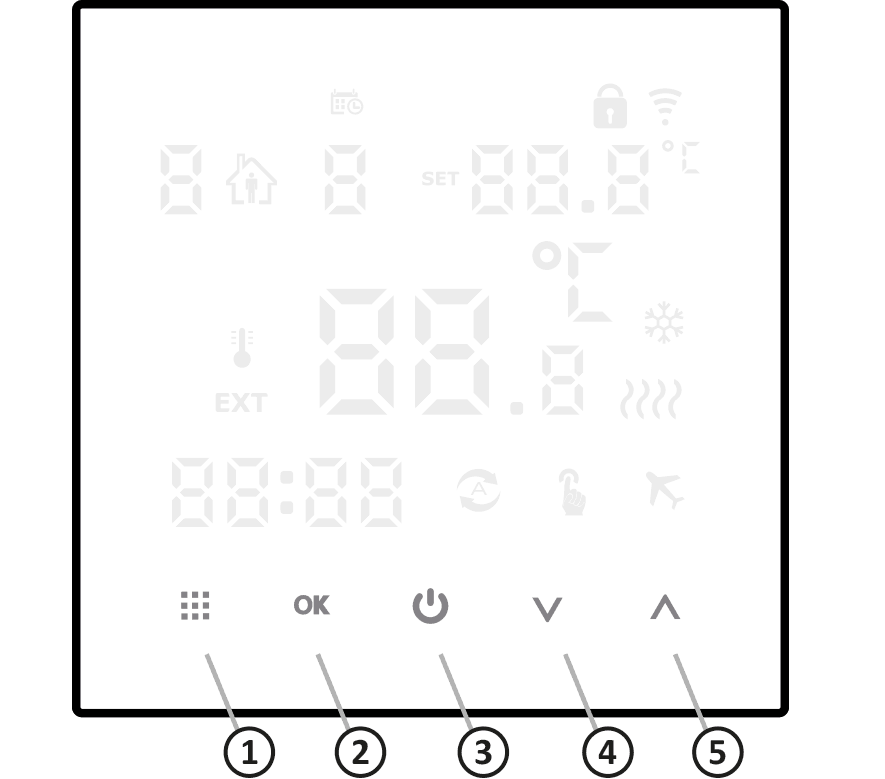
- menu (ë)
- a short press when the controller is turned on switches between manual and automatic operation
- holding for about 5 seconds when the controller is turned off will take you to advanced settings
- holding for about 5 seconds when the controller is turned on allows you to set programs
- Configuration button (É)
- used with the menu
- setting the clock by holding the button for about 5 seconds with the controller turned off
- holiday mode by holding the button for about 5 seconds with the controller turned on
- viewing the temperature of the external sensor by simultaneously holding the button for approx. 5 seconds together with the menu when the controller is turned on (if connected and configured – both sensors are active)
- regulator switch (and)
- turn on – hold for 2 seconds
- turn off – hold for 5 seconds
- decrease button ( Á ) – long press to quickly decrease temperature or time
- Increase button ( Â ) – long press to quickly increase temperature or time
In automatic mode, pressing the decrease button or increase button will switch to temporary manual mode until the next program change.
ATTENTION:
Pressing the decrease button and the increase button simultaneously activates the button lock (parental lock).
Choosing the right location
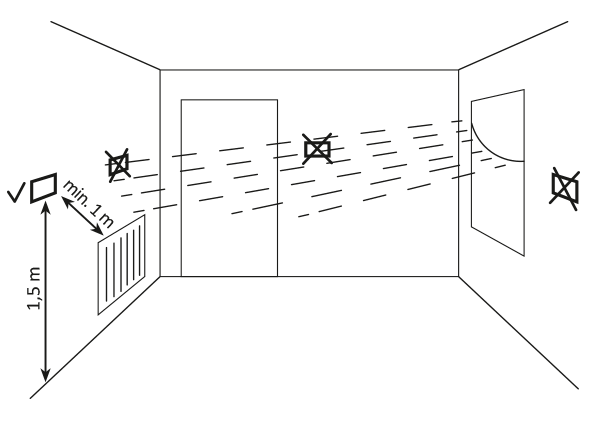
The proper operation of the AURATON Pictor DS is largely determined by its location. Siting it in a location lacking air circulation or exposed to direct sunlight may result in improper temperature control. The AURATON Pictor DS should be installed on an interior wall (partition wall), in an environment with free air circulation. Avoid proximity to heat-emitting devices (television, radiator, refrigerator) or locations exposed to direct sunlight.
Connecting the cables
The cable terminals are located on the rear panel of the AURATON Pictor DS.
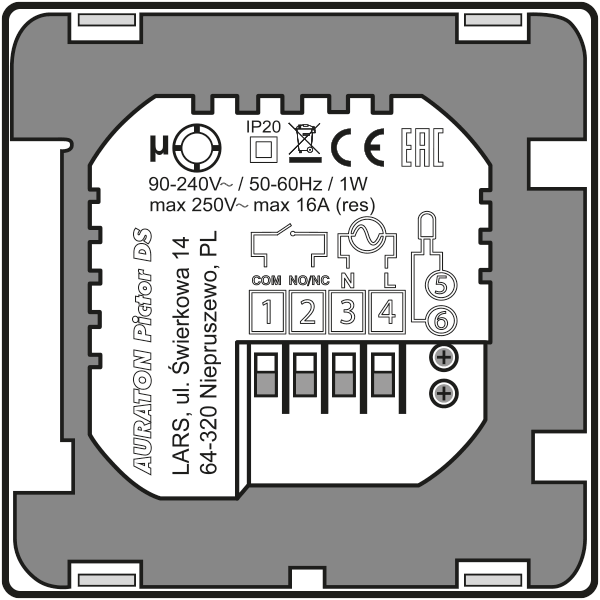
1-2 – control connector terminals (COM-NO/NC)
3-4 – 230 V AC mains power connector terminals (N,L)
5-6 – external temperature sensor terminals
AURATON Pictor DS mount
weekly, wired temperature controller
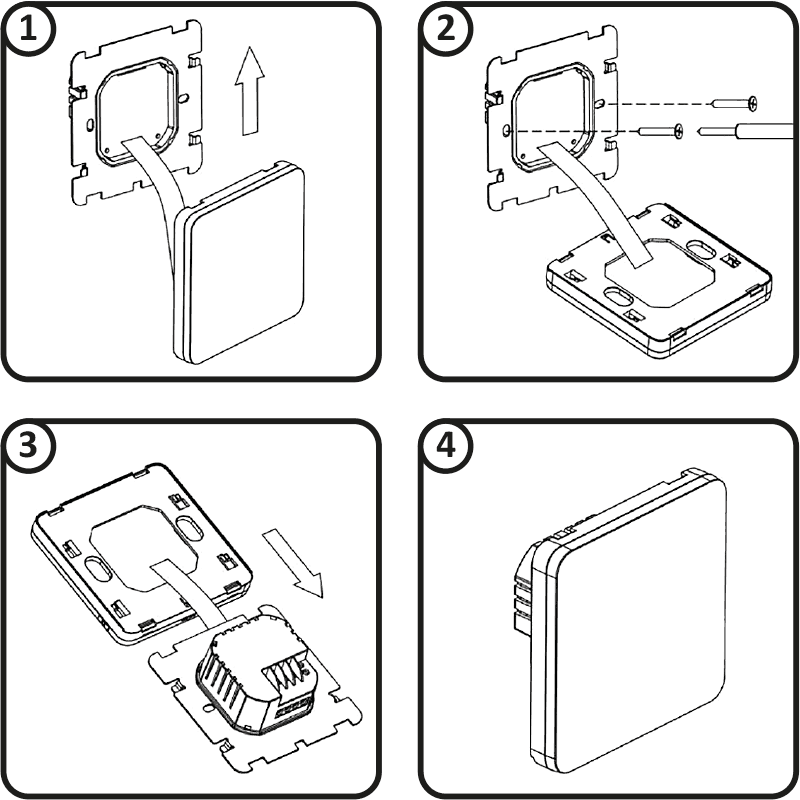
- Remove the cover as shown below.
- Screw the rear part of the AURATON Pictor DS housing to a standard Ø 60 mm electrical box using the screws included in the kit.
- Put the casing on.
First start-up
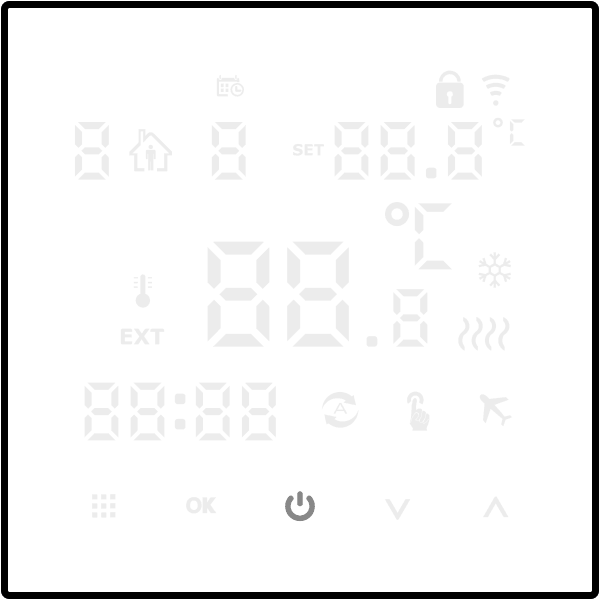
Once the power is connected correctly, all segments will appear on the LED display for one second.
Then the controller will wait for the first start-up or time setting (off mode)
Setting the clock and day of the week
To set the clock, the controller must be in off mode.
- É for 5 seconds . The minutes segment will flash on the display.
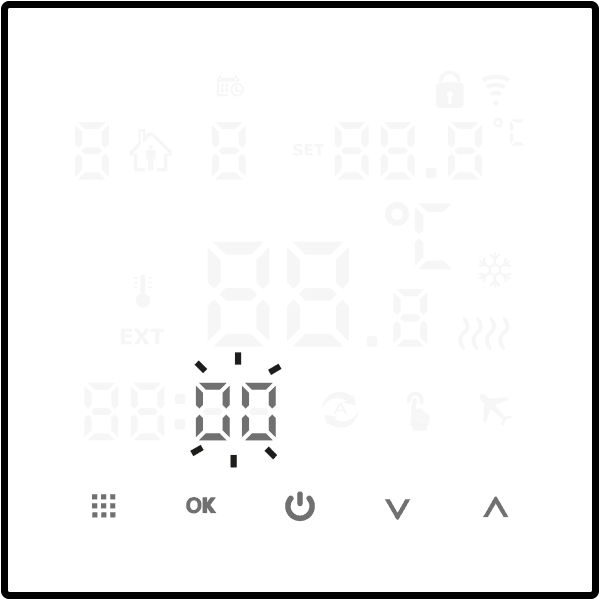
- the function buttons ( Á Â ) to set the desired minute and confirm with the button ( É ).
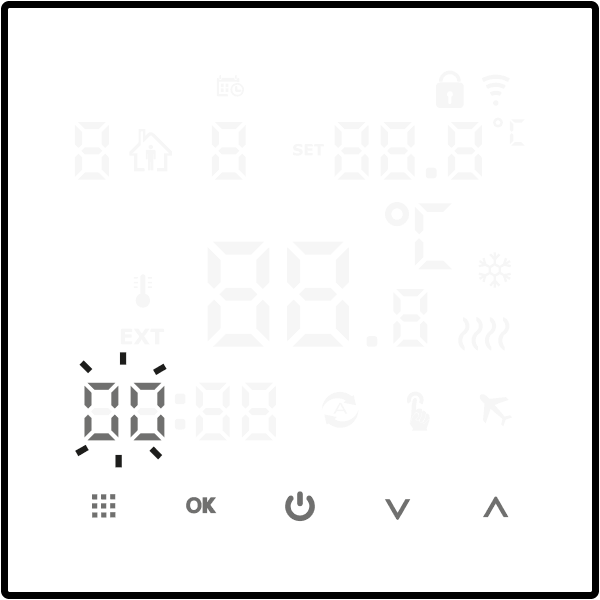
- the function buttons ( Á Â ) to set the correct value in the hour segment and confirm again with the button ( É )
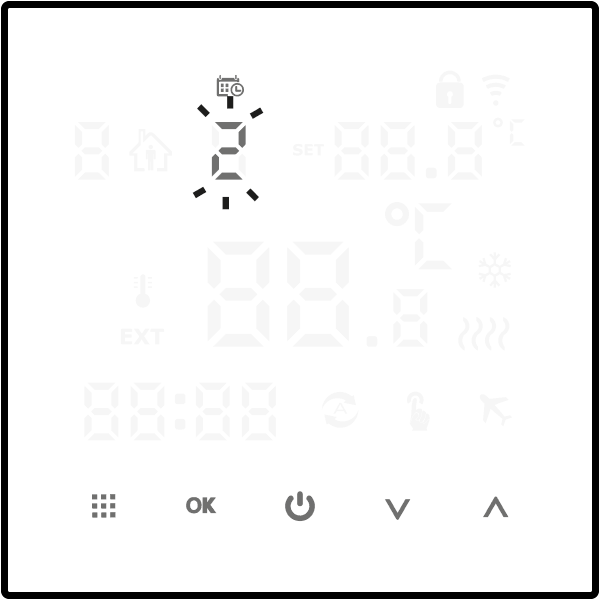
- The day of the week symbol will flash in the upper left corner of the display. Use the function buttons ( Á Â ) to set the desired day of the week and confirm your selection with the ( É ) button.
When programming any functions, not pressing any button for 10 seconds is equivalent to confirming the entered data.
The first press of any function button always displays full information, and only then does the button function start.
Programming
Before starting programming, set one of the three program operation schedules in the controller menu.
Setting the operating schedule of the controller programs: see the Advanced Settings .
The AURATON Pictor DS allows you to store up to six programs and work in three schedules. This allows for exceptionally precise planning of the building's temperature depending on the time of day.
Schedule 0 (5 + 2 days; factory setting) – allows you to set programs for Monday through Friday and Saturday and Sunday.
Schedule 1 (6 + 1 day) – allows you to set programs for Monday through Saturday and Sunday separately.
Schedule 2 (7 days) – sets six programs for the entire week.
Sample factory programs
| Ä 1 | incentive | from 6:00 | 20 °C |
| Ä 2 | away from home | from 8:00 | 15 °C |
| Ä 3 | returning home | from 11:30 | 15 °C |
| Ä 4 | away from home | from 1:30 p.m. | 15 °C |
| Ä 5 | returning home | from 5:00 p.m. | 22 °C |
| Ä 6 | night | from 10:00 p.m. | 15 °C |
To start programming you need to:
The controller must be turned on
ë button for approximately 5 seconds until the hour segment flashes on the display.
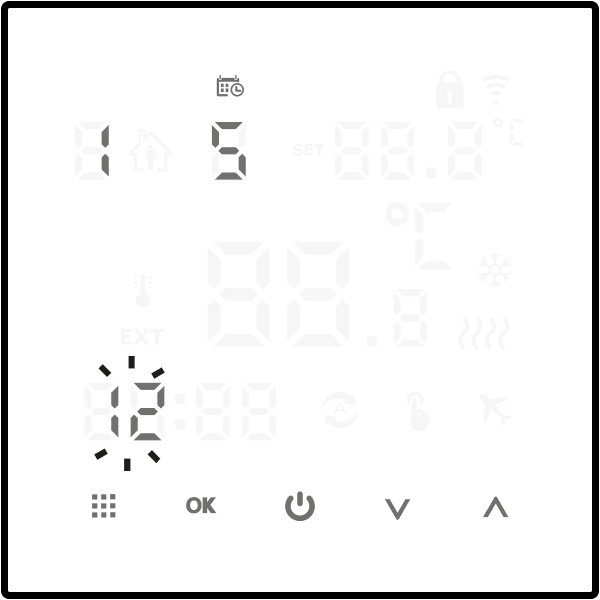
Use the ( Á Â ë ) button again
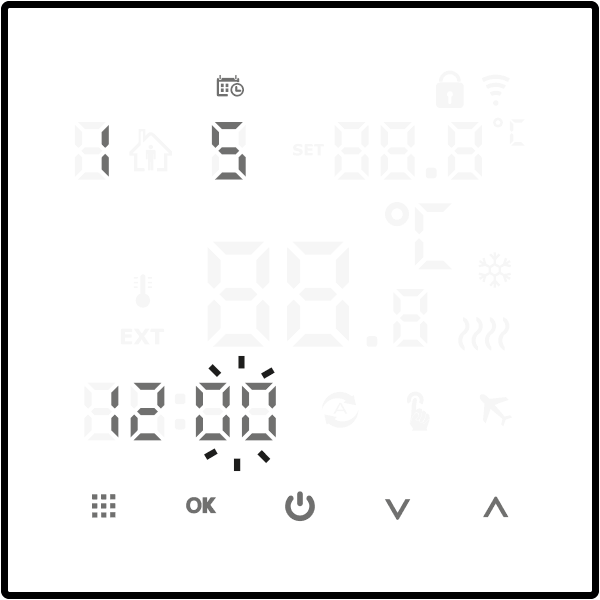
Use the ( Á Â ) buttons to select the minute of the program start and then move on to the temperature setting by pressing the ( ë ) button.

Use the ( Á Â ) buttons to select the program temperature and then move on to setting the next program by pressing the ( ë ) button.
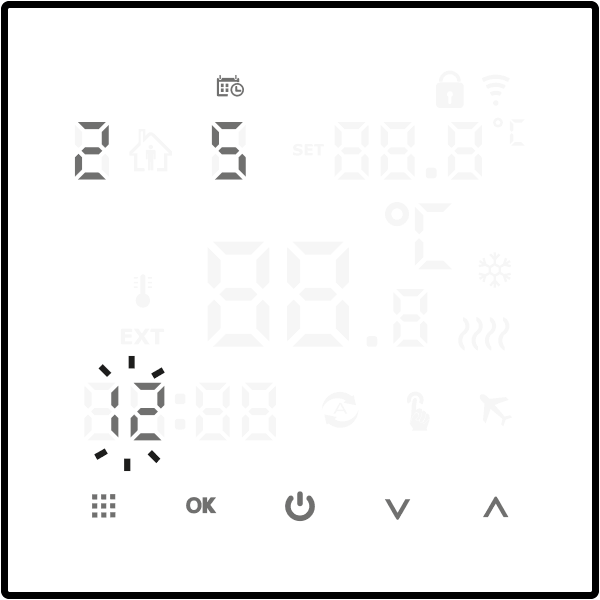
Set the next programs, up to 6, according to the principle above.
This is how we set the programs for Monday through Friday (5 days). To set the next 6 programs for Saturday and Sunday (2 days), proceed in the same way as for weekdays. The display will show the number 2, indicating Saturday and Sunday.
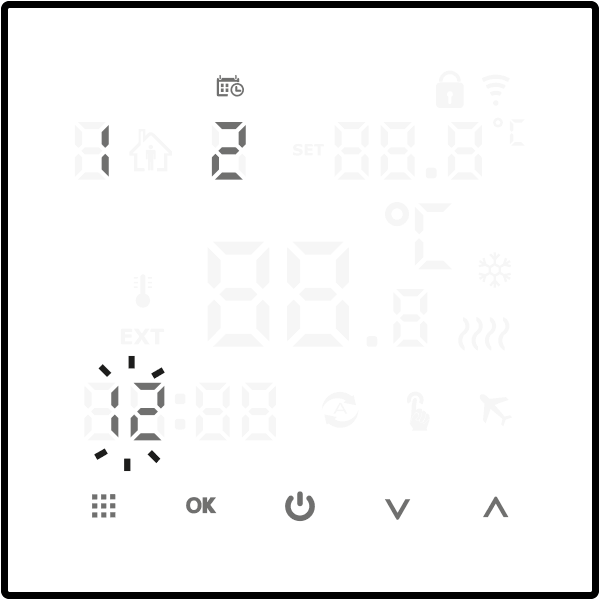
After completing the program settings, the controller will automatically save the entered settings and resume normal operation.
When setting the 2nd work schedule (2:7 days), you only need to set 6 programs that will be executed every day for the entire week.
Manual control
Ö
If for any reason you want to interrupt automatic operation at a given moment and change the maintained temperature, you can do it manually.
Use the ( ë ) button to select manual mode, which is indicated on the display by the ( Ö ) symbol. Then, ÁÂ to select the desired value, which will be automatically saved. To return to the program (automatic operation), use the ( ë Ü ) symbol will then be visible on the display
You can also activate a temporary manual mode that maintains the manual temperature until the next program change.
To activate temporary manual mode, press the ( Á or  ) button while in automatic mode, then use the same buttons to set the desired value.
To cancel this mode, press the ( ë ) button until the ( Ü ) symbol appears on the display.
Vacation mode
Ç
If you'd like to suspend programs for an extended period, you can use vacation mode. While this option is active, the AURATON Pictor DS only maintains the "vacation temperature."
Vacation mode can be used for a maximum of 30 days.
To activate the holiday mode (controller turned on):
- É button for approximately 5 seconds until the display shows flashing OFF .
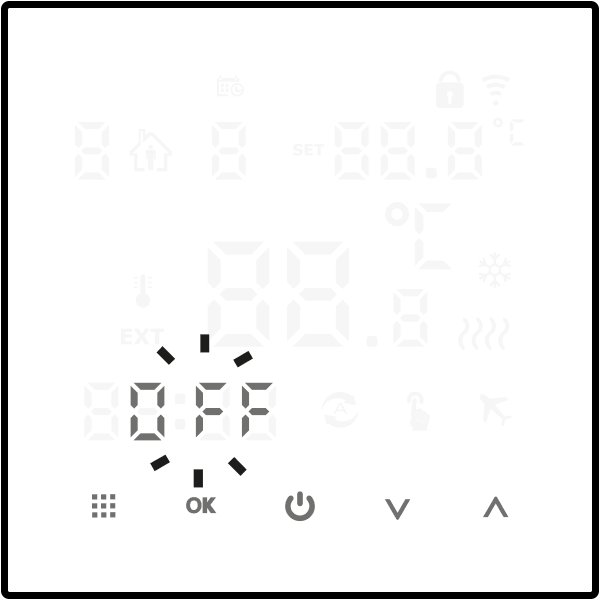
- Use the ( Á Â ) buttons to change the text to ON , then confirm with the ( É ) button.
- Select the appropriate number of days using the ( Á Â É ) button.
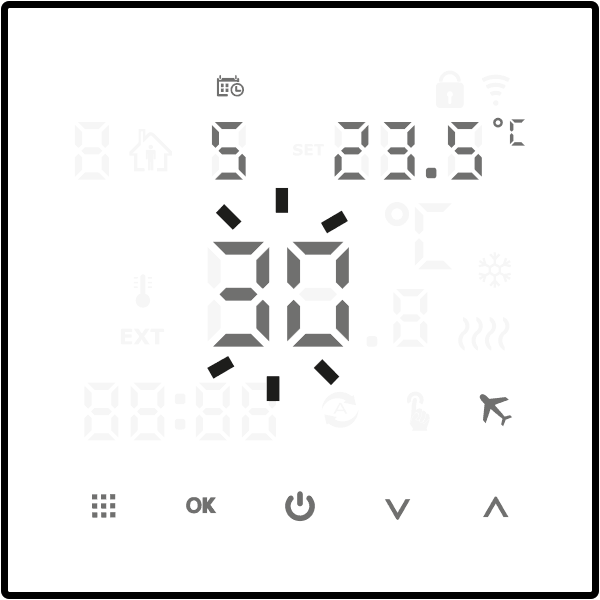
- Then use the ( Á Â ) buttons to set the desired temperature.
- Confirm everything with the ( É ) button.
Ç )
symbol will be displayed on the screen To end vacation mode more quickly, press the ( É ) button for approximately 5 seconds and use the ( Á Â ) buttons to change the text to OFF . Then confirm your selection with the ( É ) button.
When programming any functions, not pressing any button for 10 seconds is equivalent to confirming the entered data.
Advanced settings
When the AURATON Pictor DS controller is off, long-press the ( ë ) button for approximately 5 seconds to access the advanced settings. Select A1 to A16 ë ) button, and change them using the ( ÁÂ ) buttons.
Confirm your settings by pressing the ( â ) button, which saves them and allows the controller to resume normal operation, or wait up to 10 seconds for automatic saving. In this case, the controller will remain off.
Advanced settings table.
| Option | Description | Functions | Factory setting |
| A1 | Calibration of temperature readings. | from -3 °C to +3 °C with an accuracy of 0.2 °C | 0 |
| A2 | Hysteresis | ±0.2 °C or ±0.4 °C | ±0.2 °C |
| A3 | Parental lock |
0: partial lock, only the power button can be used 1: full lock, all buttons locked |
0 |
| A4 | In case of a power outage |
0: After power is restored, it remains in the pre-loss state. 1: When the power returns, the controller is turned off 2: When the power returns, the controller is turned on |
0 |
| A5 | Display brightness level |
0: 0% brightness 1: 50% brightness 2: 100% brightness |
2 |
| A6 | Program work schedule |
0: 5+2 (Monday to Friday + Saturday and Sunday) 1: 6+1 (Monday to Saturday + Sunday) 2: 7 (all week) |
0 |
| A7 | Lower limit of temperature setting | 1-10 °C | 5 °C |
| A8 | Upper limit of temperature setting | 20-70 °C | 35 °C |
| A9 | Antifreeze temperature | Range: 1-10 °C. Setting a value higher than 10 °C will cause the ( ä ) symbol to be displayed and the frost protection will be disabled. When the controller is off and the built-in sensor detects that the temperature is lower than the Frost Protection Temperature value, the heating will be turned on. | 5 °C |
| A10 | Overheating protection | Range: 20-70 °C. Setting a value lower than 20 °C will cause the symbol ( ä ) to be displayed and the overheating protection to be disabled. When setting A12 to N3 is selected and the external sensor detects a temperature higher than the Overheating Protection value, the heating is switched off. | 45 °C |
| A11 | Overheating protection hysteresis | 1-9 °C | 2 °C |
| A12 | Temperature sensor selection |
N1: Controller operation only with built-in sensor. N2: Controller operation only with an external sensor. N3: Controller operation with two sensors. |
N1 |
| A13 | Minimum time between relay switching |
0: No delay 90: 90 second delay |
90 |
| A14 | Operating mode |
0: Heating 1: Cooling |
0 |
| A15 | Relay operation |
0: NO 1: NC |
0 |
| A16 | Resetting the controller to factory settings | Ü ) symbol is displayed, É ) |
Please select the correct operation mode for the built-in and external sensors. If the wrong selection or sensor damage (failure) is made, the screen will display "E1" or "E2". The AURATON Pictor DS controller will turn off the heating until the fault is removed.
A1 Calibration of temperature readings
The calibration function allows you to refine temperature readings with a tolerance of ±3°C. For example, the AURATON Pictor DS indicates that the room is 23°C, while a standard room thermometer hanging next to it reads 24°C. By changing the calibration by +1 degree, the AURATON Pictor DS will display the same temperature as the room thermometer.
A2 Hysteresis
Hysteresis is designed to prevent the actuator from switching on too frequently due to minor temperature fluctuations.
For example, for a hysteresis of ±0.2 °C, with the temperature set to 20 °C, switching on will occur at 19.8 °C and switching off at 20.2 °C. For a hysteresis of ±0.4 °C , with the temperature set to 20 °C, switching on will occur at 19.6 °C and switching off at 20.4 °C.
A3 Parental lock
Allows you to restrict access to unauthorized persons.
A4 In case of power failure
This function allows you to determine the behavior of the AURATON Pictor DS controller in the event of a power failure and its return.
A5 Display brightness level
Allows you to specify the brightness at which the display should operate.
A6 Program work schedule
This schedule allows you to define how to program the Auraton Pictor DS controller.
Three programming schedules are available:
Schedule "0" (5+2) allows you to program the controller from Monday to Friday (6 programs) and Saturday and Sunday (6 programs).
Schedule "1" (6+1) allows you to program the controller from Monday to Saturday (6 programs) and Sunday (6 programs).
Schedule "2" (7) allows you to set six identical programs for the entire week.
A7 Lower limit of the temperature setting
This function is used to set the lower limit of the temperature setpoint range. The value is adjustable from 1 to 10°C.
A8 Upper limit of temperature setting
This function is used to set the upper limit of the temperature setpoint range. The value is adjustable from 20 to 70 °C.
A9 Anti-freeze temperature
This function allows you to set the frost protection value, which protects the water in the heating system from freezing.
Range: 1-10 °C. Setting a value higher than 10 °C will cause the ( ä ) symbol to be displayed and the frost protection to be disabled. When the controller is off and the built-in sensor detects that the temperature is lower than the Frost Protection Temperature value, the heating will be turned on.
A10 Overheating protection
This function allows you to set the overheating protection value.
Range: 20-70 °C. Setting a value lower than 20 °C will cause the symbol ( ä ) to be displayed and the overheating protection to be disabled. When N3 is selected in setting A12, if the external sensor detects that the temperature is higher than the Overheating Protection value, the heating is turned off.
A11 Overheating protection hysteresis
This function allows you to set the temperature drop before the heating is turned back on after an emergency shutdown. The setting range is 1 to 9°C.
A12 Temperature sensor selection
The AURATON Pictor DS controller offers three temperature measurement methods.
With the N1 setting, the controller works only with the internal (built-in) sensor.
With the N2 setting, the AURATON Pictor DS controller will only work with the external (wired) sensor. Setting it to N3 will enable both sensors to operate simultaneously. In this case, the heating will be turned off when either sensor reaches the desired temperature.
A13 Minimum time between relay switching
The delay prevents the actuator from being switched on too frequently, e.g. due to a momentary draft (e.g. caused by opening a window).
A14 Operating mode
The AURATON Pictor DS allows you to control a heating or cooling device.
Setting "0" is for heating devices, while setting "1" is for cooling devices. With setting "1," the display will show the symbol ( Ë ).
A15 Relay Operation
The AURATON Pictor DS controller allows you to activate a device by shorting or opening the relay circuit. In most cases, the former option is used. If you need the relay to operate in reverse, this can be changed in the advanced settings. The factory setting is to short the relay contacts during actuator operation.
A16 Resetting the controller to factory settings (except for clock operation)
Using this function will erase all user settings and return to factory settings.
Connection diagram
Connections to a gas furnace – potential-free control
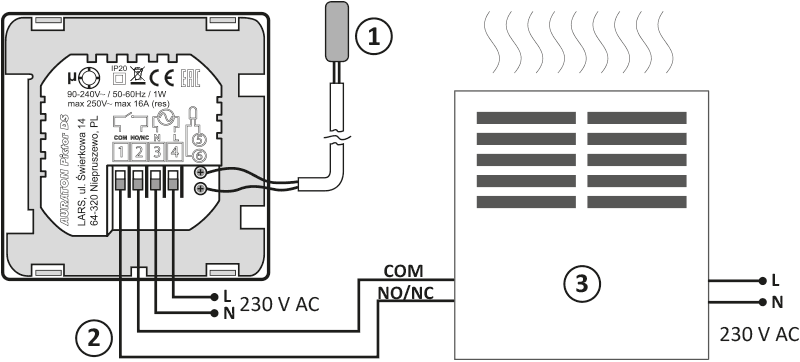
- External temperature sensor
- Control
- A heating device, e.g. a gas furnace
Connections to an electrical device – voltage control
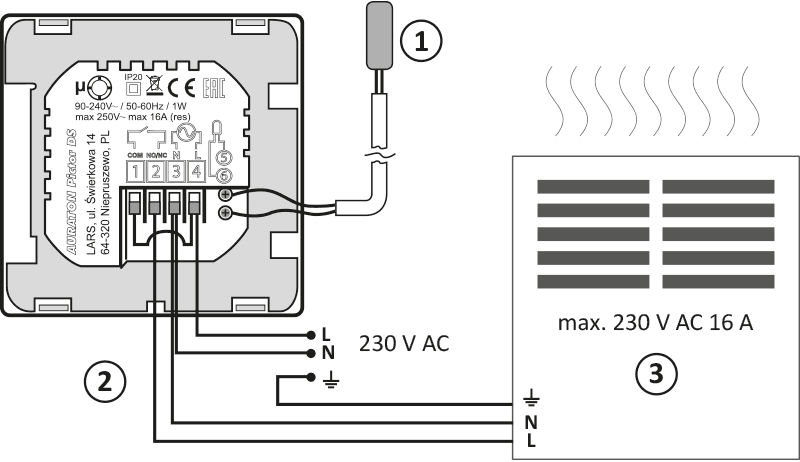
- External temperature sensor
- Control
- Electric heating or air conditioning device (max. 230 V AC 16 A)
Q
When installing the AURATON Pictor DS, the power supply should be turned off. It is recommended that the regulator be installed by a specialist.
The building's permanent installation must include a circuit breaker and overcurrent protection.
Cleaning and maintenance
- Clean the exterior of the device with a dry cloth. Do not use solvents (such as benzene, thinner, or alcohol).
- Do not touch the device with wet hands. This may result in electric shock or serious damage to the device.
- Do not expose the device to excessive smoke or dust.
- Do not touch the screen with a sharp object.
- Avoid contact of the device with liquids or moisture.
Technical data
| Power supply: | 90-240V AC/50-60Hz/1W |
| Operating temperature range: | 0-90 °C |
| Operating status indication: | LED display |
| Number of temperature levels: | 6 + holiday, manual |
| Minimum/maximum temperature | 1-10 °C/20-70 °C |
| Temperature control range: | 1-70 °C (measurement error +/- 1 °C) |
| Hysteresis: | ±0.2 °C/±0.4 °C |
| Relay load capacity: | Max 250V AC, max 16A |
| Duty cycle: | Weekly, programmable |
| Number of programs: | 6 a day |
| Degree of protection: | IP20 |
| Dimensions [mm]: | 86 x 86 x 43 |
Disposal of the device
O
Devices are marked with a crossed-out waste bin symbol. In accordance with European Directive 2012/19/EU and the Waste Electrical and Electronic Equipment Act, this marking indicates that this equipment, after its useful life, must not be disposed of with other household waste.
Users are obligated to dispose of it at a collection point for used electrical and electronic equipment.
Manufacturer's address and contact details:
LARS, ul. Świerkowa 14
64-320 Niepruszewo
www.auraton.pl