

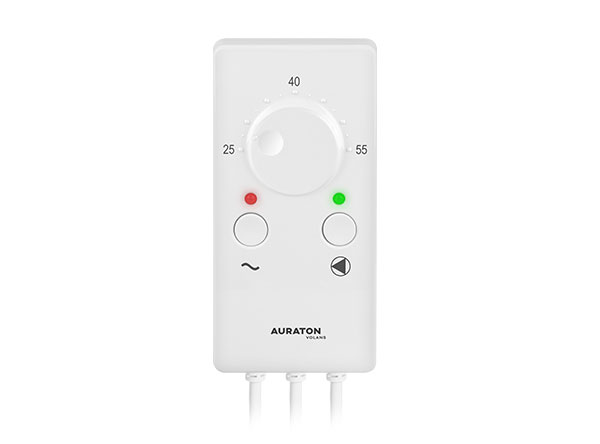
User manual ver. 20220719
This document collects information on the safety, installation and use of the AURATON Volans device.
Device description
Auraton Volans is designed to control the central heating (CH) pump
Application
AURATON Volans can be used to automatically turn the circulation pump on and off depending on the temperature.
The controller-pump assembly forces water circulation in central heating systems with a heating device. The sensor measures the temperature of the water in the central heating system's supply.
In a central heating system with a solid fuel boiler, the controller will turn off the circulation pump once the boiler flame has extinguished. Pumping water with the flame extinguished is not recommended – the air draft into the chimney causes the water in the boiler to cool faster than in the radiators. The optimal temperature can be set on the controller's scale (usually 40°C).
In a central heating installation with a gas boiler, the temperature set on the AURATON Volans must be lower than the temperature set on the central heating boiler. Setting the AURATON Volans knob to a temperature above the dew point prevents the boiler from sweating while heating the water in the central heating system.
AntiStop System
The AntiStop system installed in the AURATON Volans controller prevents the impeller from seizing when the pump is not in use.
The built-in processor automatically turns on the pump for 30 seconds every 14 days after the heating season ends. To keep the system running after the season, AURATON Volans should be left on.
Installation
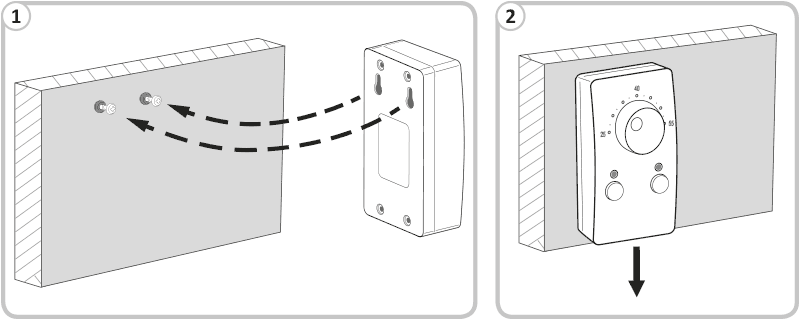
AURATON Volans mount
- Mount AURATON Volans on a wall or other support using two screws (wall plugs included),
- Attach the cables from AURATON Volans to the wall.
Sensor mounting
- Install the sensor on the exposed outlet pipe from the heating device (as close to the heating device as possible).
- Press the sensor against the pipe with a clamp.
- It is advisable to wrap the outlet pipe from the boiler to the sensor with insulating material.
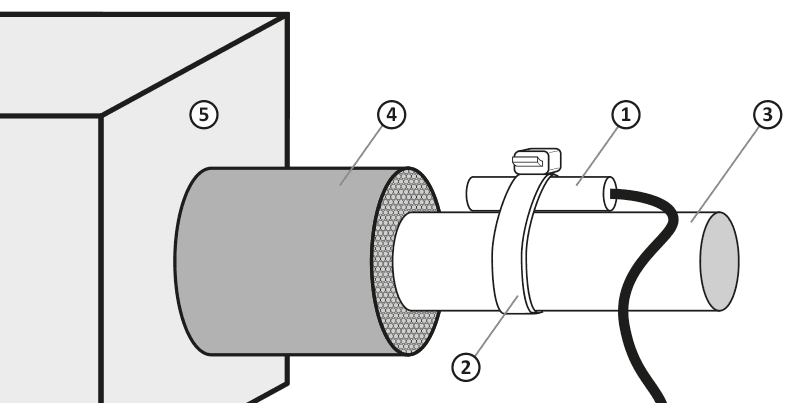
- temperature sensor
- cable tie
- pipe
- pipe insulation
- central heating furnace
If heating devices operate on a common central heating system, the sensor should be mounted at the point where both outputs connect and insulated.
Connecting the power cable to the pump:
- Connect the yellow or yellow-green wire to the terminal ( $
- Connect the blue wire (neutral wire) to the ( N
- Connect the brown wire (phase wire) to the ( L
Connecting the power cable to the pump:
- Check that the cable is connected correctly and screw the terminal box cover to the pump motor.
Connecting AURATON Volans:
After securing the wires against accidental breakage, connect the power cord to a 230 V AC power outlet with a grounding pin. The ambient temperature where the AURATON Volans is installed should not exceed 40 °C.
Description of AURATON Volans
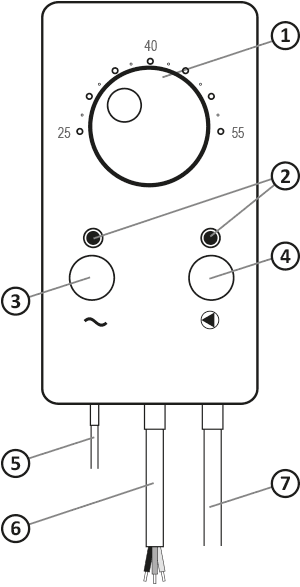
- temperature setting knob
- operation lights
- function button / power switch
- function button / operating mode
- temperature sensor
- pump control output
- power cord
First start-up
Turning on AURATON Volans
On the left side, below the temperature setting knob, is the power button ( ® ). Holding it for 2 seconds turns the AURATON Hydrus on or off. When the AURATON Volans is off, the LED lights red, and when the AURATON Volans is on, the LED lights green.
Automatic operation
If the pump operation light is off, AURATON Volans turns the pump on and off depending on the temperature set on the AURATON Volans knob.
The pump is turned on (the pump indicator light flashes green) when the temperature at the sensor location is higher than the set value, and is turned off when the temperature drops below the value set on AURATON Volans.
Continuous operation
- Press the button marked ( ® ) and then the (% ) button (the power and pump indicator lights are on continuously).
- The pump operates continuously, regardless of the temperature set on AURATON Volans and the actual temperature at the sensor location.
AntiStop function
The AURATON Volans is equipped with an AntiStop function that prevents the pump impeller from seizing when not in use. If the pump is not used for an extended period, the built-in processor will automatically start the pump for 30 seconds every 14 days.
To ensure the system continues to function after a long period of inactivity, AURATON Volans should be left turned on.
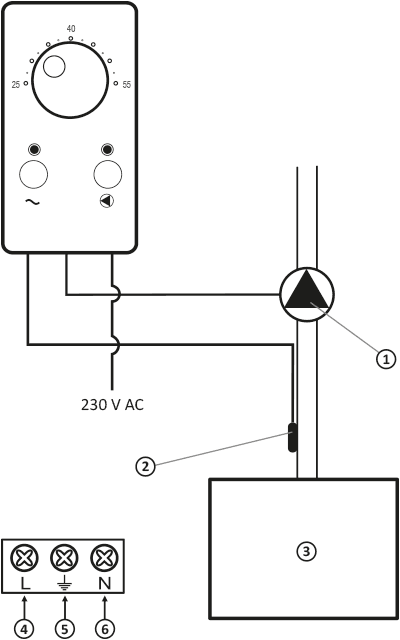
- pump
- temperature sensor
- heating device
- brown wire
- yellow-green wire
- blue wire
Cleaning and maintenance
- Clean the exterior of the device with a dry cloth. Do not use solvents (such as benzene, thinner, or alcohol).
- Do not touch the device with wet hands. This may result in electric shock or serious damage to the device.
- Do not expose the device to excessive smoke or dust.
- Do not touch the screen with a sharp object.
- Avoid contact of the device with liquids or moisture.
Technical data
| Power supply: | 230V AC, 50Hz, 1.5W |
| Operating temperature range: | 0 – 40 °C |
| Operating status indication: | LED diodes |
| Temperature control range: | 25 – 55 °C |
| Temperature measurement range: | 2 – 99 °C |
| Hysteresis: | 5 °C |
| Relay load capacity: | Max. 250 V AC, max. 5 A |
| Degree of protection: | IP20 |
| Dimensions [mm]: | 69.5 x 139.5 x 39 |
Disposal of the device
O
Devices are marked with a crossed-out waste bin symbol. In accordance with European Directive 2012/19/EU and the Waste Electrical and Electronic Equipment Act, this marking indicates that this equipment, after its useful life, must not be disposed of with other household waste.
Users are obligated to dispose of it at a collection point for used electrical and electronic equipment.
Manufacturer's address and contact details:
LARS, ul. Świerkowa 14
64-320 Niepruszewo
www.auraton.pl