

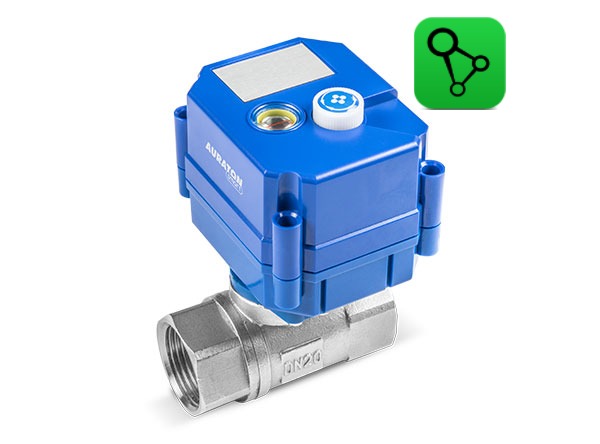
User manual ver. 20250612
This document collects information on the safety, installation and use of the AURATON Flood Sensor Valve device.

The valve has two openings and a shut-off ball to control water flow. Never insert fingers or other body parts into the openings, as this may result in permanent injury, including severing body parts by the valve!
Basic information
The AURATON Flood Sensor Valve is designed to provide an emergency shutoff when flooding is detected in the monitored room. The device can shut off the water circulation in the system when the AURATON Flood Sensor detects flooding. For proper operation, an AURATON Flood Sensor Valve and at least one AURATON Flood Sensor (maximum 10 sensors) are required.
The system will minimize damage resulting from water damage only if*:
- the Flood Sensor Valve was correctly installed in the water system by the installer
- the FSV valve has been correctly paired with at least one Flood Sensor
- radio communication between FS and FSV devices is correct and stable, and has been previously checked (devices should not operate at the limits of their range)
- The Flood Sensor is placed close to a point with access to water, e.g. a washing machine, dishwasher, sink, and has a real possibility of detecting a leak
- The FSV valve remains permanently powered via the included power supply or the battery is regularly recharged to maintain continuous operation of the device.
- the valve only minimizes the risk within the scope of the installation connected to it and cannot prevent damage resulting from the action of water outside the system to which it is connected, e.g. damage resulting from leaky roofs, windows or the operation of external installations (flooded by a neighboring premises)
*The manufacturer is not responsible for losses and damages resulting from flooding and other unforeseen events.
Device description

Fig. 1.
1 – Connector (1/2″, 3/4″, 1″)
2 – Charging indicator light
3 – Knob

Fig. 2.
1 – Power socket
2 – Magnet/Flood Sensor application point for pairing/resetting ( @ )
3 – Cap
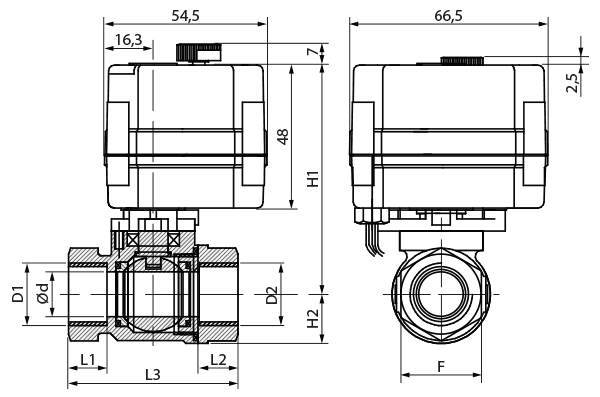
Fig. 3. Dimensions
All dimensions are given in mm.
| DN15 | DN20 | DN25 | |
| D1/D2 | G 1/2″ | G 3/4″ | G 1″ |
| d | 15 | 20 | 20 |
| L1/L2 | 13 | 16 | 18 |
| L3 | 57 | 70 | 76 |
| F | 27 | 32 | 38 |
| H2 | 16,5 | 21,5 | 21,5 |
| H1 | 77 | 81 | 81 |
| Weight (kg) | 0,37 | 0,52 | 0,52 |
Installation
Fig. 4. Assembly/disassembly
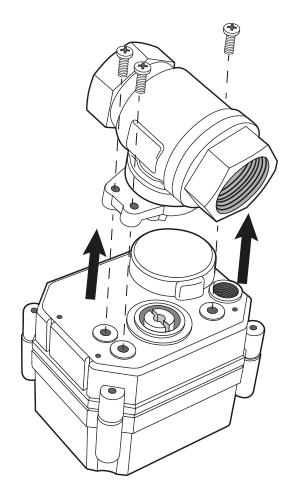
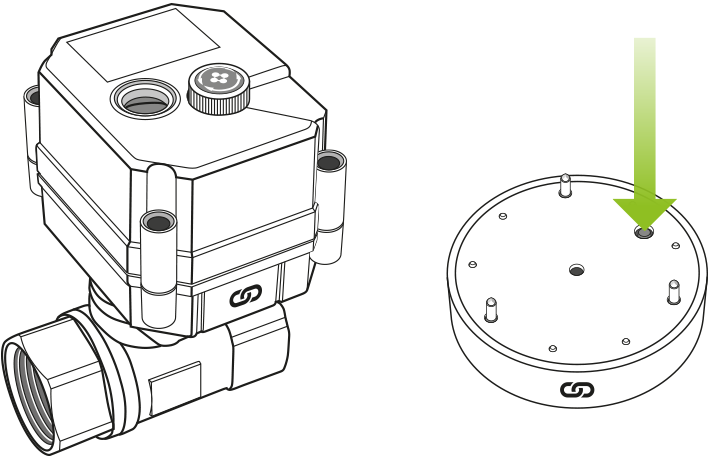
The valve should be installed in a location that will isolate a specific area or the entire system (depending on the user's needs) if flooding is detected. The valve should be installed on the water pipe so that the magnetic sensor (Fig. 2, point 2), the power/charging socket (Fig. 2, point 1), and the manual opening knob (Fig. 1, point 3) are accessible. If problems occur during installation, the electronics housing can be separated from the valve housing as shown in Fig. 4.
The distance between the AURATON Flood Sensor and the AURATON Flood Sensor Valve should be no less than 1.5 meters to avoid communication problems. If there is a lack of radio communication range, try rotating the valve on the pipe 90 degrees to better align the valve and sensor antennas, or reduce the distance between the devices.
Power supply
The valve has its own power source (a built-in battery), allowing for six months of monitoring a given room without external power. The internal battery can be charged using the included charger and power cord, or left permanently connected to the mains (the indicator light glows red while charging and turns off when fully charged). It is also possible to charge the battery using a power bank.
The water valve is factory-set to "sleep" mode for shipping.
Before first use, it must be "wakened." The "wake-up" procedure is performed by placing a magnet on the pairing/reset point ( @ ) until a single short beep is heard (this may take several seconds).
After "waking up," the valve is ready for further configuration (pairing devices).
In sleep mode, the valve assist function does not function when attempting to manually open or close the valve. Do not manually open or close the valve abruptly.
Before using the AURATON Flood Sensor Valve for the first time, it is recommended to connect it to a power source for 24 hours to fully charge the internal battery and to manually open or close the valve.
Device pairing
To activate pairing on the AURATON Flood Sensor Valve, place the FS flood sensor (or, if not available, a regular magnet) and the FSV valve on the side with the pairing symbol (@).
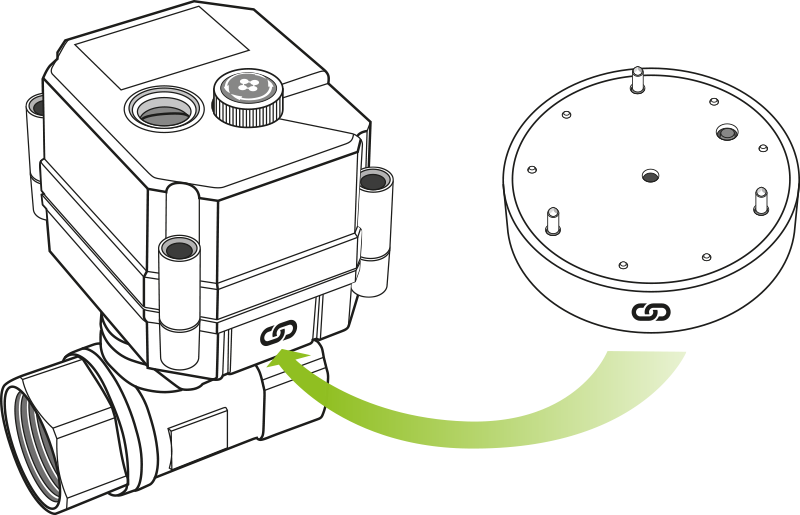
A moment after application, the valve will emit a short sound signal (BEEP), keep the sensor applied until another longer sound signal (BEEP) is heard.
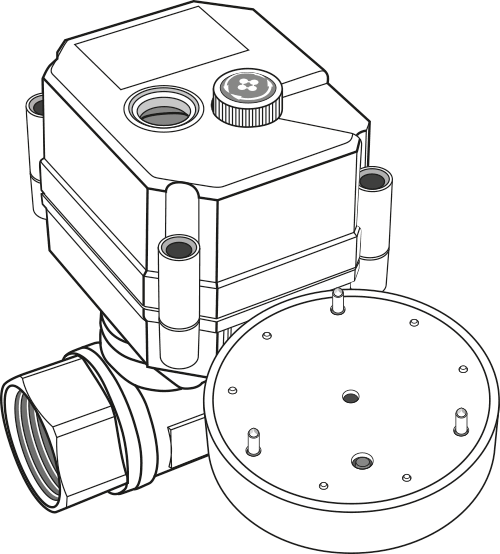
After a long beep, move the two devices apart. The device should be in pairing mode.
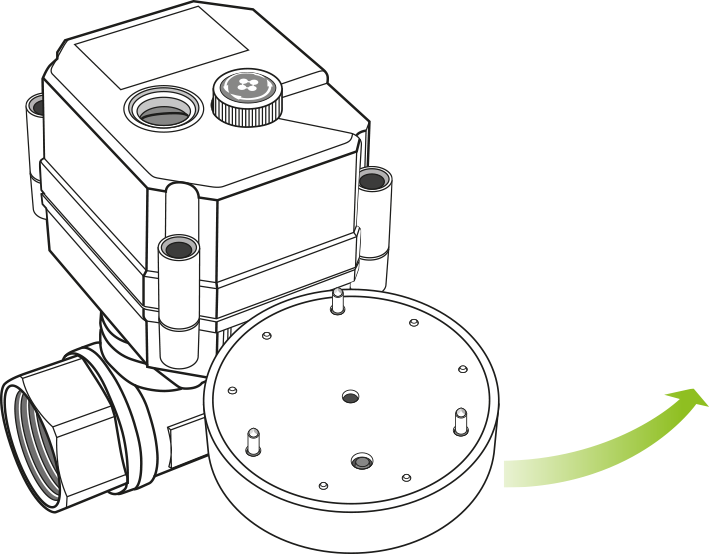
Long beeps (BEEP) indicate successful completion of the function, while short beeps (BEEP) indicate an error.
After completing the appropriate function, the device returns to its previous state.
Enabling pairing – AURATON Flood Sensor
To enable pairing on the AURATON Flood Sensor, press and hold the button. A short beep will sound after pressing . Hold the button until you hear another longer beep , then release the button. Pairing is enabled by a flashing red LED.
Enabling pairing – AURATON Box gateway
Pairing the AURATON Flood Sensor Valve with the AURATON Box gateway can be done in two ways:
- On the AURATON Box gateway, briefly press the right "Auraton" pairing button (
 ) – the LED under the button will start flashing. Then, put the valve into pairing mode.
or
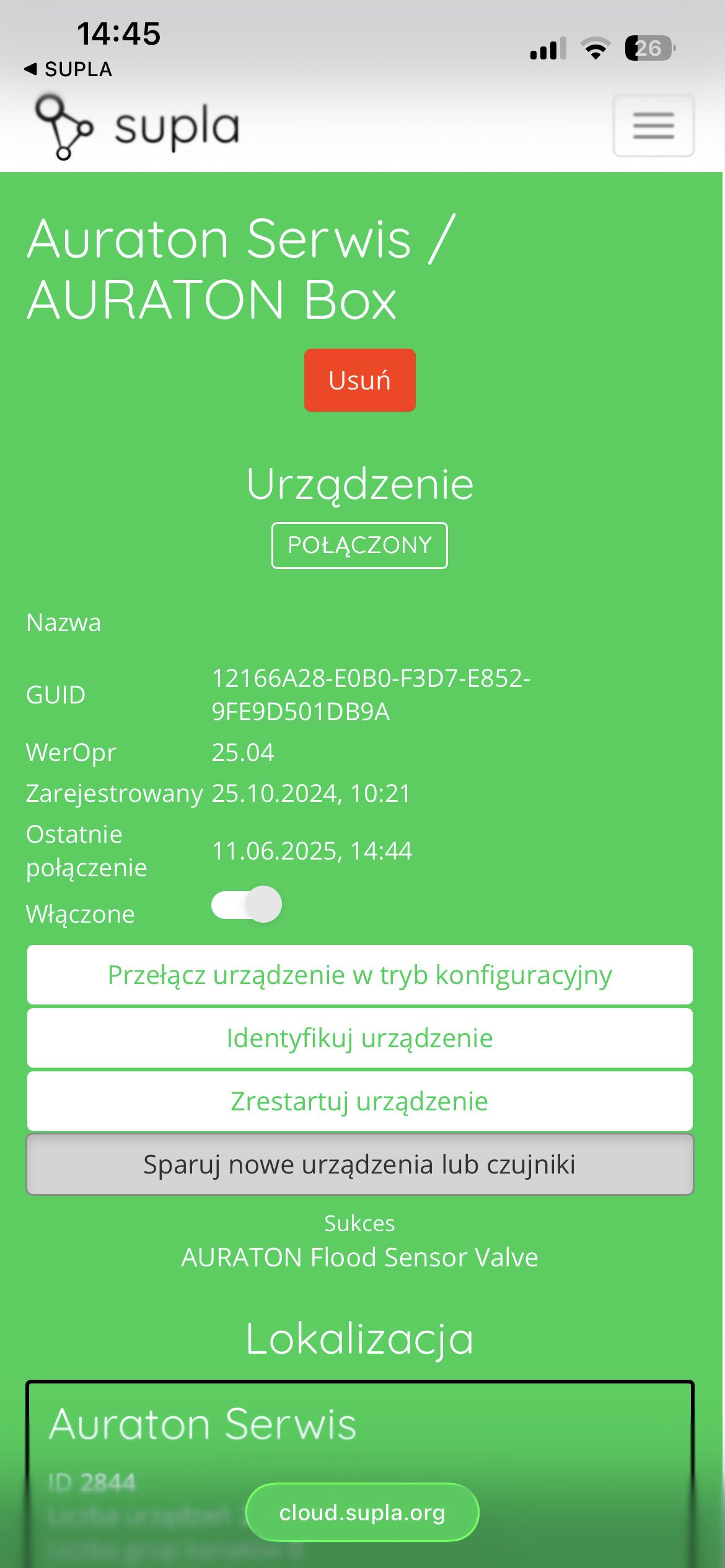
- In Supla Cloud, enter the AURATON Box gateway channel and press the "Pair new devices or sensors" button – the LED under the right "Auraton" pairing button will start flashing. Then, put the valve into pairing mode.
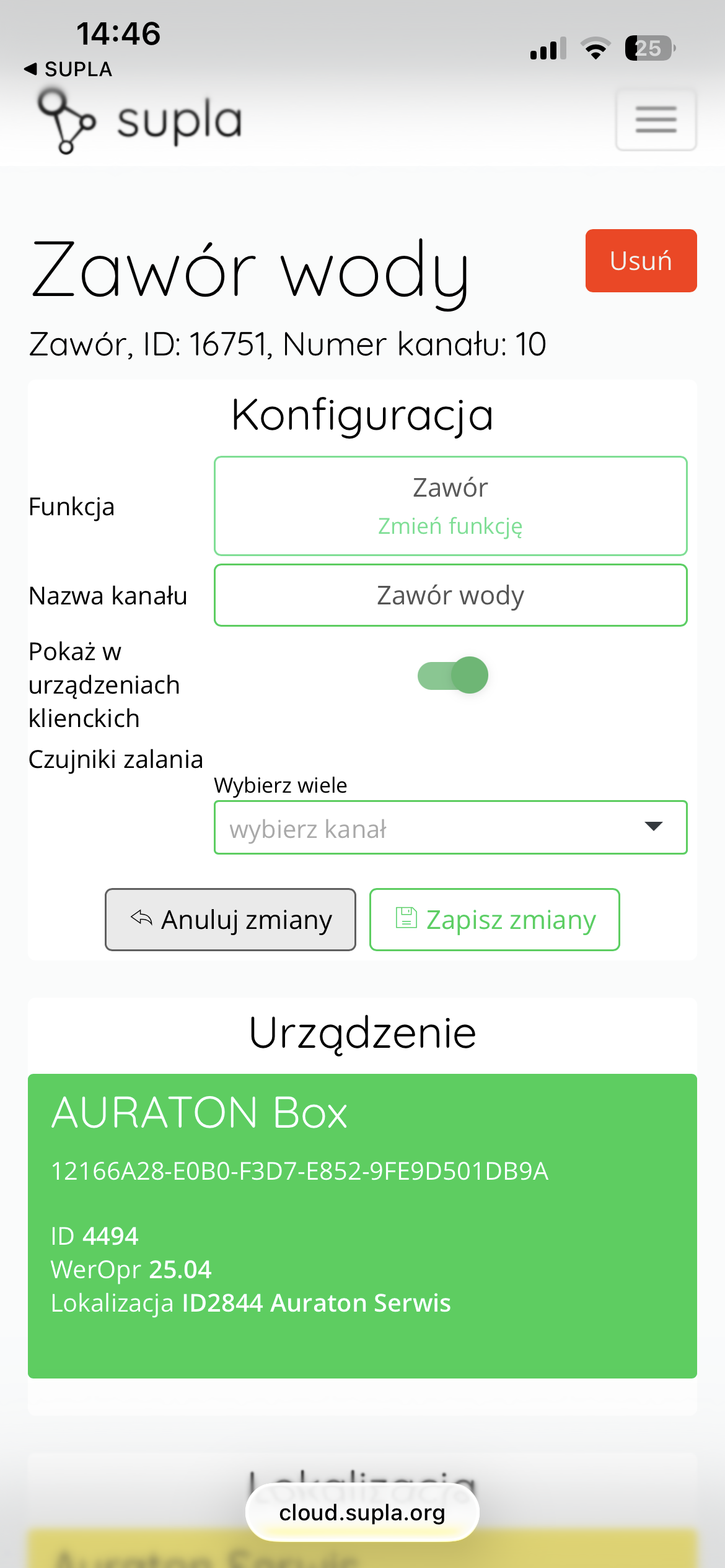
After pairing the AURATON Flood Sensor Valve with the Auraton Box, it is recommended to give it a name in its channel in Supla Cloud. To do this, edit the "Channel Name" and click " Save Changes " to confirm the changes.
Factory reset
To restore the factory settings on the AURATON Flood Sensor Valve, place the FS flood sensor (or, if unavailable, use a standard magnet) and the FSV valve together on the pairing symbol ( @ ). A moment after contact, the valve will emit a short beep . Keep the sensor pressed until you hear two longer beeps , and then move the two devices apart. At this point, a continuous beep will sound for 10 seconds. To confirm the operation, manually change the valve status by turning the control knob on the valve within 10 seconds. This will turn off the beep and initiate the factory settings restore.
Long beeps (BEEP) indicate successful completion of the function, while short beeps (BEEP) indicate an error.
After completing the appropriate function, the device returns to its previous state.
Device functions
Manual opening and closing of the valve
To open or close the valve:
- Lift the knob up.
- Turn the knob to the right or left until automatic operation occurs.
- Lower the knob again after opening or closing the valve.
Do not open or close the valve abruptly by hand.
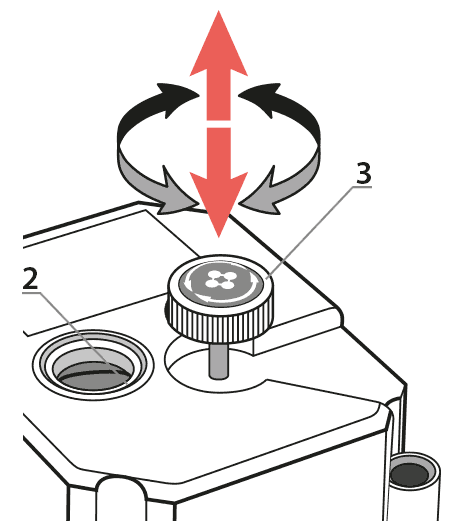 Fig. 5.:
2 – indicator light
3 – knob
Remote device operation
The valve is compatible with the AURATON Box internet gateway (SUPLA app available for Android and iOS), which allows remote control of the entire system. You can then remotely close or open the valve, monitor any flooding alarms, check the battery charge level, and more.
Anti-stop function
The AURATON Flood Sensor Valve is equipped with a built-in automatic mechanism that helps remove dirt from the valve mechanism. The valve performs short movements of the valve orifice every 14 days, cleaning the orifice and preventing the mechanism from blocking. Dirt buildup is a natural process, especially in valves that are rarely used. Therefore, it is crucial to regularly prevent this phenomenon so that in an emergency – for example, during flooding – the valve can be closed quickly and effectively, without any obstructions.
Automatic shutdown due to low battery
The AURATON Flood Sensor Valve signals battery discharge. When powered by a battery without a charger connected, the valve begins signaling at 4% capacity (3 short beeps every 10 minutes). Additionally, it automatically closes the valve at 1% battery capacity to prevent the valve from becoming inoperable and unresponsive to signals from the AURATON Flood Sensors during a flood event. After discharge, the valve can only be opened manually using the knob. The charger should then be connected immediately to recharge the valve's battery, as the valve will no longer close automatically due to the battery's low battery condition. This protection will reactivate after 24 hours or when the battery reaches a level greater than 4% capacity.
Function to restore the previous software
To change the software on the AURATON Flood Sensor Valve, place the FS flood sensor (or, if unavailable, use a standard magnet) and the FSV valve next to each other, facing the pairing symbol ( @ ). A moment after application, the valve will emit a short beep . Keep the sensor applied until three longer beeps are heard , and then separate the two devices. The valve will emit a continuous beep for 10 seconds. To confirm that you want to restart the device, you must manually change the valve status by turning the control knob on the valve without delay and within 10 seconds. After turning, place the flood sensor (magnet) again against the valve until you hear three beeps. After this signal, you can separate the two devices. The device will then restart and the previous software version will be restored (in the event of malfunctions after the update). The entire process may take up to a minute. The previous version of the program is always loaded, if the program was previously changed from version 1.6 to 1.5, the previous version of the program in this case is 1.6.
Transport mode
The AURATON Flood Sensor Valve features a battery-saving mode that allows for extended storage without complete discharge. This mode allows the valve to be stored for up to 2 years without complete discharge. In this mode, the valve will not operate normally, will not communicate, and will not respond to any controls.
To activate this mode, place the FS flood sensor (or, if unavailable, a standard magnet) against the FSV valve on the pairing symbol ( @ ). A moment after contact, the valve will emit a short beep . Keep the sensor pressed against the valve until you hear four longer beeps , and then separate the two devices. At this point, a continuous beep will begin for 10 seconds. To confirm that you want to activate transport mode, you must manually change the valve's status by turning the control knob on the valve without delay and within 10 seconds. To exit this mode, place the flood sensor (or magnet) against the valve ( @ ).
Device operating modes
The AURATON Flood Sensor Valve together with the AURATON Flood Sensor can operate in two modes.
Mode I (Local):
In this mode, the valve and sensor can operate independently without the need for an AURATON Box internet gateway. The sensor must be correctly assigned to the valve. Up to 10 sensors can be assigned to a single valve. If flooding is detected by one of the sensors, the valve will automatically close. The valve does not open automatically and must be manually operated using the knob located on the top of the valve housing.
Mode II (remote):
In remote mode, you can use the AURATON Box internet gateway, providing access to the entire system from outside your home.
This allows you to remotely open or close the valve, check the battery levels of both the valve and the sensor itself, receive notifications of possible flooding, create schedules, and much more. Of particular importance is the ability to link valve closures to specific flood sensors, enabling automatic valve closure when flooding is detected via the AURATON Box gateway. This also allows you to receive remote notifications of flooding events.
For proper remote operation, Internet access is required both from the gateway itself and from a phone or tablet with the application (Android, iOS).
When using Mode II (remote), it is recommended to first pair the sensor with the valve itself . Pairing the valve and sensor will ensure correct operation of the set even in the event of a power outage to the AURATON Box gateway (e.g. power outage).
Cooperation with the Supla application
Cooperation of the AURATON Flood Sensor Valve with the AURATON Flood Sensor in the SUPLA application
After correctly pairing the valve and the AURATON Box gateway, the devices are visible in the SUPLA application – as in the picture below:
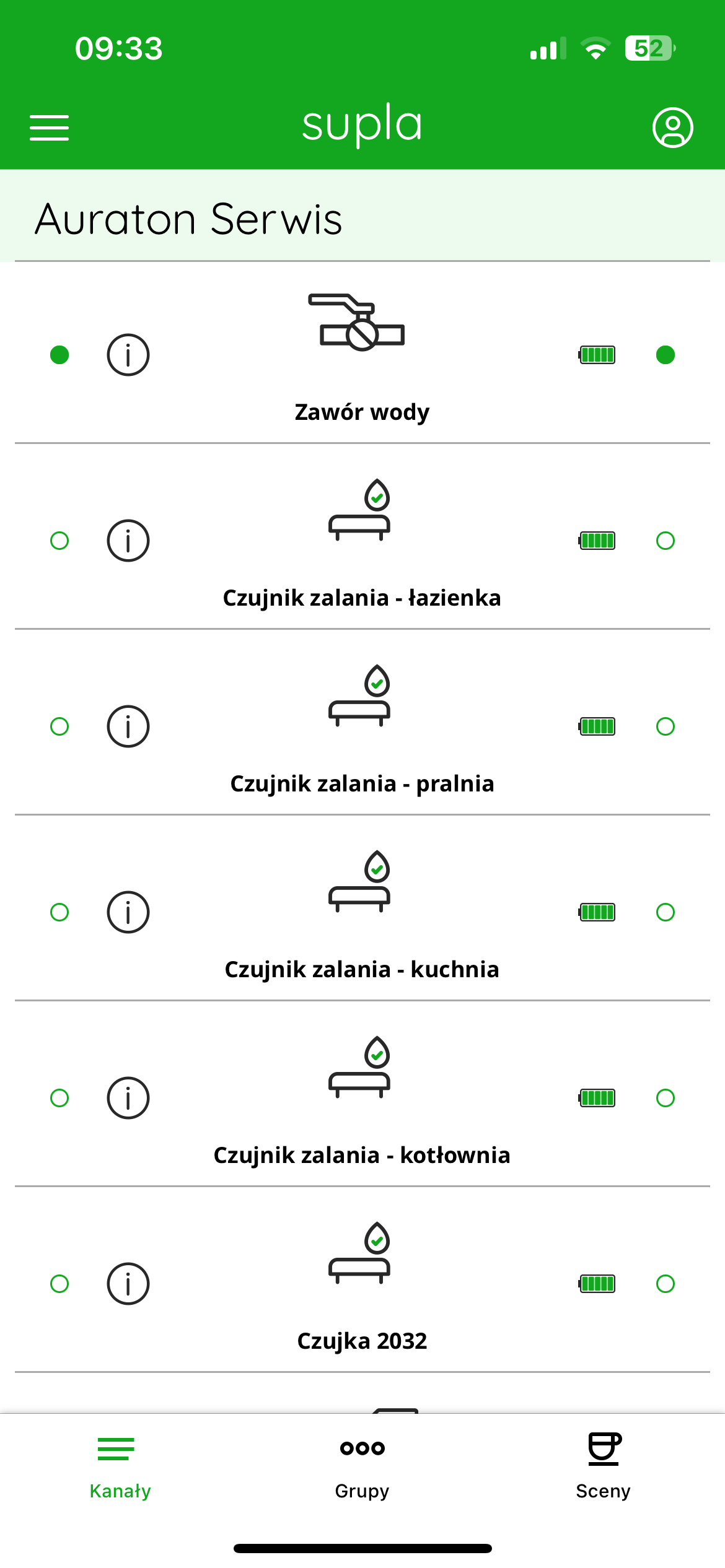
Each flood sensor and valve appear as separate channels. Device names can be freely edited in Supla Cloud, making them easier to identify when multiple sensors are present (e.g., kitchen, bathroom, boiler room).
Green status icons and battery level indicators on the sensors indicate that the devices are working properly and have an active connection to the gateway. The water valve is displayed as a separate channel with a ball valve icon – its status (open/closed) can be controlled manually or automatically in response to flooding detection.
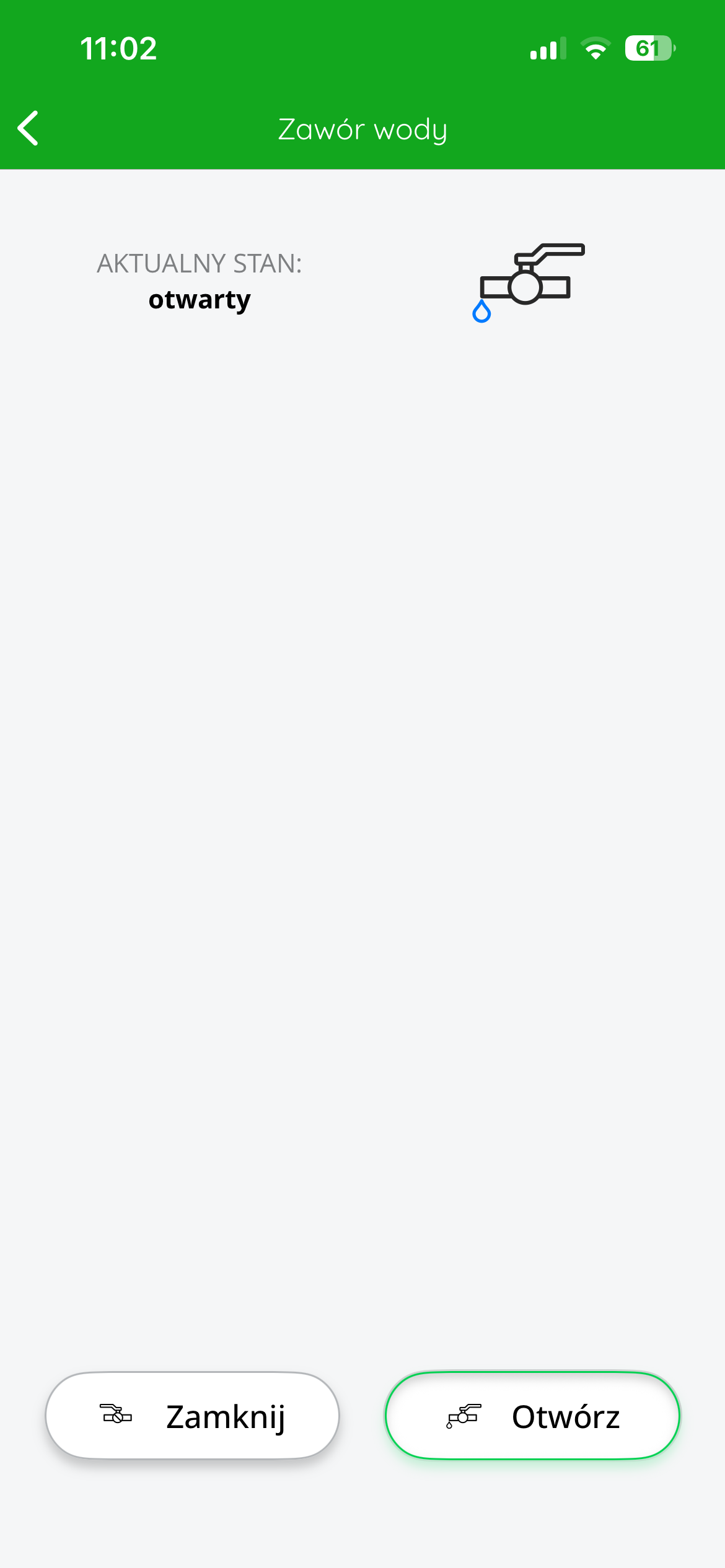
Upon entering a valve channel, the SUPLA app displays the following information: valve name, current status – whether the valve is open or closed – each status is represented by a separate icon. Action buttons are also available: "Close" and . "
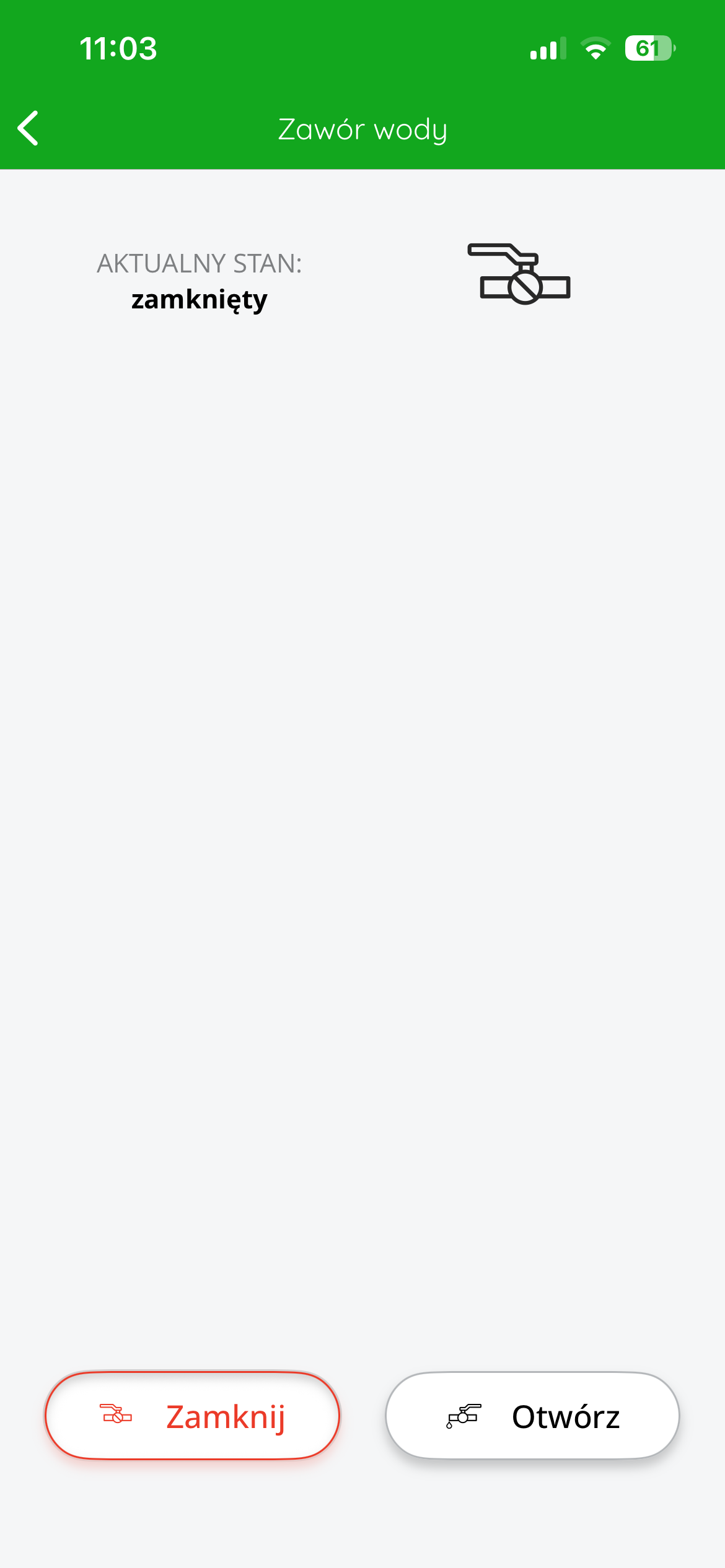
Further configuration allows you to assign sensors to the valve to automatically shut off the water supply when flooding is detected – this process is described in the next steps of this manual.
Assigning flood sensors to the AURATON Flood Sensor Valve in the SUPLA application
To configure automatic cooperation between AURATON Flood Sensor flood sensors and the AURATON Flood Sensor Valve, you must assign the appropriate sensor channels to the valve channel in SUPLA Cloud.
To do this, log in to SUPLA Cloud and go to the AURATON Box gateway channel to which the devices are assigned.
Next, you need to select the valve channel – most often labeled “Water Valve.”
After entering this channel, in the "Configuration" you will be able to assign flood sensors to the valve.
In the "Flood Sensors" , select all the sensors from the list that are to affect the valve (e.g. "Flood Sensor – Bathroom", "Flood Sensor – Kitchen", etc.).
To assign more than one sensor, use the "Select Multiple" and select the appropriate channels.
After assigning all sensors, confirm the configuration with the "Save changes" .
From this point on, each of the assigned sensors will be able to independently trigger the closing of the water valve in the event of flooding – which protects the entire facility against the serious consequences of a water system failure.
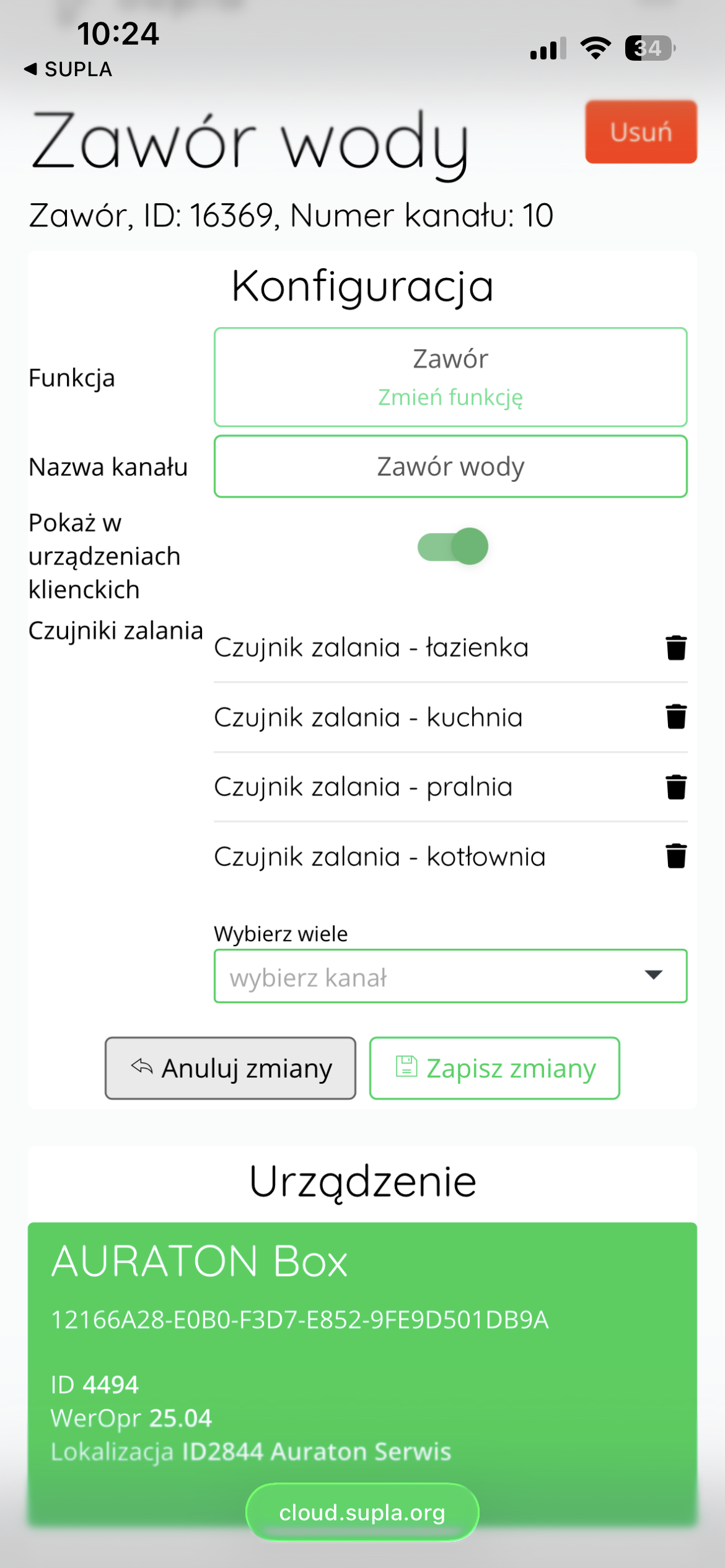
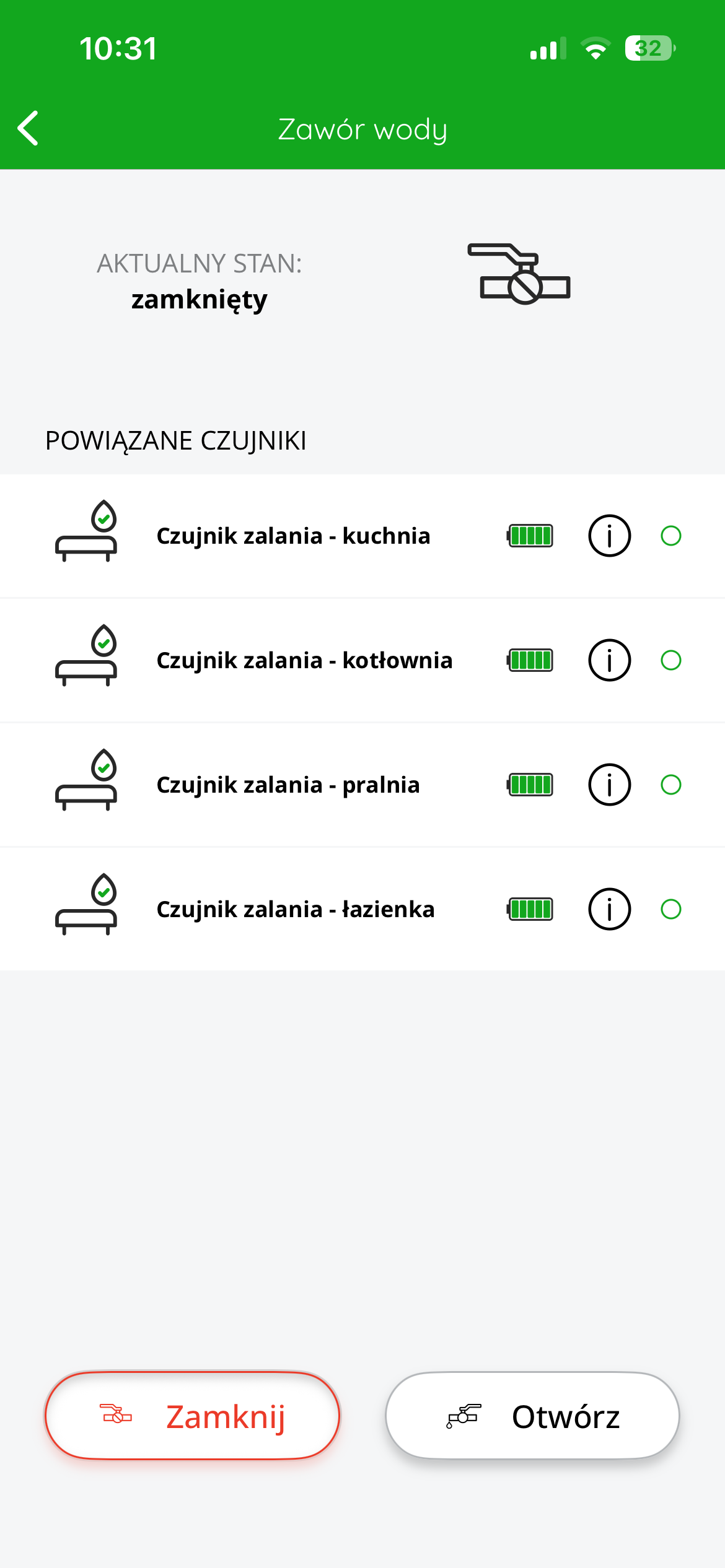
After saving the configuration, the status of the valve and the flood sensors assigned to it can be viewed at any time in the SUPLA application by entering the details of the valve channel.
This view displays the current valve status (e.g., "closed"), and below it is a list of all associated sensors with their names, battery charge status, and information about correct connection to the system.
If any of the assigned sensors detects flooding, the valve will automatically close. A clear notification of this event will also appear in the app – the sensor icon will change to an alarm icon and the valve will display a "closed" status.
Once the cause of the flooding has been removed, the user can manually open the valve by pressing the "Open" at the bottom of the screen. If necessary, the valve can also be manually closed again by pressing the "Close" .
Thanks to this function, the user has full control over the valve and a quick view of the system status without the need for physical contact with the device.
PUSH notifications and automations
In SUPLA Cloud, in the valve channel, the user can create so-called "Reactions" – rules that will be triggered in response to specific events, e.g., flooding detection, valve closing, or engine error reporting.
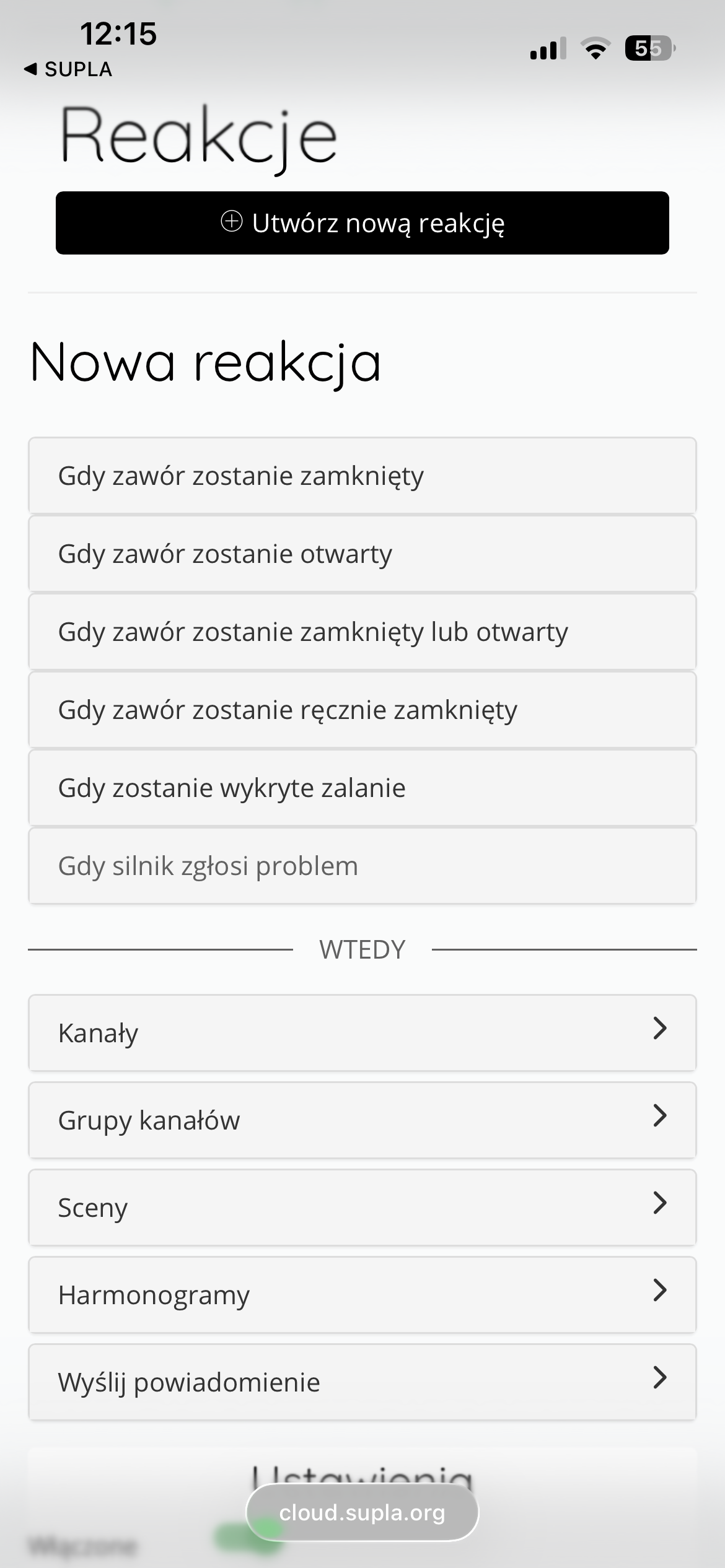
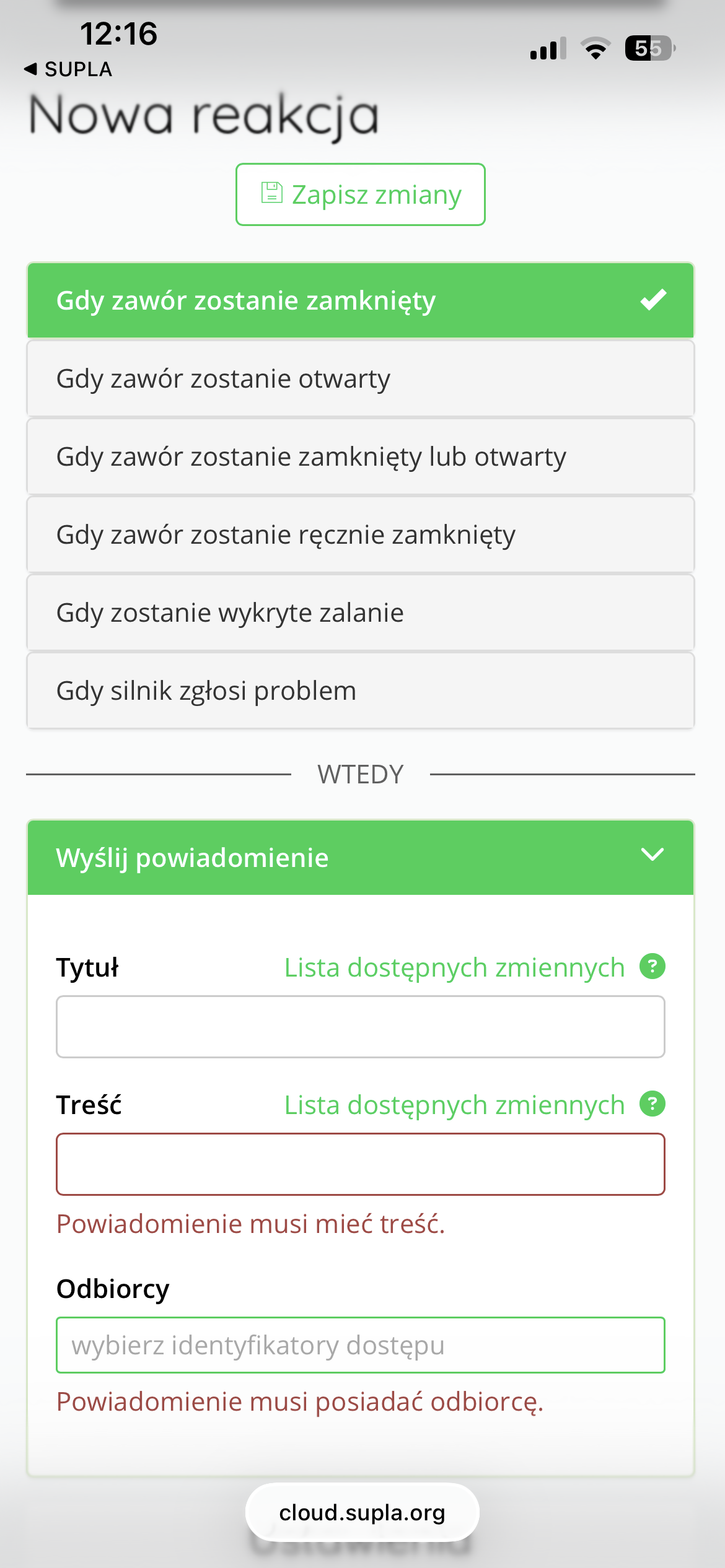
Various actions can be programmed for each of the above events, e.g.:
-
Sending push notifications to selected users
-
Changing the status of other channels (e.g. switching on the pump)
-
Launching a specific scene
-
Schedule Switch
This allows the system to operate even faster and more efficiently in emergency situations – for example, by automatically closing the valve when flooding is detected and simultaneously sending a warning to the owner or installer.
Practical applications of the AURATON Flood Sensor Valve
The AURATON Flood Sensor Valve is a device that can not only protect against flooding but also become a component of home automation, impacting the safety, convenience, and efficiency of water management in a building. Here are some possible application scenarios:
- Automatic water shut-off upon flooding detection:
This is the basic and most commonly used operating mode. After connecting flood sensors to a valve in the SUPLA Cloud, any water detected by any of the sensors automatically closes the valve and blocks the water supply. You can also configure a response that sends a notification to the user.
- Preventive water shut-off – e.g. during absence:
Thanks to the schedule function, the valve can be set to automatically shut off the water at specific times – for example, daily at 8:00 a.m. (when household members leave for work/school) and reopen at 5:00 p.m. This is an effective way to secure the building when no one is inside.
- Remote control of water supply:
The valve can be operated remotely via the SUPLA app, opening and closing it regardless of location. This allows, for example, for providing water to a renovation crew without the need to physically be present in the building, or for a quick response in the event of a suspected malfunction.
- Garden watering control:
The valve can function as a solenoid valve in a simple irrigation system – simply program it into a schedule to open at specific times of day and close after a pre-set time. For example, open at 6:00 a.m. and close at 6:15 a.m.
- Usage scenarios and automation:
The valve can be part of complex scenes, e.g. "Leaving the house" – in which:
- the system turns off the heating,
- turns off the lights
- lowers the temperature in rooms,
-
closes the water supply.
Technical data
| Model: | AURATON Flood Sensor Valve |
| Torque: | 2 Nm |
| Opening/Closing Time: | about 5 seconds |
| Operating voltage: | 5V |
| Power consumption: | 3 in |
| Maximum medium pressure: | 1.0 MPa |
| Medium temperature range: | 0-100 °C |
| Operating temperature range: | from 1 °C to 45 °C |
| Humidity: | ≤85% non-condensing |
| Operating status check: | LED diode, sound signal |
| Maximum number of paired devices: | 10 |
| Power supply | Li-ion/5V DC battery (USB) |
| Cooperation with the internet gateway | AURATON Box |
| Degree of protection: | IP67 |
| Radio frequency: | 865.500MHz 867.200MHz 868.150MHz 868.450MHz 869.800MHz |
| Radio signal strength: | 11 dBm |
| Radio receiver category: | 2 |
| Range of action: | in a typical building with standard wall construction – up to 50 m in open space – up to 150 m |
Disposing of the device
O
Devices are marked with a crossed-out waste bin symbol. In accordance with European Directive 2012/19/EU and the Waste Electrical and Electronic Equipment Act, this marking indicates that this equipment, after its useful life, must not be disposed of with other household waste.
Users are obligated to dispose of it at a collection point for used electrical and electronic equipment.