

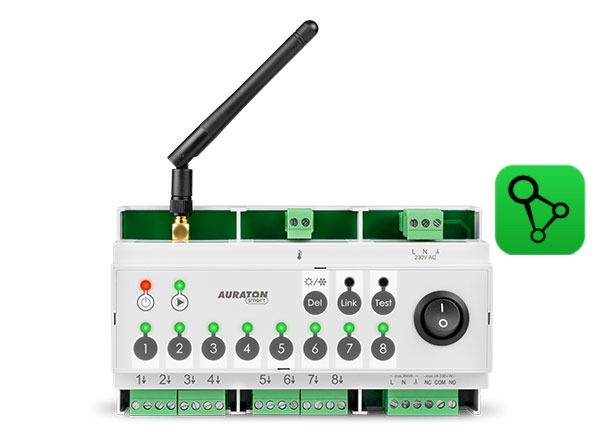
User manual ver. 20250602
This document collects information regarding the safety, installation and use of the AURATON Floor Heating Controller.
Wireless underfloor heating control strip
The AURATON Floor Heating Controller is an 8-zone, wireless underfloor heating control strip designed to work with AURATON Vela actuators, a central heating pump, and a heating device. Individual heating zones are controlled using wireless temperature controllers from the AURATON Smart series.
The strip is only available as a set with four AURATON Vela thermoelectric actuators. This set is called the AURATON Multizone Controller.
| Q P |
NOTE! The AURATON Floor Heating Controller is designed for DIN rail mounting in standard installation cabinets. If installation in a metal cabinet is necessary and connectivity problems occur, it is recommended to use the optional external AURATON Antena antenna, which improves the range and quality of the radio signal. |
Action
The AURATON Floor Heating Controller supports 8 separate heating zones and can also perform the following functions:
- control of the central heating circulation pump,
- controlling the central heating furnace via a relay with potential-free contacts,
- cooperation with the AURATON Box gateway to automate the AURATON Floor Heating Controller with other AURATON Smart series devices
- testing the signal strength between individual paired devices
Device operating modes
The AURATON Floor Heating Controller set together with the AURATON Smart series regulator can operate in two modes:
Mode I (local):
In this mode, the strip and thermostat can operate independently without the need for an AURATON Box internet gateway. The Smart series thermostat must be correctly assigned to the AURATON Floor Heating Controller. Only one Smart series thermostat can be assigned to each heating zone.
Mode II (remote):
In remote mode, the AURATON Box internet gateway can be used, providing access to the entire system from outside the home.
This allows remote heating control, event notifications, scheduling, and much more.
For proper remote operation, internet access is required both from the gateway itself and from a phone or tablet with the application (Android, iOS).
When using Mode II (remote), it is recommended to first pair the AURATON Floor Heating Controller with a Smart series controller. This pairing will ensure the set will operate correctly even in the event of a power outage to the AURATON Box gateway. Up to 9 devices can be added to a single AURATON Floor Heating Controller (8 controllers (one for each zone) + Auraton Box).
Description of the device, buttons and controls
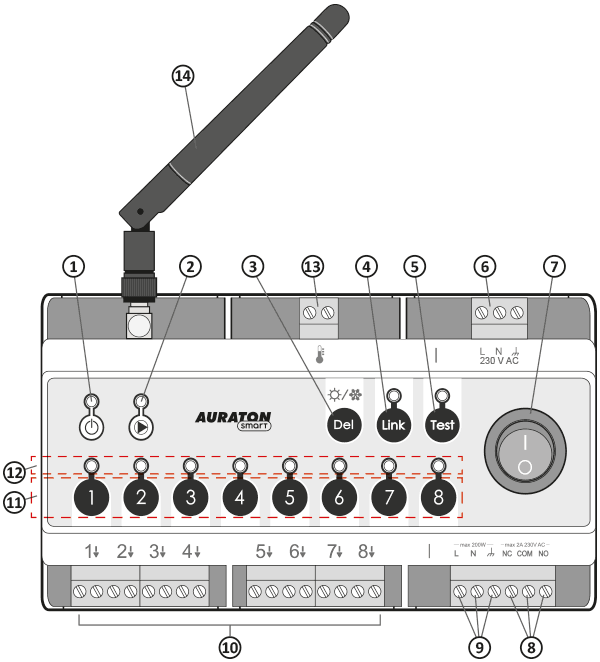
- Power status indicator light.
- Indicator light indicating the operating status of the central heating pump
- (Del) button to unpair the regulators or return to factory settings.
- Button (Link) for pairing with the AURATON Box gateway
- (Test) button with indicator light of the tester function operating mode.
- L, N, $ – 230 V AC power connection
- Power switch
- NC, COM, NO – potential-free relay contacts
- Central Heating Pump Control (L, N, $)
- Connections for heating zones 1-8 (actuators)
- Heating zone buttons 1-8
- Indicator lights for zones 1-8
- External temperature sensor connection
- Antenna
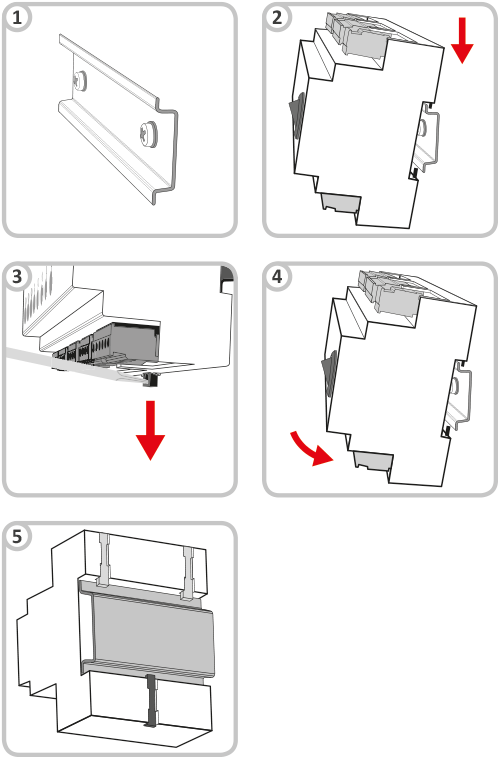
DIN rail mounting
- DIN rail.
- Hook the AURATON Floor Heating Controller onto the DIN rail using the upper hooks.
- Pull the lower tab down using a flat-head screwdriver.
- Place the AURATON Floor Heating Controller in the correct location.
- Release the lower catch
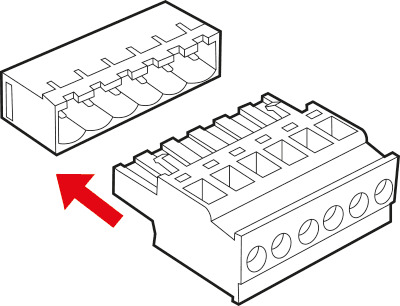
For ease of installation, the connections are equipped with removable terminals. These terminals can be disconnected from the AURATON Floor Heating Controller before making cable connections.
Q
All connections must be made with the power source disconnected.
AURATON Floor Heating Controller operation signaling using LEDs
-
- Power status indicator light (red):
| Power light off | AURATON Floor Heating Controller disabled |
| Power light is on | AURATON Floor Heating Controller is in normal operation mode |
-
- TEST indicator light:
| TEST light off | Normal mode |
| The TEST light is on | Test mode |
Signaling in normal state:
-
- Indicator light indicating the operating status of the central heating pump (green):
| The indicator light is off | No central heating pump control |
| The light is flashing | Waiting for the pump to turn on (3-minute delay) |
| The indicator light is on | Central heating pump on |
- Heating zone controls:
The indicator light is off Heating zone output off The indicator light is on Heating zone output on The indicator light flashes slowly (every 0.5 seconds) Zone in pairing mode The indicator light is flashing rapidly Zone in check-out mode - LINK indicator light:
The indicator light is off Not paired with AURATON Box The indicator light is on Paired with AURATON Box
Signaling in TEST state:
-
- Indicator light indicating the operating status of the central heating pump (green):
| The indicator light is off | Cooling mode |
| The indicator light is on | Heating mode |
- Heating zone controls:
The indicator light is off Unassigned zone The indicator light is on Zone assigned to a smart device
Control of the central heating pump and relay
The central heating pump or furnace is activated when heating is activated in any of the heating zones – the central heating pump operation indicator light will illuminate.
The central heating pump or relay is deactivated when no heating zone is active – the central heating pump operation indicator light will be off.
To improve the operation of the heating system, the AURATON Floor Heating Controller is equipped with a time delay system for switching on the central heating pump.
When the heating is turned on, the actuators are first activated, and then, after a 3-minute delay, the central heating pump and relay are activated. The waiting time for the pump and relay to be activated is indicated by the pump indicator light flashing. After this time, the pump and relay are activated, and the indicator light remains lit.
This action of the AURATON Floor Heating Controller is designed to rationally manage the heating and prevent excessive load on the central heating pump, which could lead to premature wear.
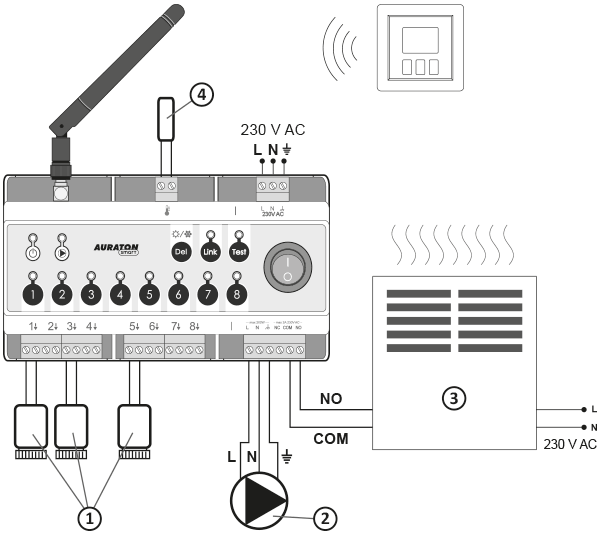
- Actuators
- Central heating pump
- A heating device, e.g. a gas furnace
- External temperature sensor
Information and comments
- Only one controller can be paired to each zone. The controller, via an independent channel, transmits two parameters to the AURATON Floor Heating Controller:
– current temperature,
– setpoint temperature.
Device pairing
AURATON Floor Heating Controller, for correct operation, must be paired with the AURATON Heat Monitor regulator or the AURATON Box gateway.
If you have a simple configuration: AURATON Box gateway + AURATON Heat Monitor regulator + AURATON Floor Heating Controller – even if you plan to control the devices only using the SUPLA app, it is recommended to perform two-way pairing of AURATON devices.
-
First, pair your devices directly with each other – this will provide a backup form of communication in case the app crashes or there is no internet access.
-
Then pair the devices with the AURATON Box gateway to enable remote control via the SUPLA application on your phone, tablet or computer.
A maximum of 1 controller can be added to one heating zone.
Enabling pairing – AURATON Floor Heating Controller (pairing heating zones)
-
- Press the appropriate zone button for 3 seconds, wait for a single beep, then release the button. When the zone enters pairing mode, the zone's indicator light flashes (0.5s/0.5s).
If a zone already has two devices assigned, you won't be able to select it. To add a new device to it, you must first unpair the previous devices.
-
- After entering pairing mode for one zone, you can also enter other zones by briefly pressing the button for another zone. This allows you to pair the same controller to more than one zone simultaneously. Briefly pressing the button for a zone that was already in pairing mode deactivates pairing mode for that zone. Disabling pairing mode for all zones causes the AURATON Floor Heating Controller to return to normal operation mode. Confirm zones and initiate communication between devices by briefly pressing the LINK button.
Pairing mode is automatically turned off 60 seconds after the last zone has entered pairing mode or after the controller has been successfully paired or after briefly pressing the DEL button.
- To pair the AURATON Smart series controller to a zone (or several zones), activate the pairing mode in the desired zones, briefly press the LINK button, and then start pairing in the controller (the description of pairing AURATON wireless controllers is below).
- Successful pairing of the controller is confirmed by a single 1-second acoustic signal. Once the wireless device is paired, the AURATON Floor Heating Controller enters normal operation mode.
Enabling steaming – Heat Monitor controller
On the AURATON Heat Monitor controller, press thebd orcd for 3 seconds until the transmission symbol (W ) lights up on the display. The AURATON Heat Monitor controller waits 30 seconds for pairing. After this time, it will automatically return to normal operation.
Copying paired controllers
The AURATON Floor Heating Controller also allows you to copy a previously paired controller to another heating zone without the need to pair the device again. To do this, follow these steps:
- Press the button for the already paired zone for 7 seconds. You will hear a single pairing beep, followed by a double pairing beep. When you hear a triple beep, release the button. The zone entering the copying mode is signaled by a slow flashing of the corresponding zone's indicator light (2s/2s).
- After entering copy mode for one zone, you can also enter other zones by briefly pressing the button for another zone. This allows you to simultaneously copy the same controller to more than one zone. Briefly pressing the button for a zone that was already in copy mode disables copy mode for that zone. Disabling copy mode for all zones causes the AURATON Floor Heating Controller to return to normal operation mode. Confirm the copied zones by briefly pressing the LINK button.
Enabling pairing – AURATON Floor Heating Controller (pairing the Auraton Box gateway)
Press the LINK button for 3 seconds, wait for a single beep, then release the button. Entering the gateway pairing mode is indicated by the LED next to the LINK button flashing (0.5s/0.5s). The heating zone LEDs remain off. Within 30 seconds, start the pairing process on the AURATON Box gateway as well.
Enabling pairing – AURATON Box gateway
Pairing the AURATON Floor Heating Controller with the AURATON Box gateway can be done in two ways:
- On the AURATON Box, briefly press the right "Auraton" pairing button (
 ) – the LED under the button will start flashing. Then, put the strip into pairing mode.
or
- In Supla Cloud, enter the AURATON Box gateway channel and press the "Pair new devices or sensors" button – the LED under the right "Auraton" pairing button will start flashing. Then, put the AURATON Floor Heating Controller into pairing mode.
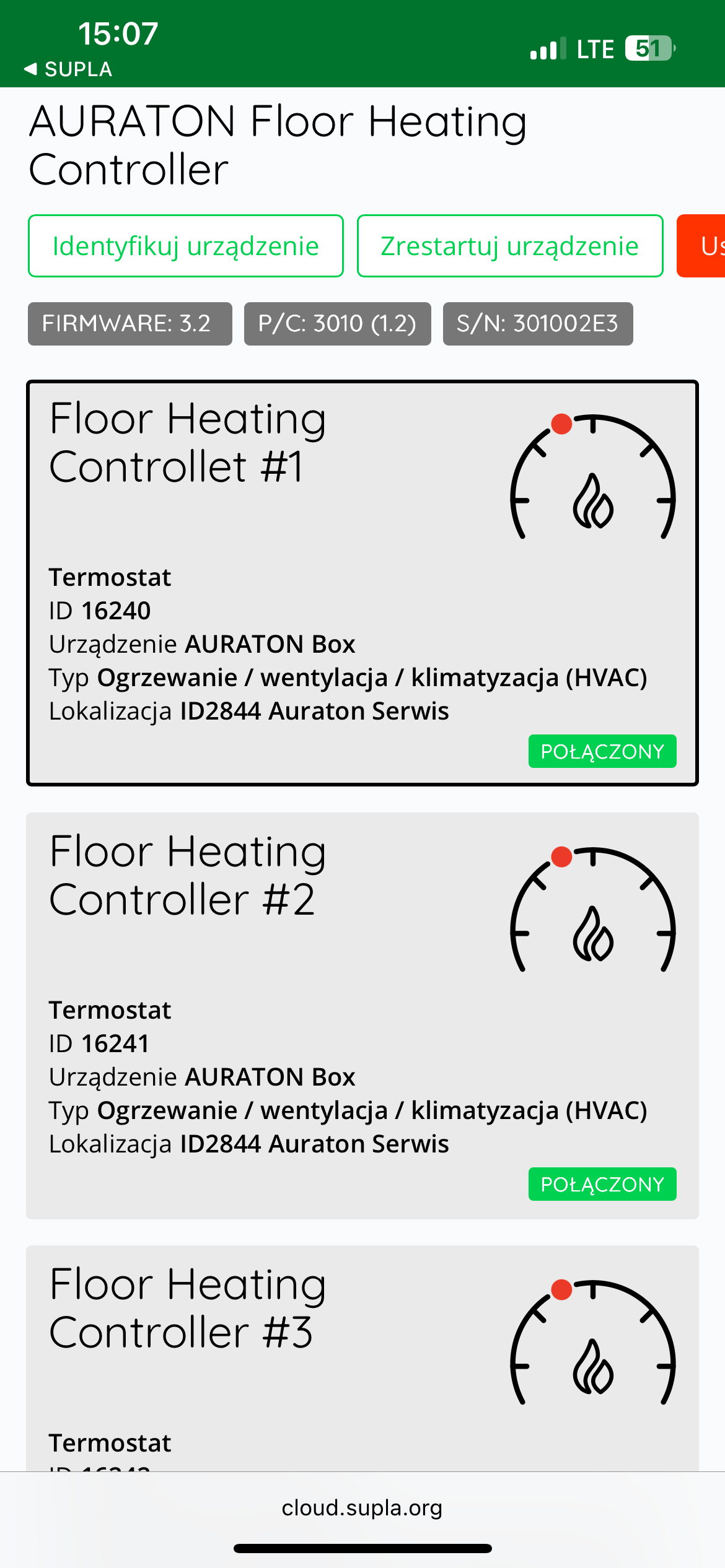
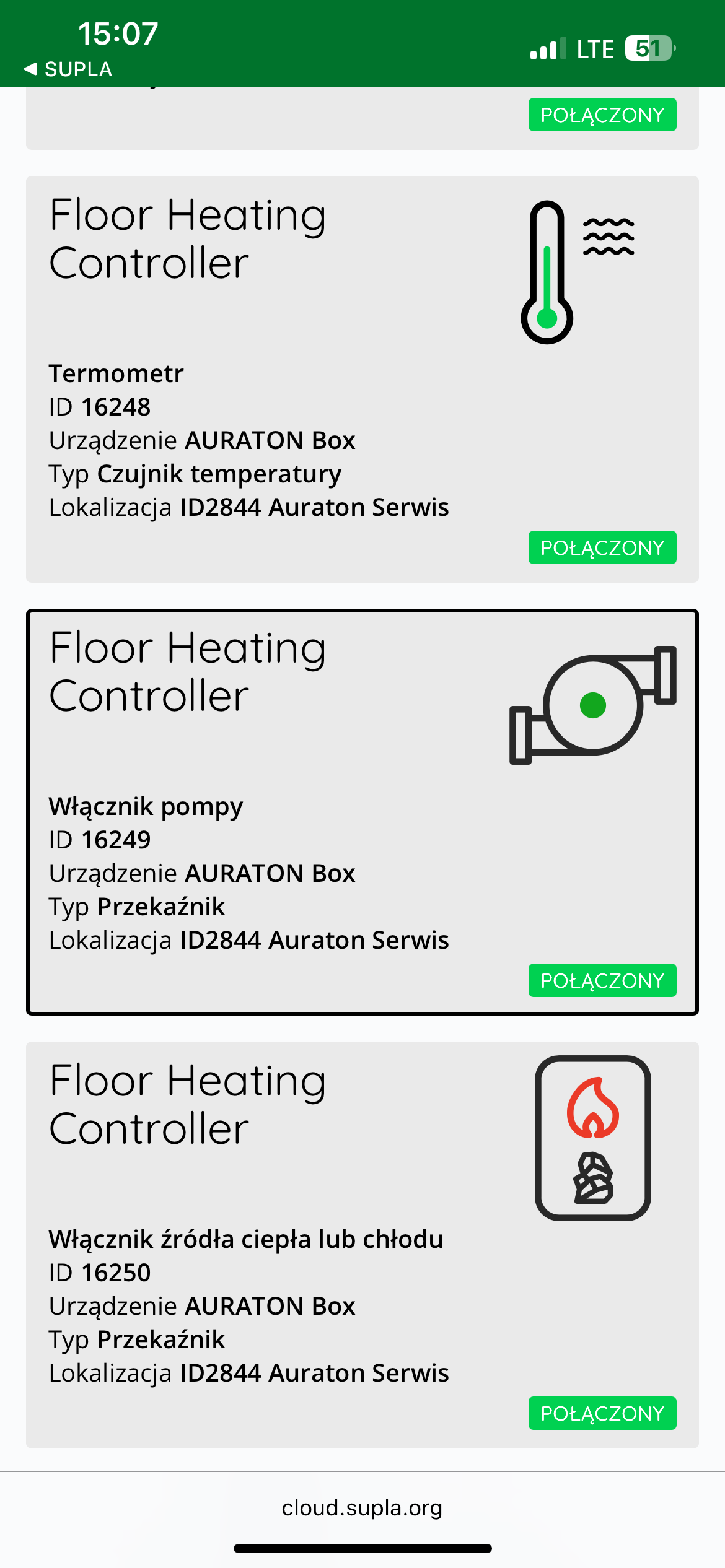
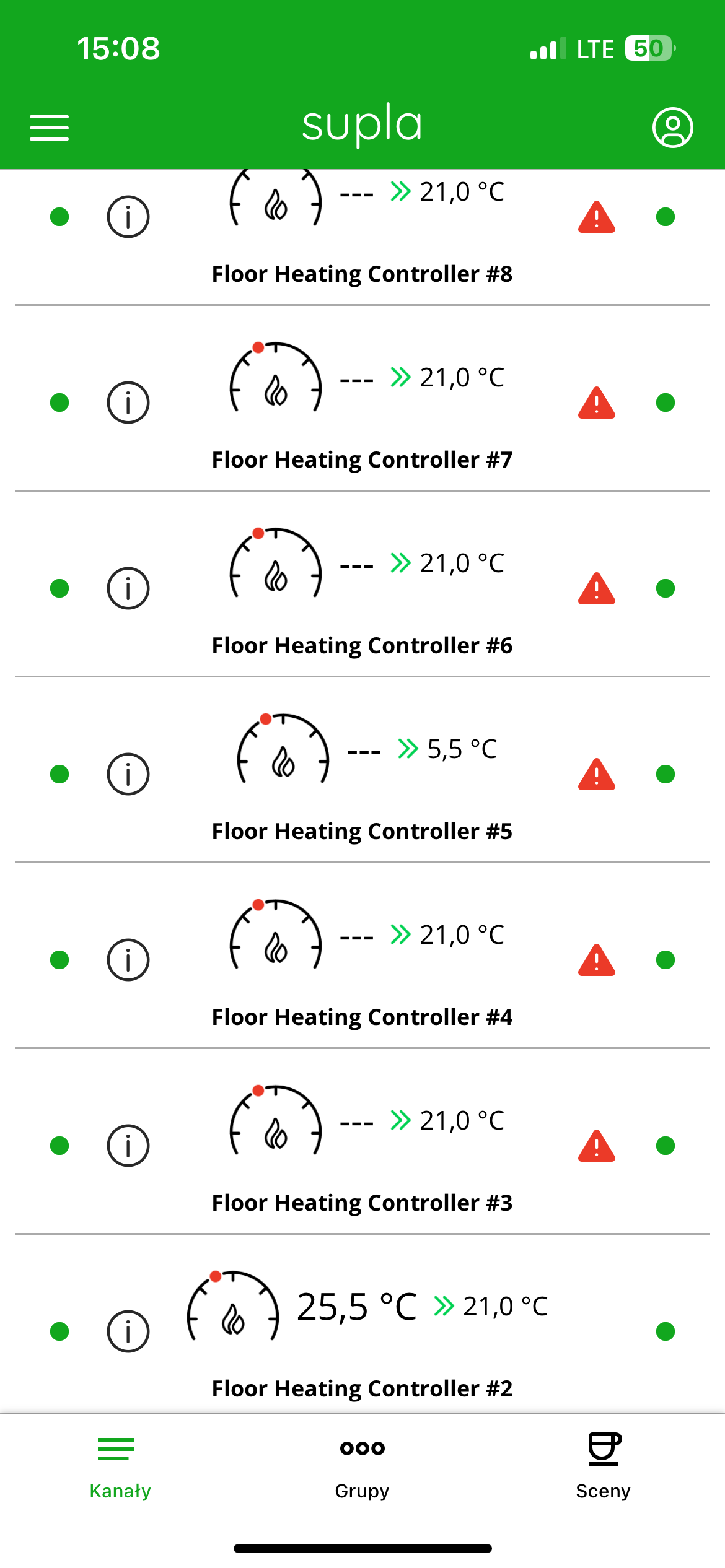
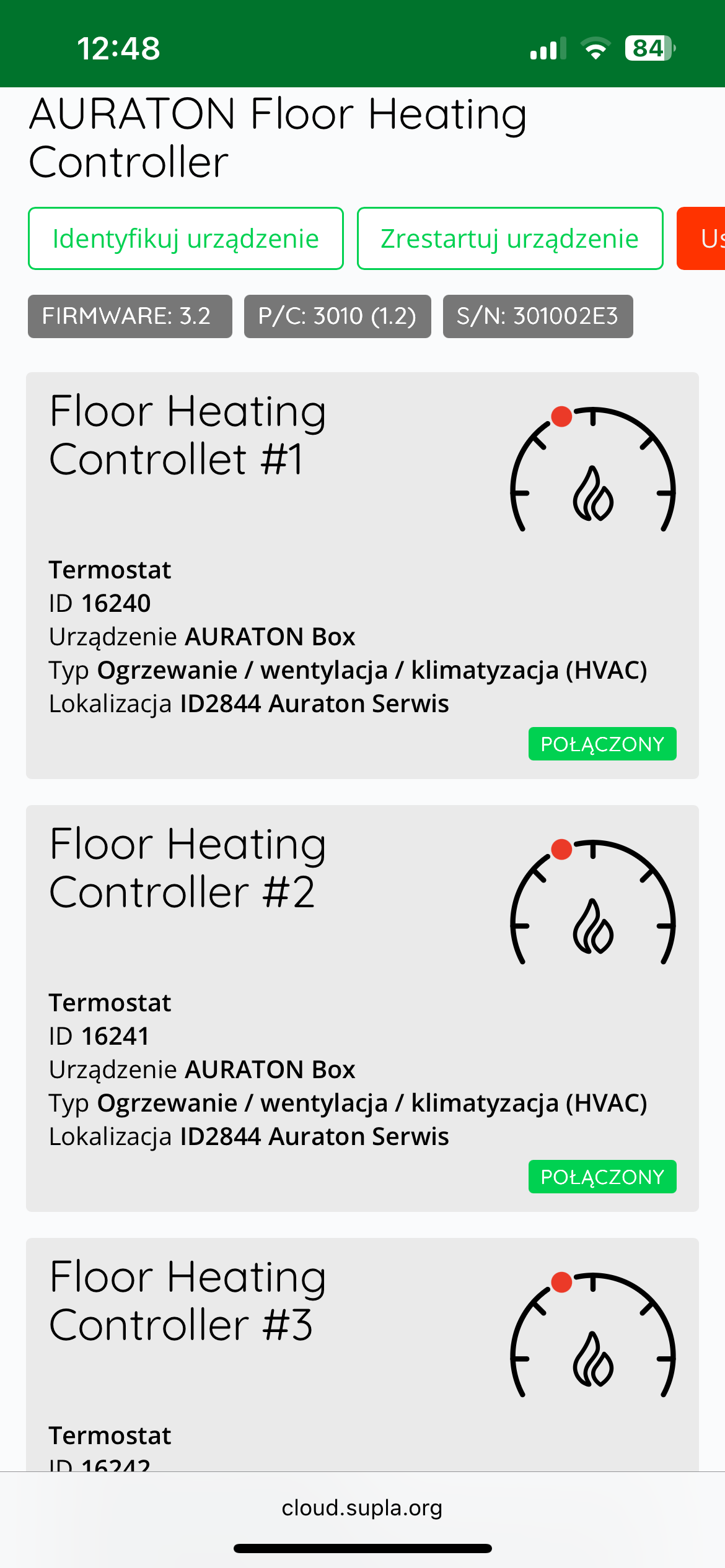
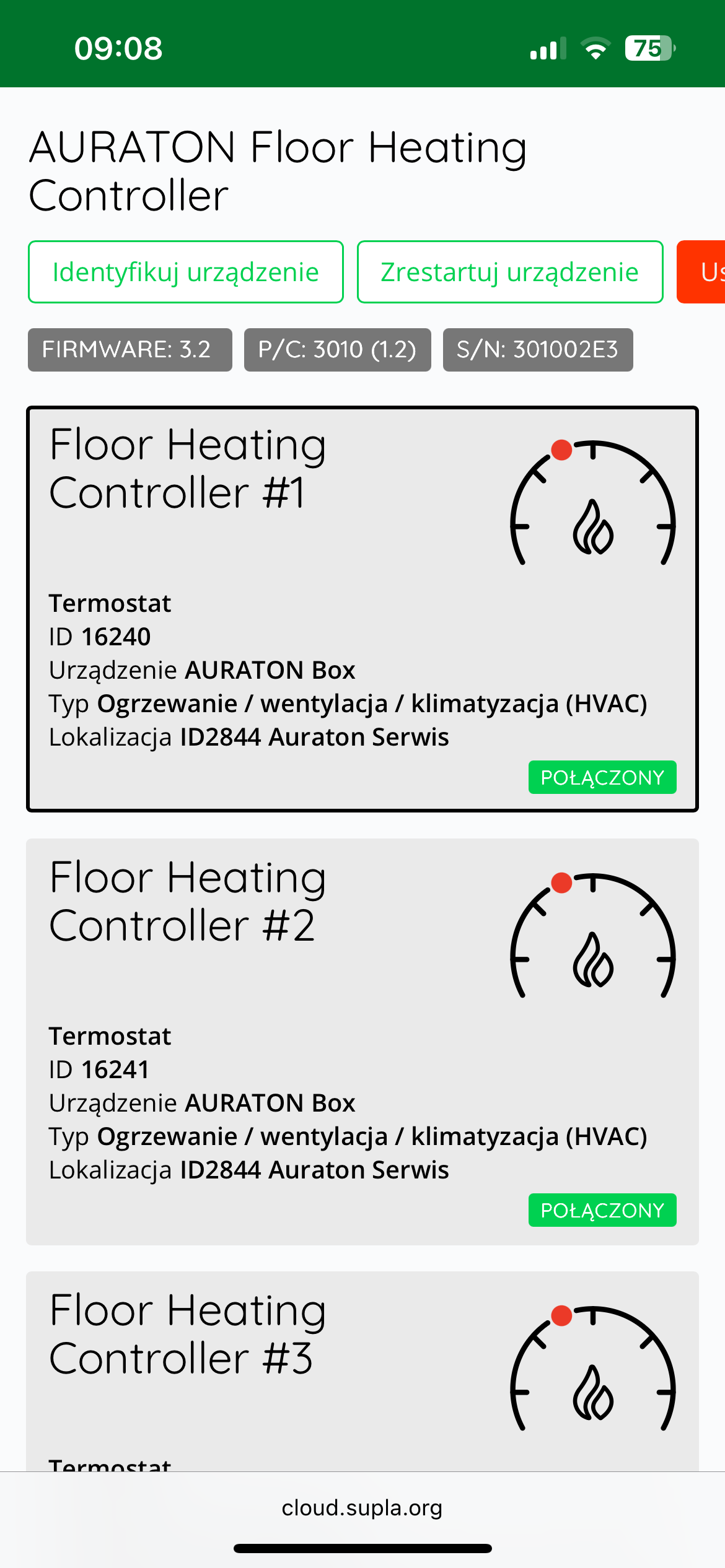
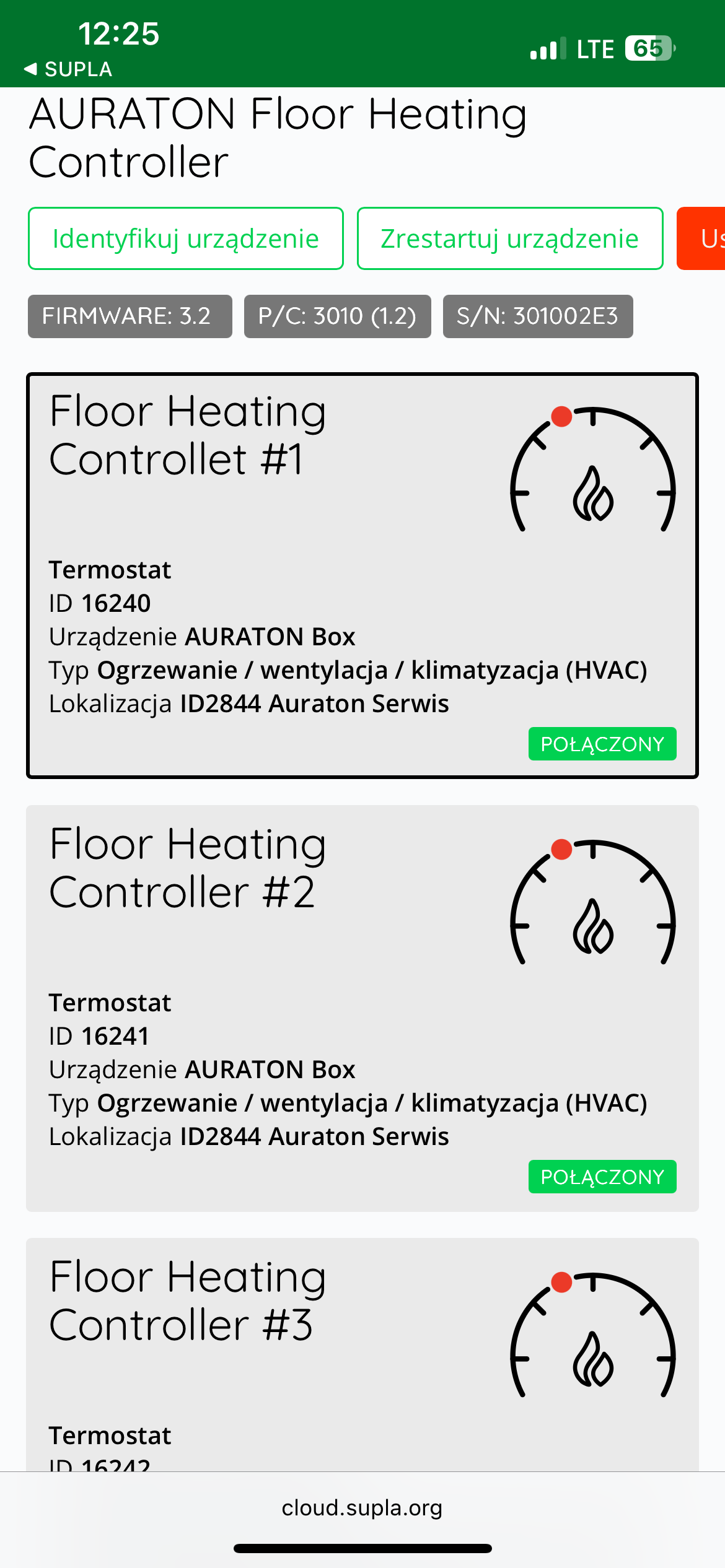
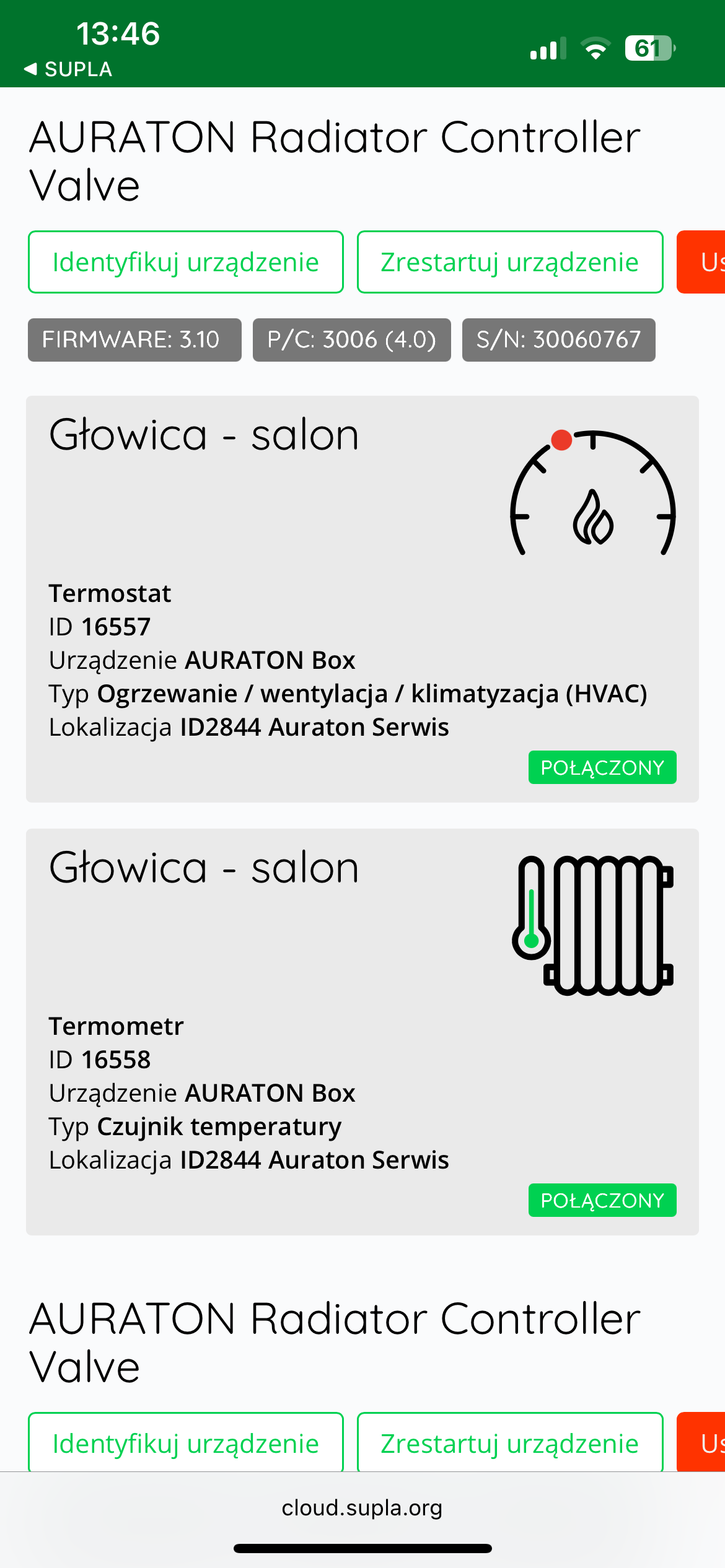
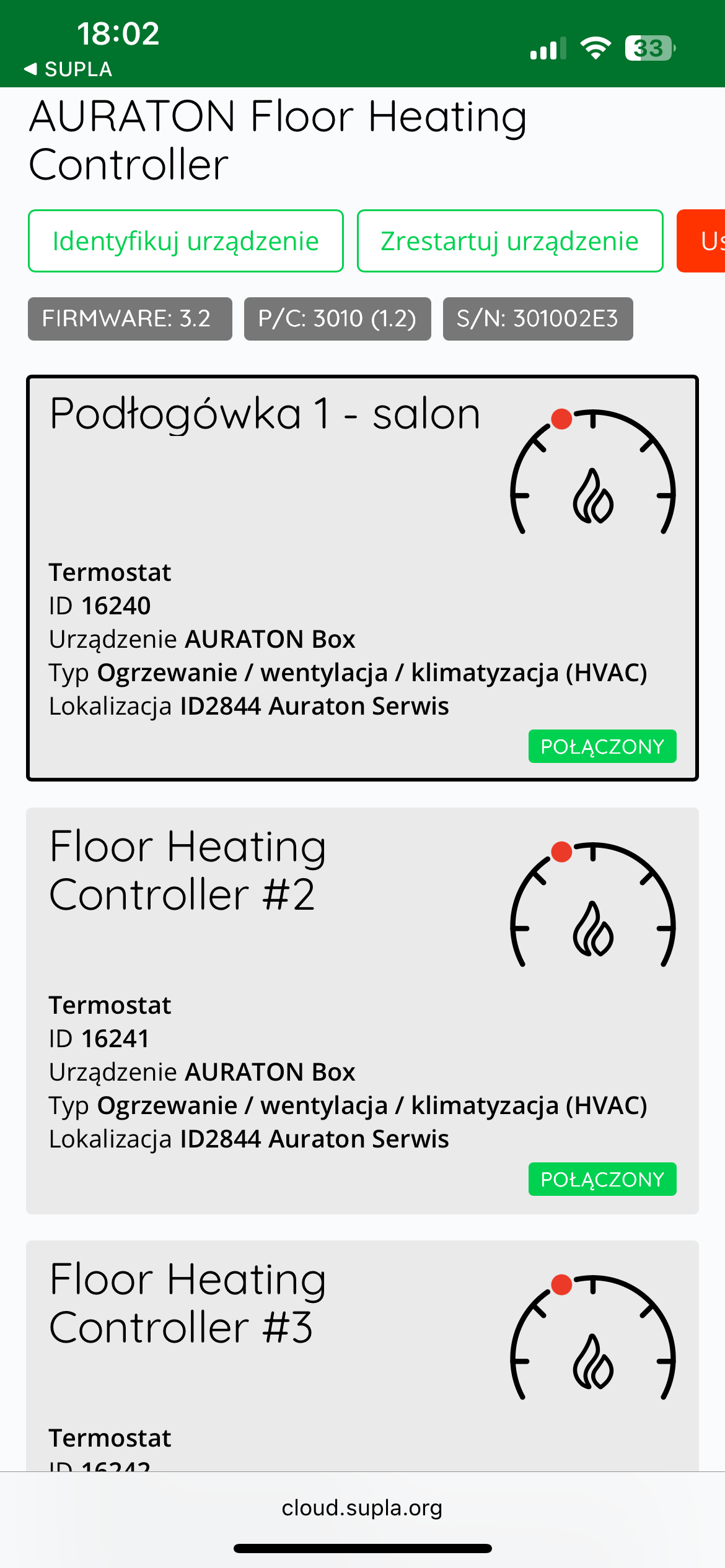
After pairing the AURATON Floor Heating Controller with the Auraton Box gateway, it becomes visible in SUPLA Cloud as 8 heating zone channels (e.g. "Floor Heating Controller #1") and an overheating protection thermometer channel ( "Thermometer" ), a pump channel ( "Pump Switch" ) and a furnace channel ( "Heat or Cooling Source Switch" ). Only 8 heating zones are visible in the application.
Evaporation of wireless controllers from the zone
Pairing a wireless controller from a single channel
- If you know the zone to which the device was paired, press the button for that zone for more than 5 seconds. After 3 seconds, you'll hear a single pairing beep – do not release the button. After another 2 seconds, you'll hear a double beep, and the zone automatically enters unpairing mode (the indicator light flashes faster).
- After selecting the regulators to be paired, confirm the operation with the DEL . After successful pairing, you will hear a single beep.
The steam mode in a given zone is automatically turned off 60 seconds after the last zone has been entered into steam mode, or after removing the controller from a given zone, or after briefly pressing the DEL button.
- If all indicator lights stop flashing rapidly, the AURATON Floor Heating Controller will switch to normal operation.
Factory reset (unpair all devices)
After turning off the AURATON Floor Heating Controller using the power switch, press and hold the Del Del button ).
The device paired with the AURATON Box gateway must also be removed from SUPLA Cloud.
AURATON Box Gateway Evaporation
To pair the AURATON Box gateway, hold down the Del until you hear a double beep. Once the gateway is paired, you will hear a longer beep.
TEST function
The TEST button is used to launch an additional "submenu" with separate signaling and the option to check the radio signal level. This mode is activated by pressing the "TEST" button. It automatically deactivates 5 seconds after the last button press.
Checking the steam status of the heating zones:
After activating TEST mode, you can check which zones are connected to other AURATON Smart controllers. If the LED next to a given zone is lit, it means it is paired. If the LED above the LINK button is lit, it means the system is connected to the AURATON Box gateway.
Heating/cooling mode:
In TEST mode, the central heating pump status LED indicates heating (LED on) or cooling (LED off). To change the mode, press and hold the DEL button for 3 seconds (while in test mode). Confirmation of the change will be signaled by a single beep, and the LED will change to the opposite state.
Signal level test:
- We enter test mode
- Next, to check the signal level of the AURATON Smart series controller assigned to a given zone, briefly press the button above the zone. For the AURATON Box internet gateway, press the LINK button.
- If the device has correctly received the radio signal within the last 45 minutes, the LEDs next to the heating zones will light up – the more of them, the stronger the signal.
- If there is no communication, the LEDs will be off and you will hear a long beep.
If the TEST function is not disabled by the user, the AURATON Floor Heating Controller will do so automatically 5 seconds after the last button press.
If you pair the AURATON Box internet gateway, the device will operate in remote mode, so the regulators' signal level will not be visible. To check the regulators' signal level during installation, first pair the AURATON series regulators and check the radio signal, and then pair the AURATON Box gateway.
Activated test mode does not affect the heating control process.
Working with an external temperature sensor
The AURATON Floor Heating Controller has a connector for an external temperature sensor operating in the safety system.
When an external sensor is connected, the operating temperature limit for the AURATON Floor Heating Controller without the AURATON Box is 55°C. This means that if the system temperature exceeds 55°C, the AURATON Floor Heating Controller will turn off all heating zones and the furnace. This protects against excessive temperatures in the heating system. If the AURATON Floor Heating Controller is to operate without protection, the sensor should not be installed.
Temperature sensor installation:
Install the sensor on an exposed supply pipe near the manifold system.
When using the AURATON Box gateway, the temperature in the security system is editable.
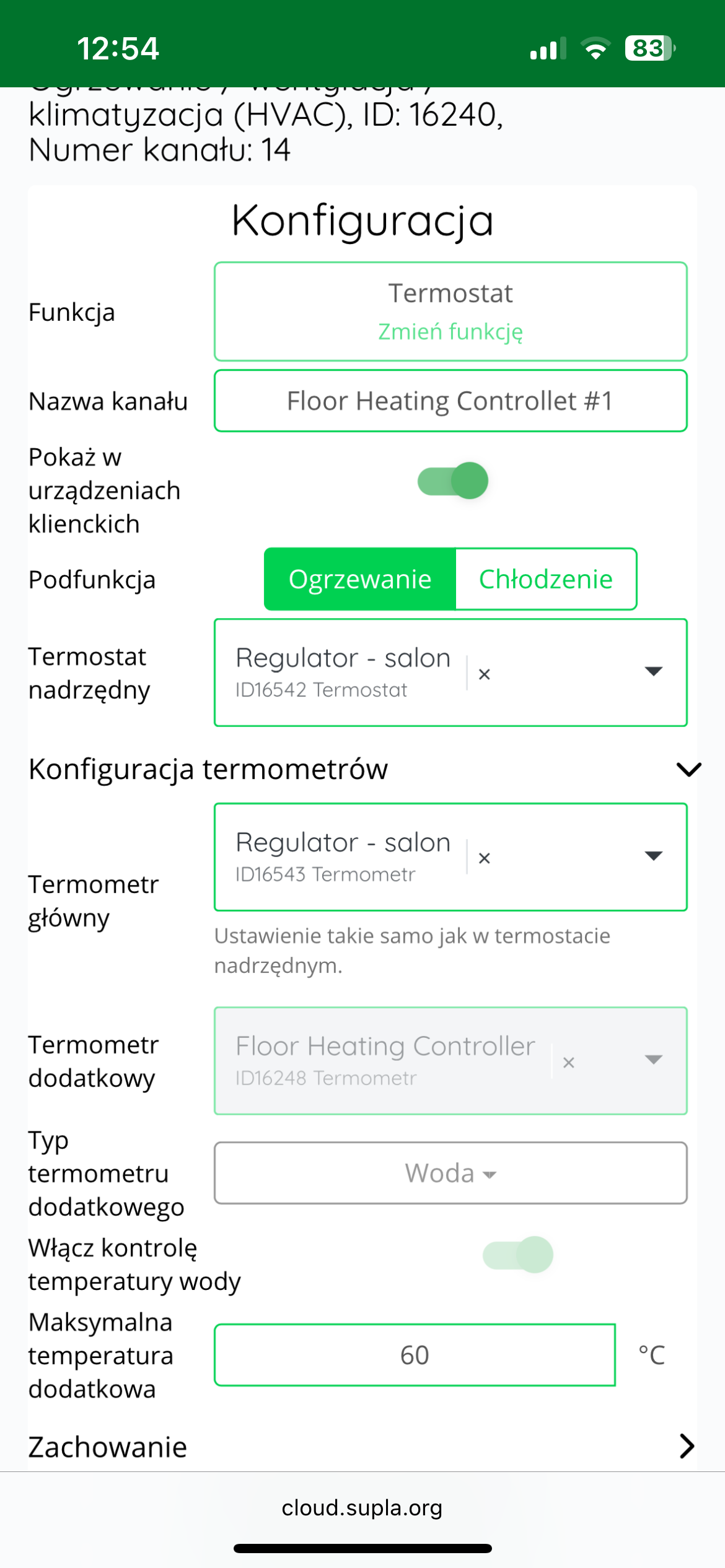
To edit the cut-off temperature of the AURATON Floor Heating Controller strip, you must log in to the SUPLA Cloud system.
After logging in, enter the AURATON Box gateway channel.
Then go to the channel of one of the active heating zones of the AURATON Floor Heating Controller strip.
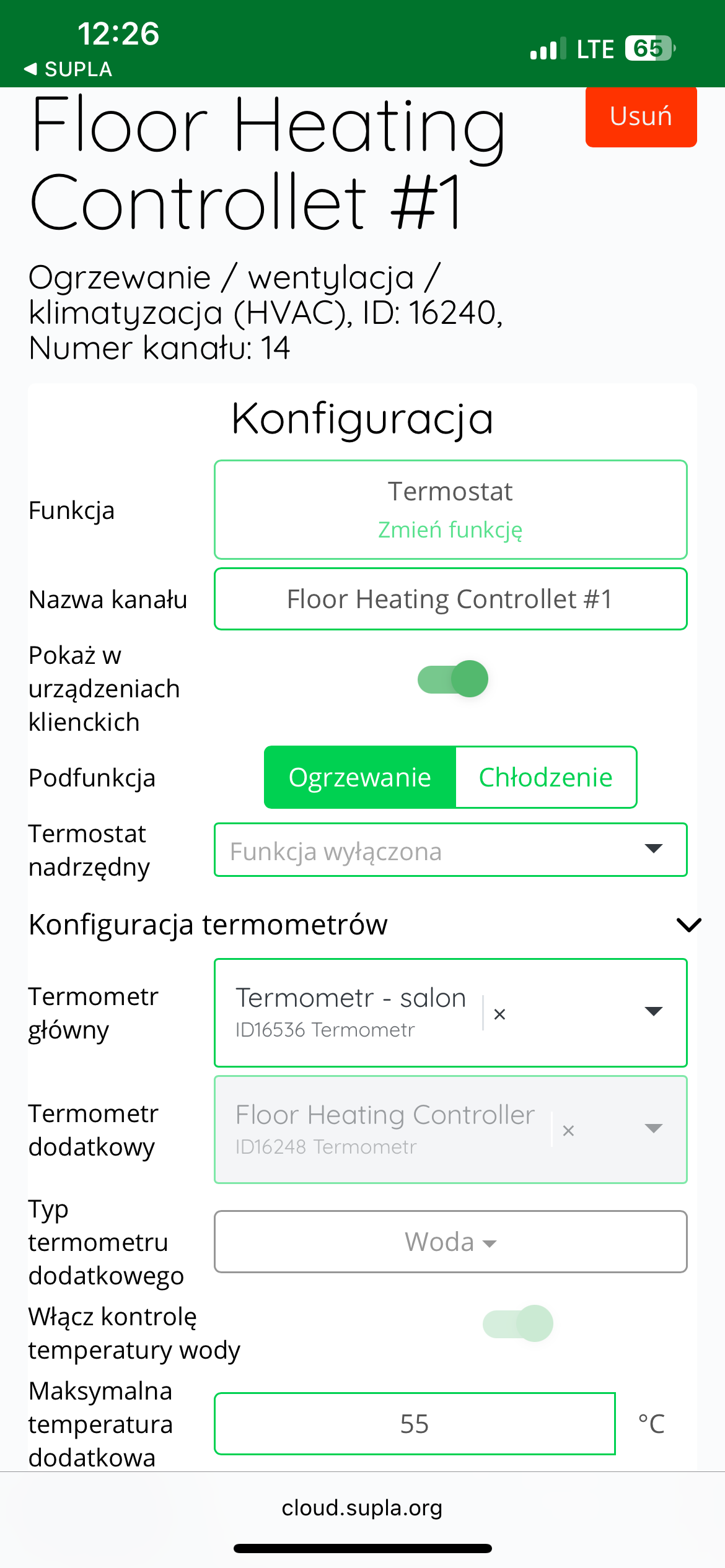
In the next step, expand the "Thermometer configuration" .
In the “Maximum additional temperature” , enter the desired cut-off temperature value – in the range from 40°C to 70°C.
Finally, confirm the changes by clicking the "Save changes" .
The cut-off temperature value assigned to one heating zone is copied to the other zones.
Device functions
How does the heating function work?
The AURATON Floor Heating Controller activates outputs to eight heating zones, which are controlled based on the current and setpoint temperatures from other SMART sensors. If the current temperature for a given zone is lower than its setpoint temperature by at least 0.1°C, the output for that zone will be activated, activating the connected actuator. After a 3-minute delay to allow the actuators to fully open, the furnace
and pump will also be activated.
When all zones are turned off, the furnace is turned off first (it must be on for at least 1 minute – FurnaceGuard function), and then, 1.5 minutes after the furnace, the pump is turned off.
PumpGuard function
The AURATON Floor Heating Controller is equipped with a special "PumpGuard" function that protects the pump from possible stagnation. This function activates when the pump output has been inactive for at least 14 days. It then activates for 1 minute.
FurnaceGuard function
The AURATON Floor Heating Controller is equipped with a special "FurnaceGuard" function that protects the furnace from being switched on too frequently. Once the furnace output is switched on, it can be switched off after 1 minute of operation.
Overheating protection
Using an external temperature sensor, we can set the maximum operating temperature. For more information, see "Operating with an External Temperature Sensor."
Cooling mode
In cooling mode, heating zones are switched on using reverse logic. When the current temperature is higher than the setpoint temperature, the appropriate zone is switched on. Then, after 3 minutes, the pump output is activated (the furnace output remains off). The cooling mode setting is described in the "TEST" button functions.
Signal level
You can check the signal level for each device with which the AURATON Floor Heating Controller is paired. For more information, see the "TEST Function" section.
Function to restore the previous software
To restore the previous software version, set the power switch to "0" (device off), press and hold the "TEST" button, and then turn the switch to "1" (device on). The LED next to heating zone 1 should flash green. Release the "TEST" button when the LED stops flashing and remains green. After restarting the controller, the previous software version will be restored (in the event of malfunctions after the update). The entire process can take up to a minute, and the device must remain powered on during this time. The previous software version is always loaded. If the software was previously updated from version 1.6 to 1.5, the previous software version is 1.6.
Cooperation with the SUPLA application
STANDARD SETTING (underfloor heating) – cooperation of the AURATON Floor Heating Controller wireless underfloor heating strip with the AURATON Heat Monitor wireless temperature controller in the SUPLA application
- Actuators
- Central heating pump
- A heating device, e.g. a gas furnace
- External temperature sensor
In classic underfloor heating, all that's needed for proper operation is an Auraton Box gateway paired with an AURATON Floor Heating Controller and several AURATON Heat Monitors (ideally, one for each room). AURATON Vela actuators are connected to the appropriate heating zones, and the pump and furnace are connected to the connector on the AURATON Floor Heating Controller.
To ensure backup connections, it is also worth pairing the AURATON Heat Monitor with the AURATON Floor Heating Controller.
Goal: We have underfloor heating in our home. We want individual zones of the AURATON Floor Heating Controller to be controlled based on temperature measurements from the assigned AURATON Heat Monitor temperature controllers. We also want the heating to be controlled from the temperature controllers as well.
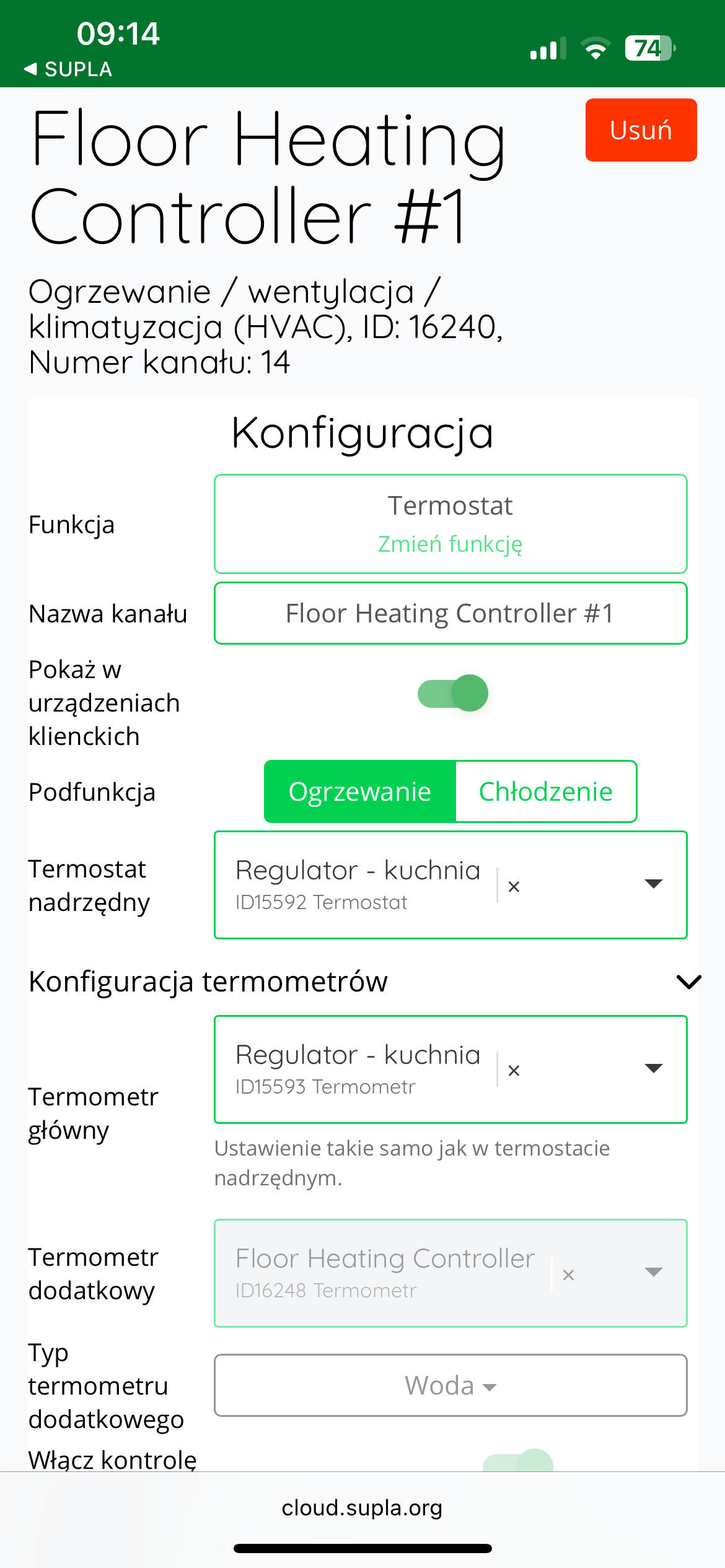
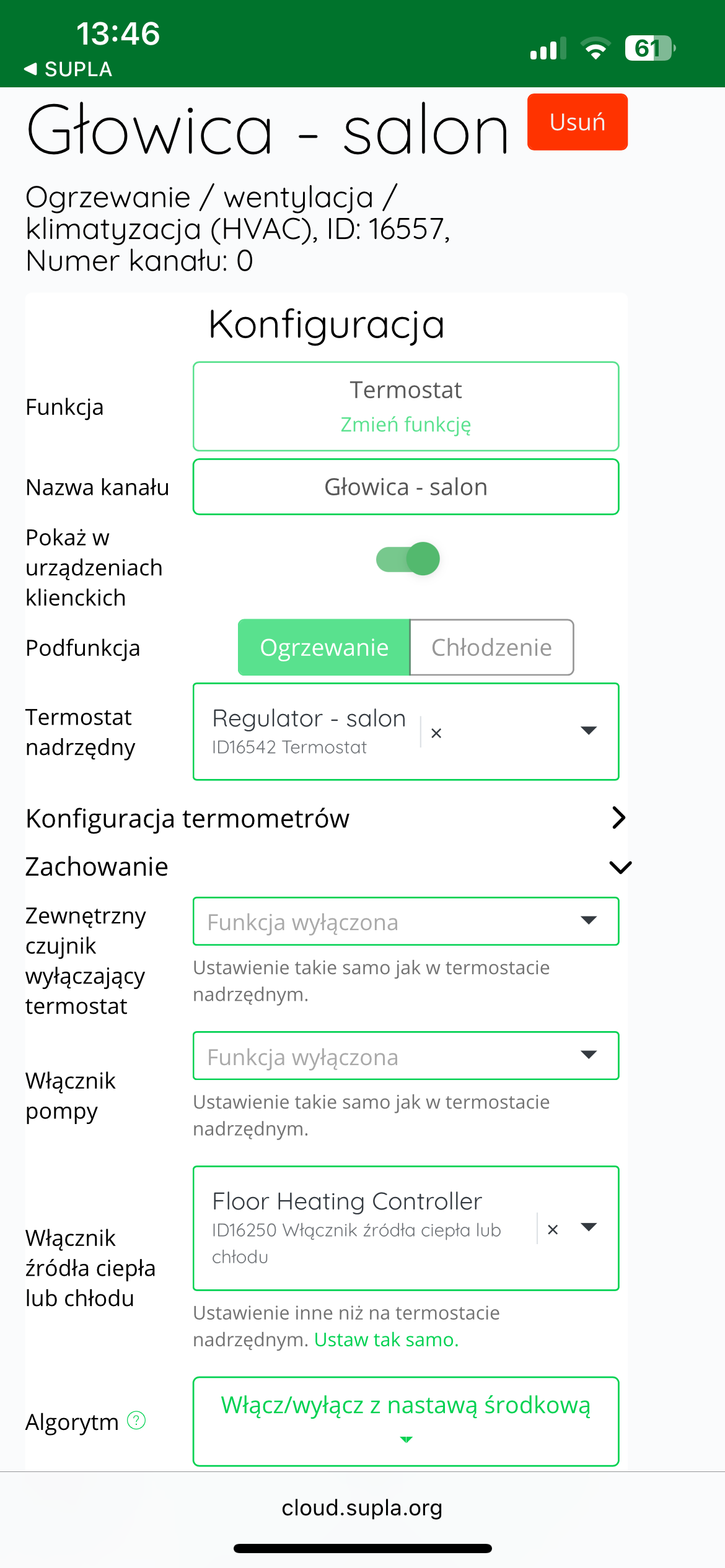
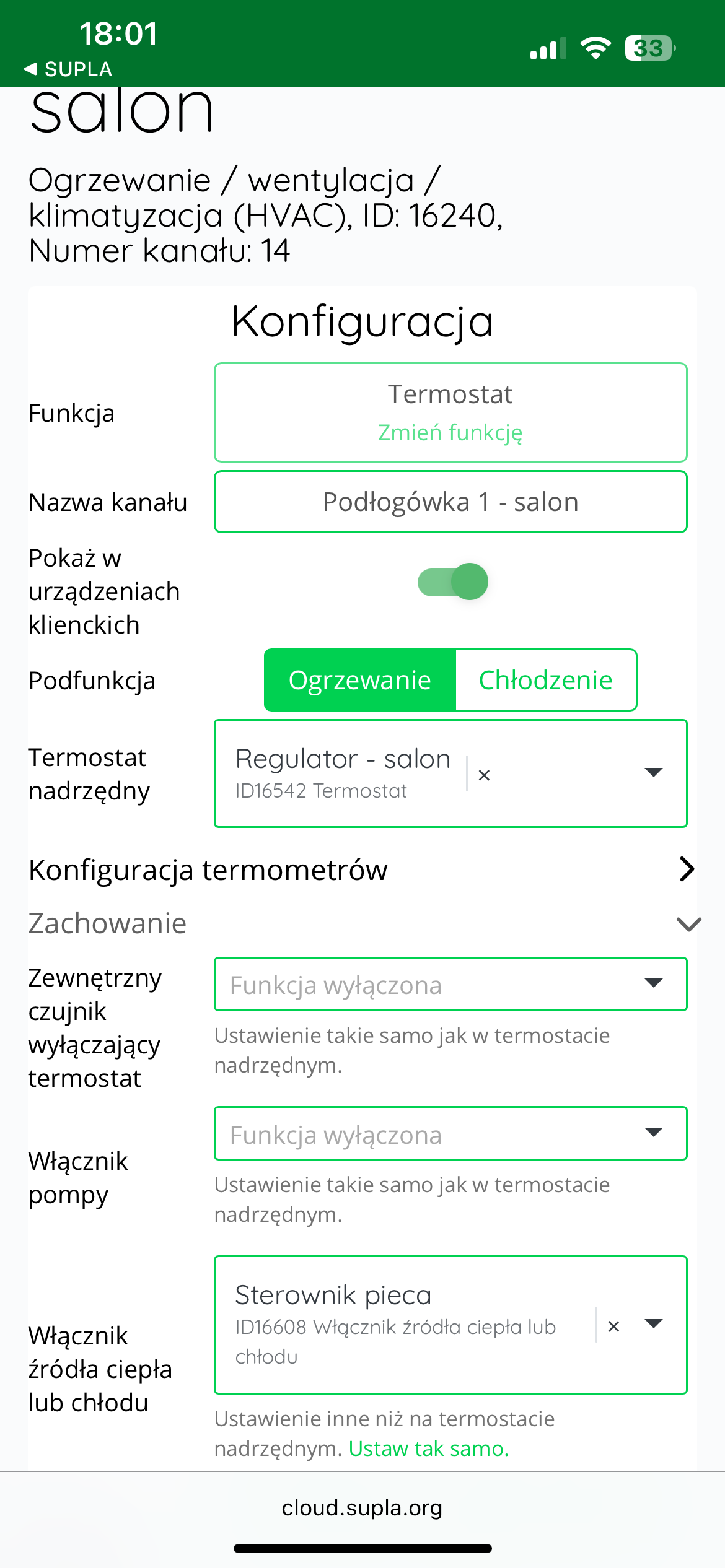
Solution: In the Supla app, select " Supla Cloud " from the Menu and log in. Then, enter the AURATON Box gateway channel. Then, enter the thermostat channel for the given zone of the AURATON Floor Heating Controller. In the "Thermometer Configuration" , select the temperature controller assigned to the given zone (e.g., "Regulator – Kitchen" as the "Master Thermostat ." In the next step, select the same temperature controller as the " Master Thermostat ." Finally, save everything by pressing the " Save Changes " button. Proceed in the same way for each pair of devices: the AURATON Heat Monitor temperature controller + the AURATON Floor Heating Controller zone. If one AURATON Heat Monitor temperature controller is to control more than one zone in a room, select the same temperature controller as the "Master Thermostat" and "Master Thermostat" in the thermostat channels of the remaining controlled zones of the AURATON Floor Heating Controller.
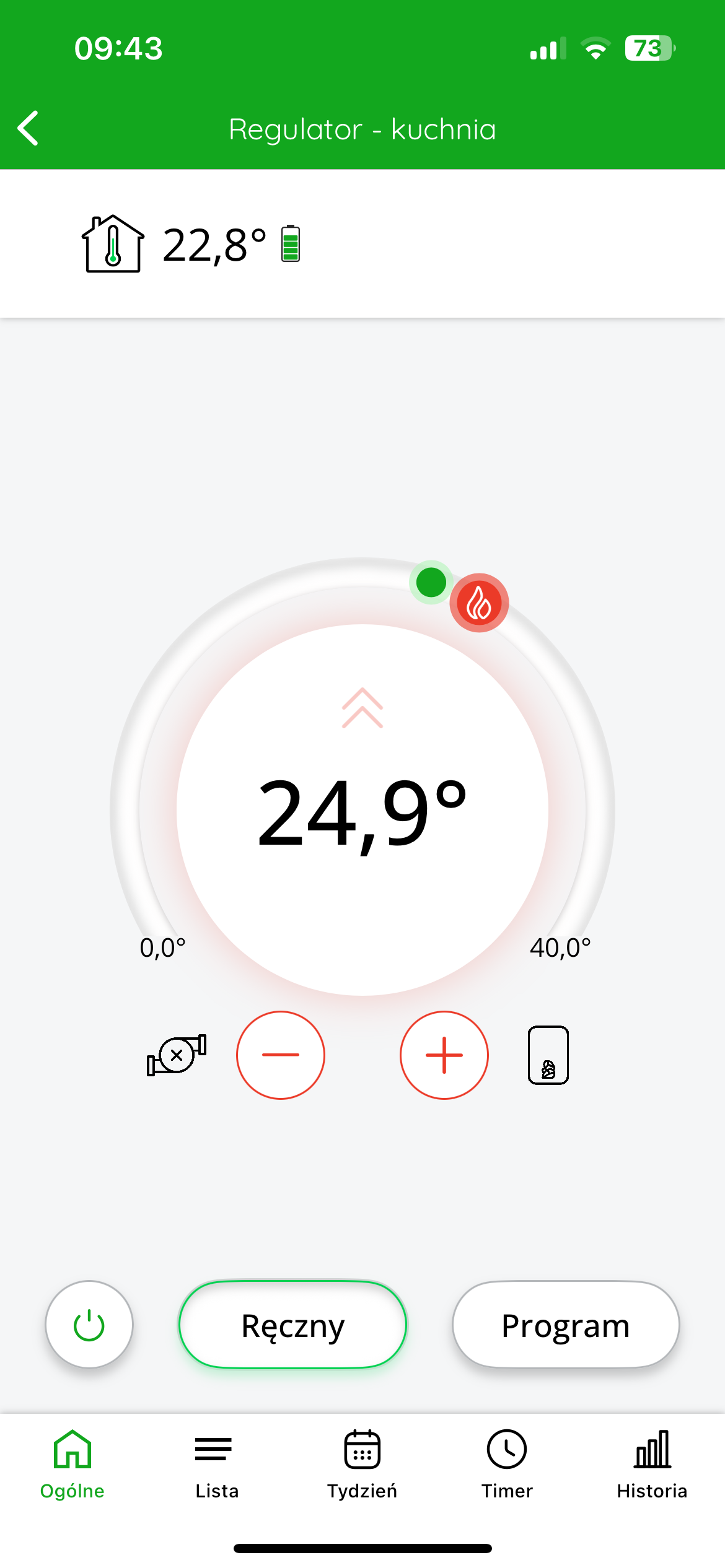
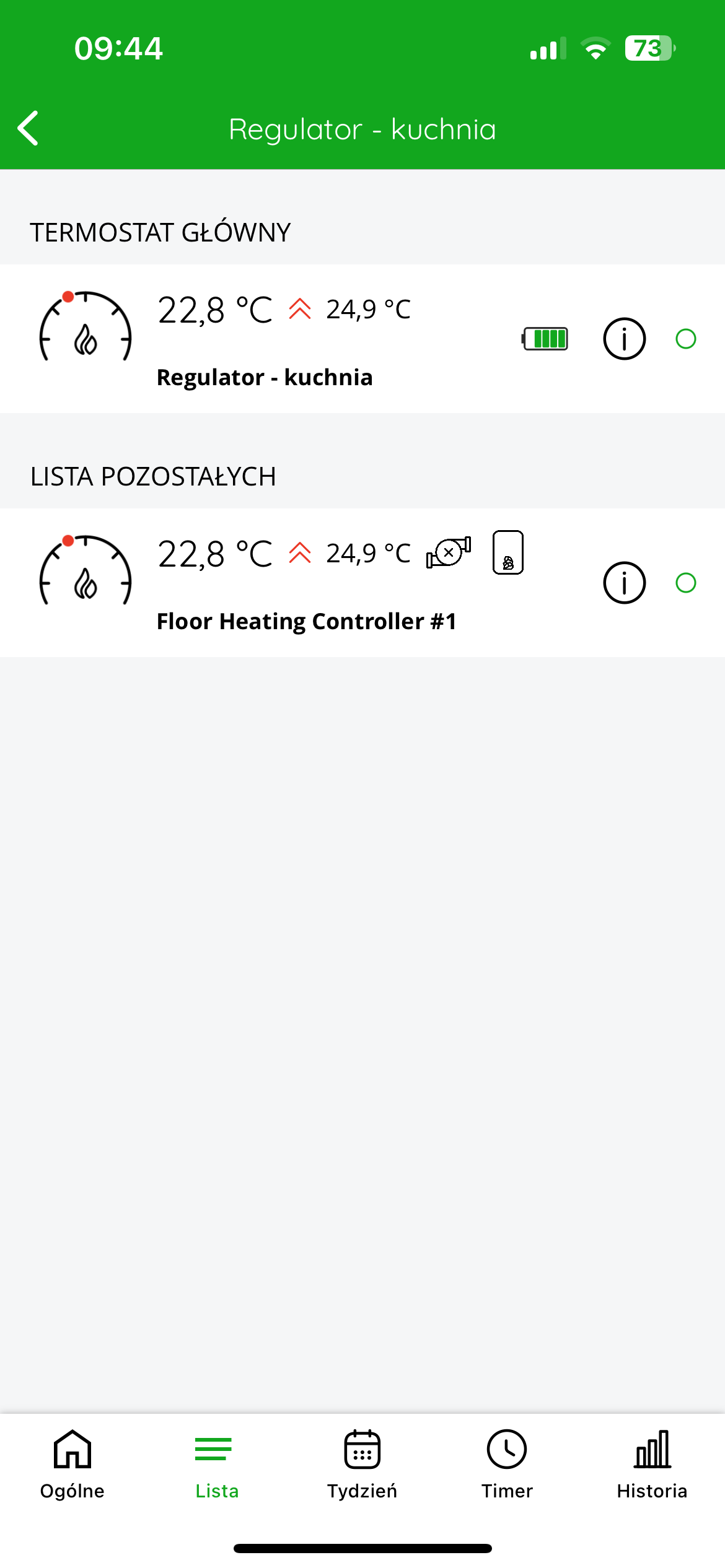
In the application, after entering the temperature controller, an additional "List" tab will appear at the bottom of the screen, after clicking on which you can see which devices are connected to each other.
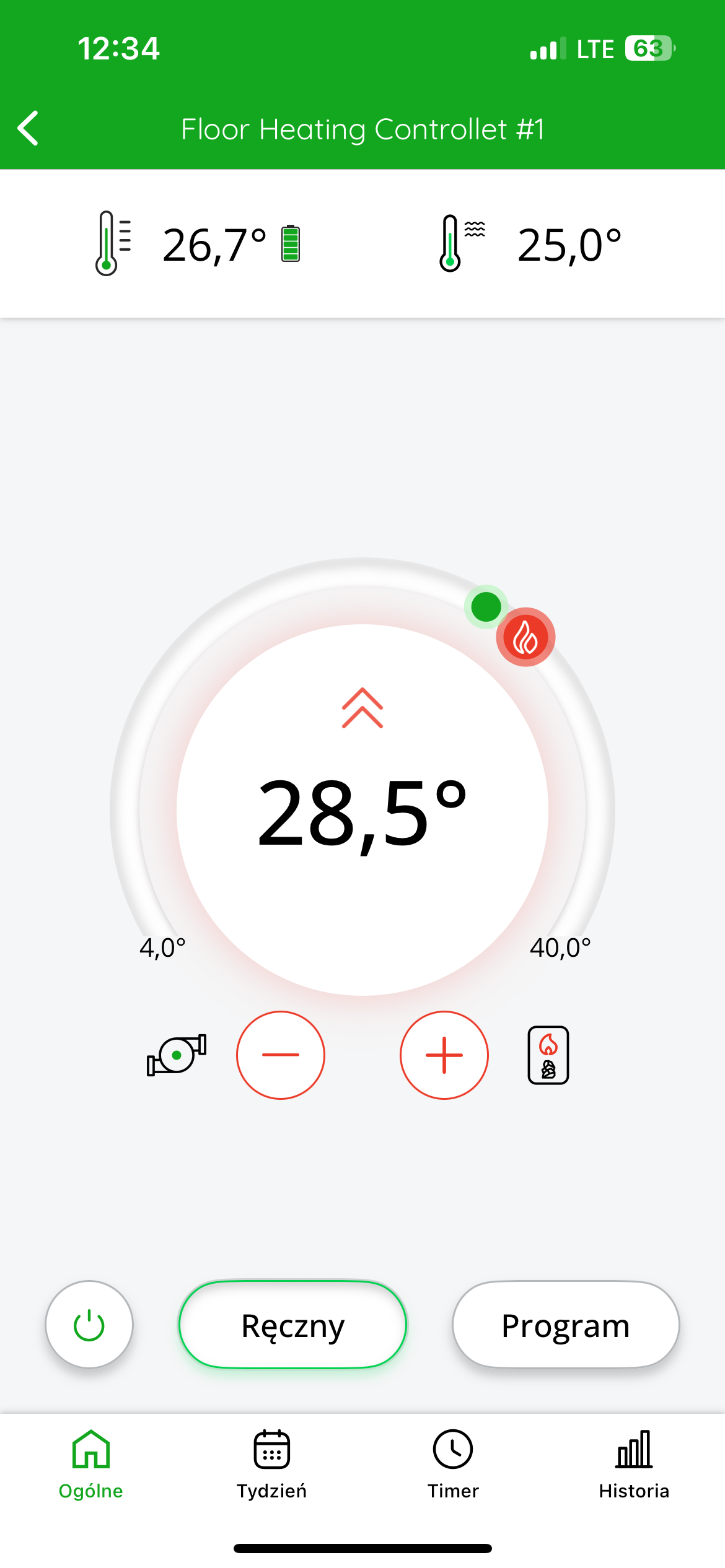
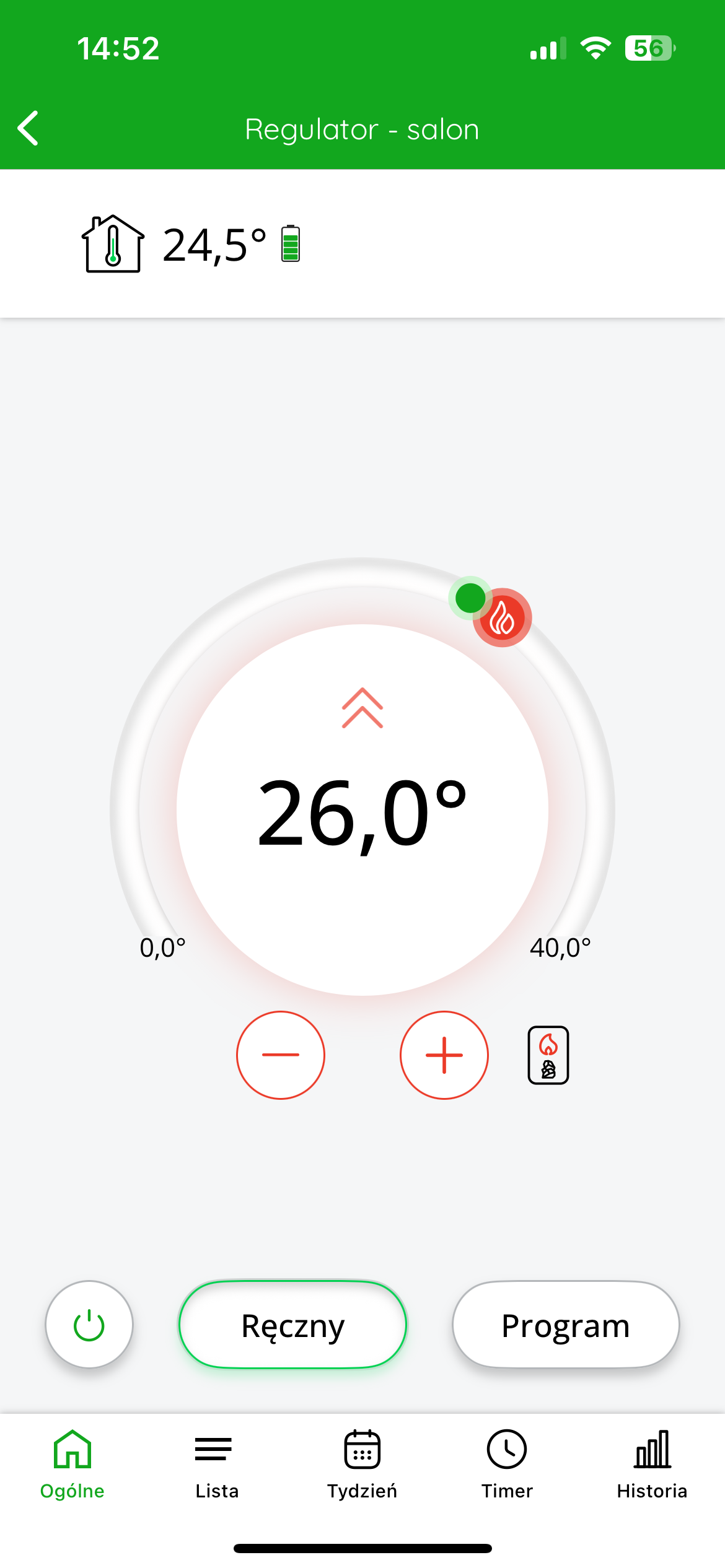
The top left of the display shows the temperature measured by the controller. The target temperature is displayed in the center of the screen.
You can roughly adjust the target temperature by moving the red slider. For more precise settings, use the "+" or "-" buttons.
STANDARD SETTING (underfloor heating) – cooperation of the wireless AURATON Floor Heating Controller with the AURATON Temperature Sensor Indoor thermometer in the SUPLA application
Goal: We have underfloor heating in our home. We want individual zones of the AURATON Floor Heating Controller to be controlled based on temperature measurements from assigned AURATON Temperature Sensor Indoor thermometers.
Solution: In the Supla app, select " Supla Cloud " from the menu and log in. Then, enter the AURATON Box gateway channel. Then, enter the thermostat channel of the given zone of the AURATON Floor Heating Controller. In the "Thermometer configuration" as the "Main thermometer" (e.g., "Thermometer – living room" ). Finally, save everything by pressing the " Save changes" . Proceed similarly for each pair of devices: AURATON Floor Heating Controller zone + AURATON Temperature Sensor Indoor thermometer. If one thermometer in a room is to measure the temperature to control more than one zone, then select the same thermometer as the "Main thermometer" in the thermostat channels of the remaining controlled zones of the AURATON Floor Heating Controller.
In the application, after entering a given zone of the strip, we gain the ability to control the target temperature of the room to which the devices are assigned.
At the top left of the display there is information about the temperature measured by the thermometer.
At the top of the display on the right side there is information about the temperature measured by an external temperature sensor optionally connected to the strip (see the chapter: "Working with an external temperature sensor".
The target temperature is displayed in the center of the screen .
You can roughly adjust the target temperature by moving the red slider. For more precise settings, use the "+" or "-" buttons.
MIXED SETTING (underfloor heating + radiator heating) – cooperation of the wireless AURATON Floor Heating Controller underfloor heating strip with AURATON Radiator Controller electronic radiator heads and AURATON Heat Monitor temperature regulators in the SUPLA application
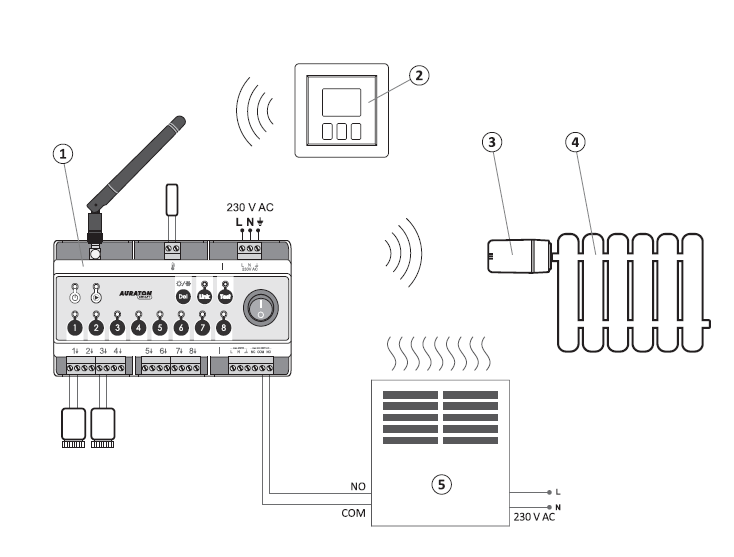
- AURATON Floor Heating Controller
- AURATON Heat Monitor.
- AURATON Radiator Controller
- Heater
- A heating device, e.g. a gas furnace
Remote control of the furnace and/or pump – using the AURATON Heater Controller
If you have underfloor heating and you need to control the operation of the heater, but there is no possibility of connecting the strip to the heater by wire, the control function can be taken over by the AURATON Heater Controller.
To configure such cooperation in the SUPLA system, log in to the Supla Cloud and then enter the AURATON Box gateway channel .
In the next step, enter the channel corresponding to the thermostat of the selected zone of the AURATON Floor Heating Controller strip , for example named "Floor 1 - living room" .
After entering the channel, expand the "Behavior" , and then in the "Heating or cooling source switch" , select the device responsible for switching on the furnace, i.e. the AURATON Heater Controller , which may be marked as " Furnace controller ".
After making your selection, confirm the settings by clicking the "Save changes" .
The same procedure should be repeated for each subsequent underfloor heating zone that we want to link to the furnace controller.
Once the configuration is complete, the system will operate in such a way that when any zone reports a demand for heat, the AURATON Heater Controller will start the furnace.
The furnace will operate until the temperature in a given room reaches the set point in the thermostat settings.
Additional notes
- The greater the distance of the tested regulator, the fewer indicator lights will light up.
- If only 1 or 2 LEDs are lit, consider changing the location of the controller/thermometer.
A maximum of 6 AURATON actuators can be connected to each zone.
| Q | All connections must be made with the power source disconnected. It is recommended that the AURATON Floor Heating Controller be installed by professionals. |
| P | For proper operation and radio signal shielding, it is necessary to mount the controller in PLASTIC electrical cabinets on a DIN rail. |
Technical data
| Power supply: | 230V AC, 50Hz, 1.5W |
| Operating temperature range: | 0 – 45 °C |
| Operating status indication: | LED diodes, sound |
| Maximum number of paired devices: | 10 |
| Number of independently controlled heating zones: | 8 |
| Relay load capacity: | Max. 250 V AC, max. 2 A (potential-free contacts COM, NO, NC) |
| Load capacity of 230 V head control outputs: | Max. 30 W, up to 6 AURATON Vela actuators per zone |
| Load capacity of the 230 V central heating pump output: | Max 200 W |
| Delay in switching on the relay and pump: | About 3 minutes |
| Antenna connector type | SMA |
| temperature sensor |
NTC type thermistor 100K, B = 3990K |
| Range of action: | In a typical building with standard wall construction – approx. 30 m, in open spaces – up to 300 m |
| Radio frequency: | 868.150 MHz 868.450 MHz |
| Receiver category: | 2 |
| Radio signal strength: | Up to 14 dBm |
| Suggested mounting location: | On the DIN rail of the distribution box |
| Degree of protection | IP20 |
| Dimensions [mm]: | 158.90 x 90.00 x 58.50 |
Disposal of the device
O
Devices are marked with a crossed-out waste bin symbol. In accordance with European Directive 2012/19/EU and the Waste Electrical and Electronic Equipment Act, this marking indicates that this equipment, after its useful life, must not be disposed of with other household waste.
Users are obligated to dispose of it at a collection point for used electrical and electronic equipment.
LARS Andrzej Szymański hereby declares that the radio equipment type AURATON Floor Heating Controller complies with Directives 2014/53/EU and 2011/65/EU. The full text of the EU declaration of conformity is available in the download section below.
Manufacturer's address and contact details:
LARS, ul. Świerkowa 14
64-320 Niepruszewo
www.auraton.pl