

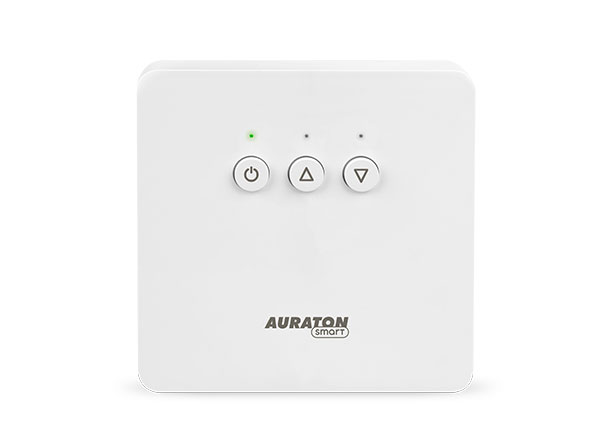
User manual ver. 20210823
This document contains information on the safety, installation and use of the AURATON Heater Controller.
Basic information
The Auraton Heater Controller is a thermostatic heater control unit for furnaces and works with the AURATON Heat Monitor wireless controller. The device is mounted next to the heating device and can operate at a load of 16A.
Device description
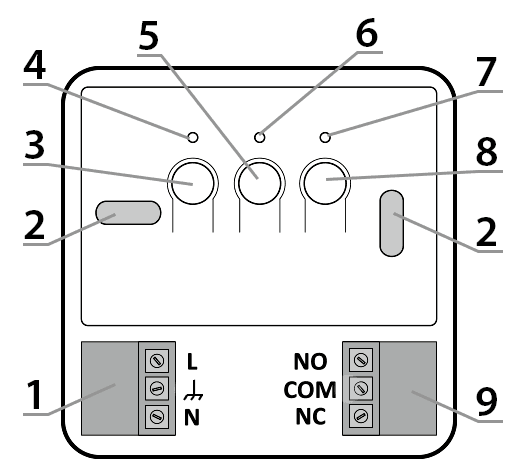
- – Detachable 230V power connector terminals
- – Mounting hole
- – On/Off button (F )
- – Green power LED
- – Factory Reset Button (E )
- – Red diode indicating that the actuator is switched on
- – Green LED indicating that the actuator is turned off
- – Device to device pairing button (D )
- – Control connector
Device assembly
P
WARNING: Before beginning installation, read this manual.
Failure to follow the instructions contained in this manual may be hazardous to your health and life and result in property damage. The manufacturer is not liable for any damage resulting from use inconsistent with this manual.
Q
WARNING! Electric shock hazard
. Before installing the AURATON Heater Controller, ensure that the power supply to the circuit to which the device is connected is disconnected. It is recommended that the installation be performed by a specialist.
Q
CAUTION! Disconnecting the power supply does not disconnect the output.
The Heater Controller is equipped with a bistable relay (self-retaining). This means that if the device's power supply is disconnected, the relay will remain in its last stored position. Please note that in such a case, dangerous voltage may be present on the terminals of the actuator connected to the Heater Controller. The NO and NC markings indicate the position of the contacts of the powered device when the heating device is off. Any changes to the device should be made with the power supply disconnected from both the Heater Controller and the actuator.
P
WARNING! Danger of damage to the electrical installation.
The device's power supply circuit must be equipped with a circuit breaker and overcurrent protection.
P
CAUTION! Danger of cable overloading.
The cables supplied with the controller are designed to carry a maximum load of 2.5A. If connecting devices with higher current consumption, they should be replaced with cables of appropriate cross-section.
For ease of installation, the connectors are equipped with removable terminals. Before making the cable connections, they can be disconnected from the controller. Wires can be routed from the bottom of the receiver by breaking out the holes in the mounting plug, or from the back of the receiver if the wires are led out of the wall. To connect from the back, break out the plug.
Method of connection to a heating device
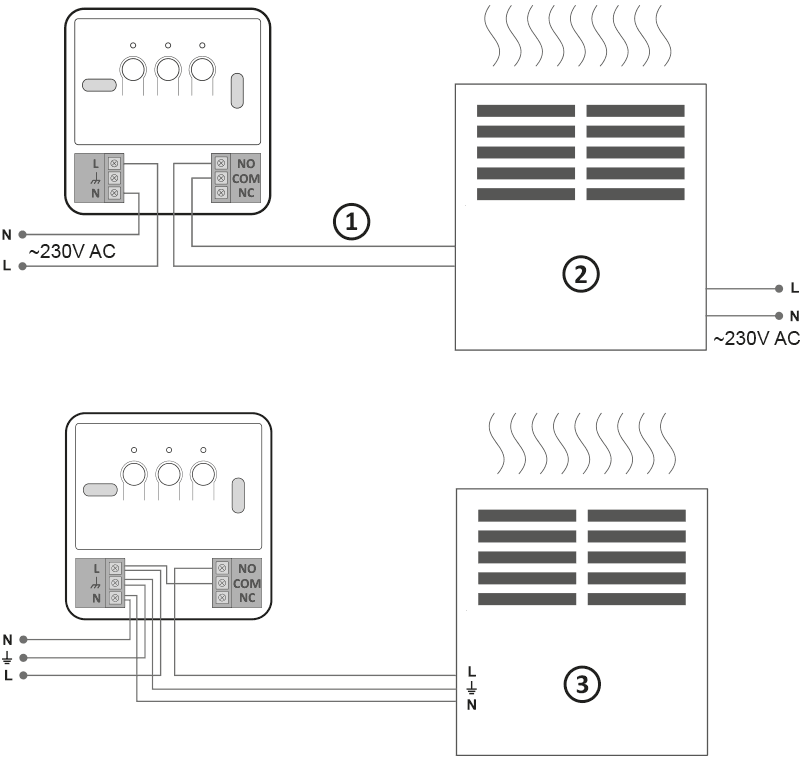
- Control
- A heating device , e.g. a gas furnace
- Electric heating device (MAX ~230 V, 16 A)
- Remove the front cover of the AURATON Heater Controller by unscrewing the screws halfway down.
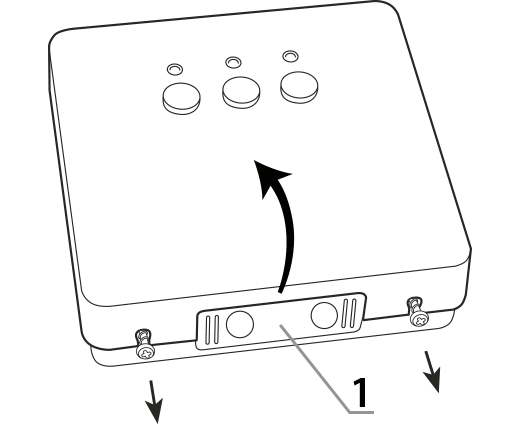
1 – mounting plug - Connect the heating device to the device's control connector terminals. Follow the heating device's service manual. The most commonly used terminals are COM (common) and NO (normally open).
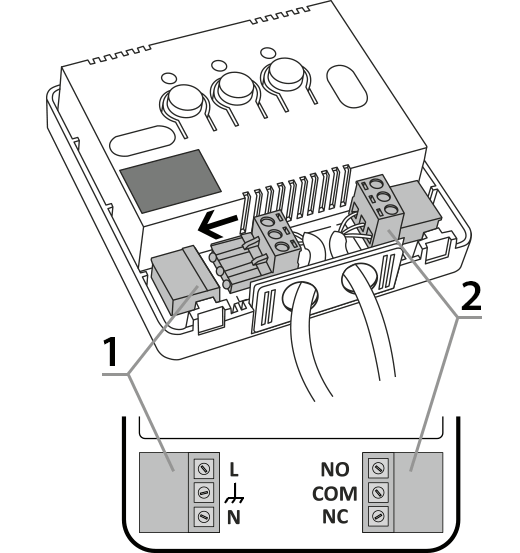
1 – power connector
2 – control connector - Connect the power cables to the AURATON Heater Controller power connector terminals while observing safety regulations.
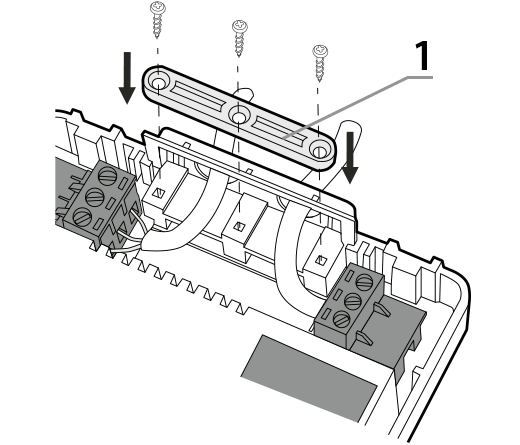
1 – cable mounting bracket - Once the cables are connected, secure them with the "cable retaining clip" and re-screw the cover onto the device.
Wall mounting
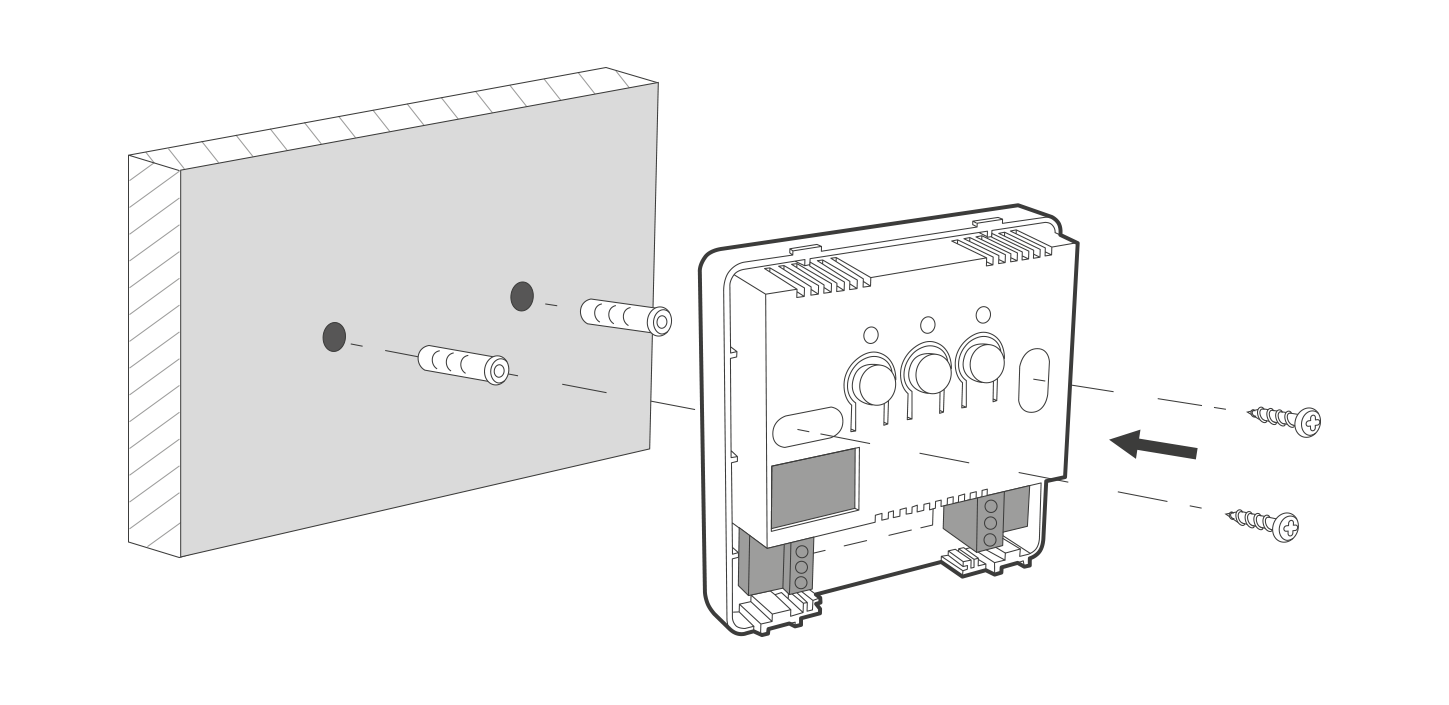
- Remove the cover from the front of the device
- Mark the position of the mounting screw holes on the wall.
- In the marked places, drill holes with the diameter of the dowels included in the kit (5mm)
- Insert expansion bolts into the drilled holes
- Screw the AURATON Heater Controller to the wall with screws so that they hold the device securely.
NOTE: If the wall is wooden, there is no need to use expansion bolts. Drill 2.7mm holes instead of 5mm and drive the screws directly into the wood.
Pairing devices
To operate correctly, the AURATON Heater Controller must be paired with an AURATON Heat Monitor regulator or an AURATON Pulse control unit.
After connecting to the mains, turn on the receiver by briefly pressing the power button (F ). When the device is turned on, the green power LED will illuminate and a single beep will sound. To turn off the receiver, e.g., outside the heating season, hold the power button for 3 seconds until a double beep is heard and the green power LED turns off, turning off the heating device.
- Pairing the AURATON Heater Controller is initiated by pressing and holding the right pairing button (D ) until the LED flashes green, at which point you can release the button.
The device waits 30 seconds for pairing. After this time, it will automatically return to normal operation. - Enable pairing mode on the second device you want to add (examples described below).
- Successful completion of the pairing is indicated by the LED on the AURATON Heater Controller stopping flashing green, a single sound signal and transition to normal operation.
If an error occurs during pairing, repeat steps 1 and 2. If further errors occur, deregister all devices from the AURATON Heater Controller (see "Restoring factory settings") and try pairing the devices again.
Enabling pairing – Heat Monitor controller
On the AURATON Heat Monitor controller, press theb d orc d for 3 seconds until the transmission symbol (W ) lights up on the display. The AURATON Heat Monitor controller waits 30 seconds for pairing. After this time, it will automatically return to normal operation.
Enabling pairing – AURATON Pulse control panel
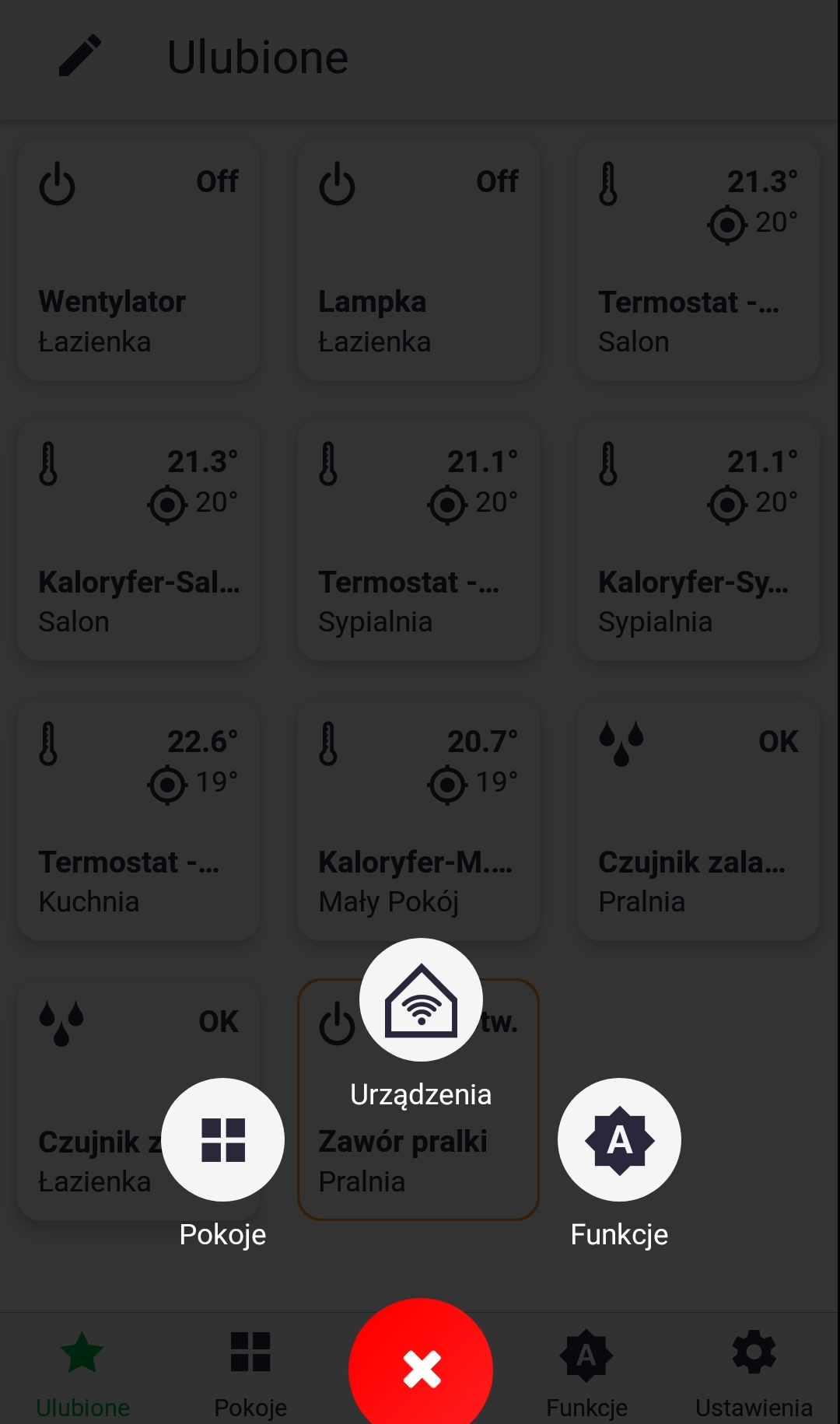
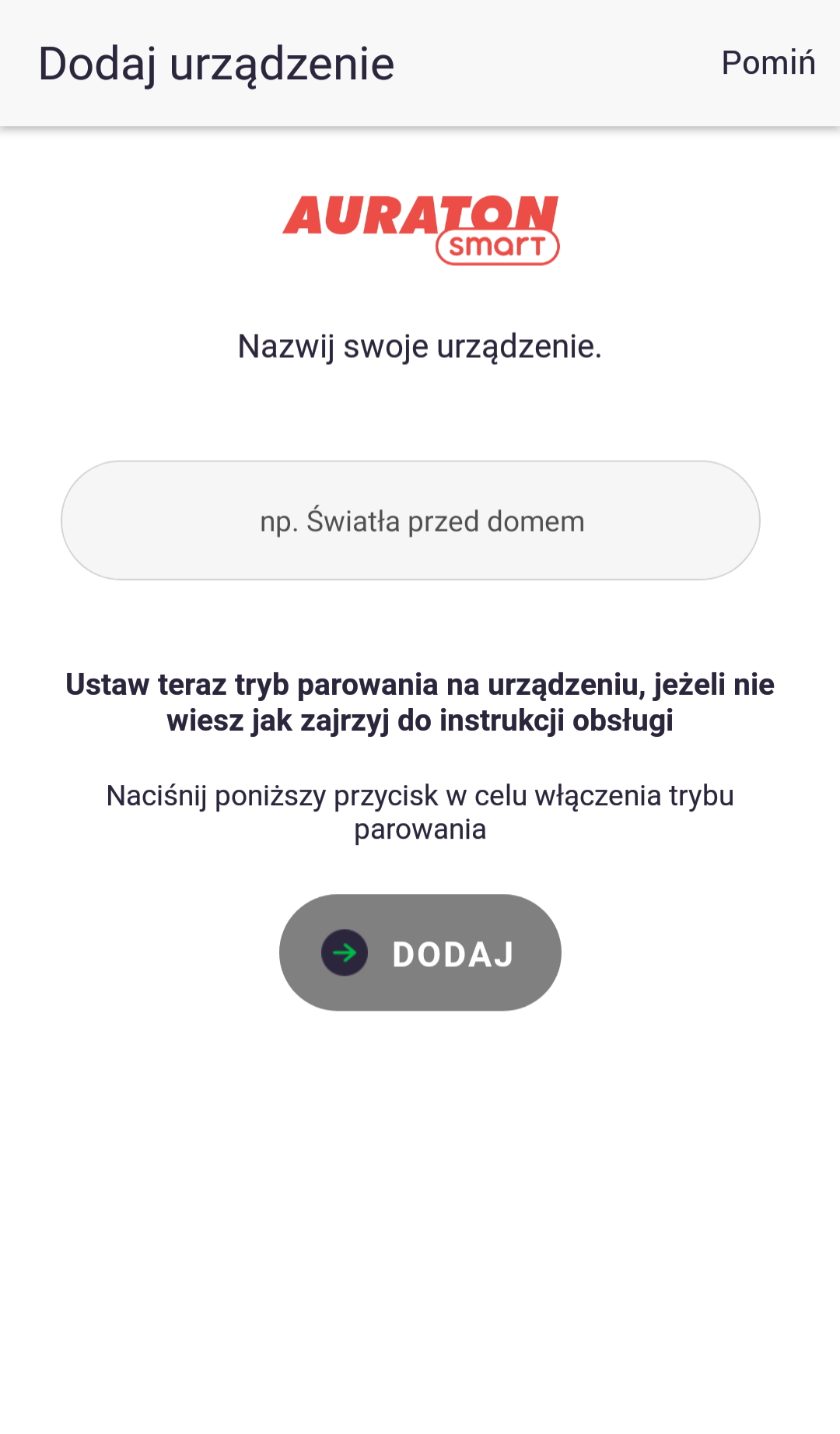
Pairing in AURATON Pulse is enabled using the AURATON Smart App. After launching the app, press the green plus button in the center of the screen. When the next screen appears, tap the house icon labeled "Devices." On the next screen, name the device you're adding. After entering the name, press the "Add" button. Once successfully paired, you can place the device in any previously added room and add it to your favorites.
Factory reset
Deleting paired device data from the AURATON Heater Controller is initiated by pressing the left deregister button (E ) for at least 10 seconds until the LED stops flashing red, then releasing the button. The audio signal works the same way as pairing, i.e., pressing the button is signaled by a short beep, followed by a double beep after 10 seconds. This operation deletes all user data from the device, but the software version remains unchanged (it does not restore the version from the time of purchase).
Device functions
How does the heating function work?
The AURATON Heater Controller operates with a hysteresis of 0.2°C. For example, if the target temperature is 21°C, the device will turn on the heating when the room temperature drops to 20.8°C and turn it off when it rises to 21.2°C. The device is equipped with its own temperature sensor, but it is recommended to use an external temperature sensor, such as the AURATON Heat Monitor.
Function to restore the previous software
First, disconnect the AURATON Heater Controller from the power supply, press and hold the power button (F ), and then, while holding it, reconnect the device to the power supply. Wait for the green LED to flash three times and then release the button (all LEDs should be off). After the device automatically restarts, the previous software version will be restored (in the event of malfunctions after the update). The entire process may take up to a minute, and the device must remain powered on during this time . The previous software version is always loaded. If the software was previously updated from version 1.6 to 1.5, the previous version is 1.6.
Work signaling
Each time a radio transmission from a paired device is received, the AURATON Heater Controller signals this with a momentary alternating color change of the LEDs. When the relay is on, the LED is red; when the relay is off, the LED is green.
Pressing any button is signaled by a short beep.
| D G |
The diode is green – the actuator is turned off (COM and NC contacts closed). |
| E I |
The diode lights red – the actuator is switched on (COM and NO contacts closed). |
| D H |
The diode flashes green – AURATON Heater Controller is waiting for the device to be paired – ( chapter: "Pairing devices" ). |
| E J |
The LED flashes red – the AURATON Heater Controller is waiting for confirmation of the factory settings restoration procedure – ( chapter: "Restoring factory settings" ). |
| F | Green power LED – AURATON Heater Controller is on. |
Device operating modes
The AURATON Heat Monitor and AURATON Heater Controller set can operate in two modes.
Mode I (local):
In this mode, the Heat Monitor and Heater Controller can operate independently without the need for the AURATON Pulse internet control panel. Simply add the controller to the heater's attachment.
Mode II (remote):
In remote mode, you can use the AURATON Pulse internet control unit, allowing you to access the entire system from outside your home.
This allows you to remotely control your heating, check battery charge levels, receive notifications about potential events, create schedules, and much more.
For proper remote operation, Internet access is required both from the control unit itself and from the phone or tablet with the application (Android, iOS).
When using Mode II (remote), it is recommended to first pair the Heater Controller with the Heat Monitor. This pairing will ensure the unit will operate correctly even if the Auratron Smart control unit itself is powered down.
Software update from version 1.12
What's new?
Radio connection failure indication
If the radio connection is lost for more than one hour, the device will display a fault indication (LEDs flash alternately red and green).
The fault indication is displayed alternately with the current readings every 5 seconds.
Until the problem is resolved, the device will maintain the temperature setpoint according to its built-in temperature sensor (the last setpoint value will be retained). When the radio connection is restored, the error is cleared and the AURATON Heater Controller returns to normal operation.
Radio signal test
The AURATON Heater Controller is equipped with a radio signal tester. To enable this function:
- Press the two outermost buttons ( FD ). Activation of the function is indicated by the appropriate number of LEDs lighting up. If there is no radio signal, the LEDs will remain off.
- If only one left LED illuminates, it indicates insufficient radio signal strength, which may cause communication problems. If both the left and middle LEDs illuminate, the radio signal strength should be sufficient for normal operation. However, if all three LEDs illuminate, the signal is excellent. The radio signal tester mode lasts for 20 seconds, after which the receiver will display the current readings.
- To turn off the tester function faster, press any button for at least 1 second.
The activated test mode does not affect the heating control process.
Power failure mode
In the event of a power outage and the device being turned on again, the AURATON Heater Controller remains in the position it was in before the power loss until it receives information from the paired device (AURATON Heat Monitor regulator, AURATON Pulse control unit).
Cooperation with the AURATON Pulse headquarters
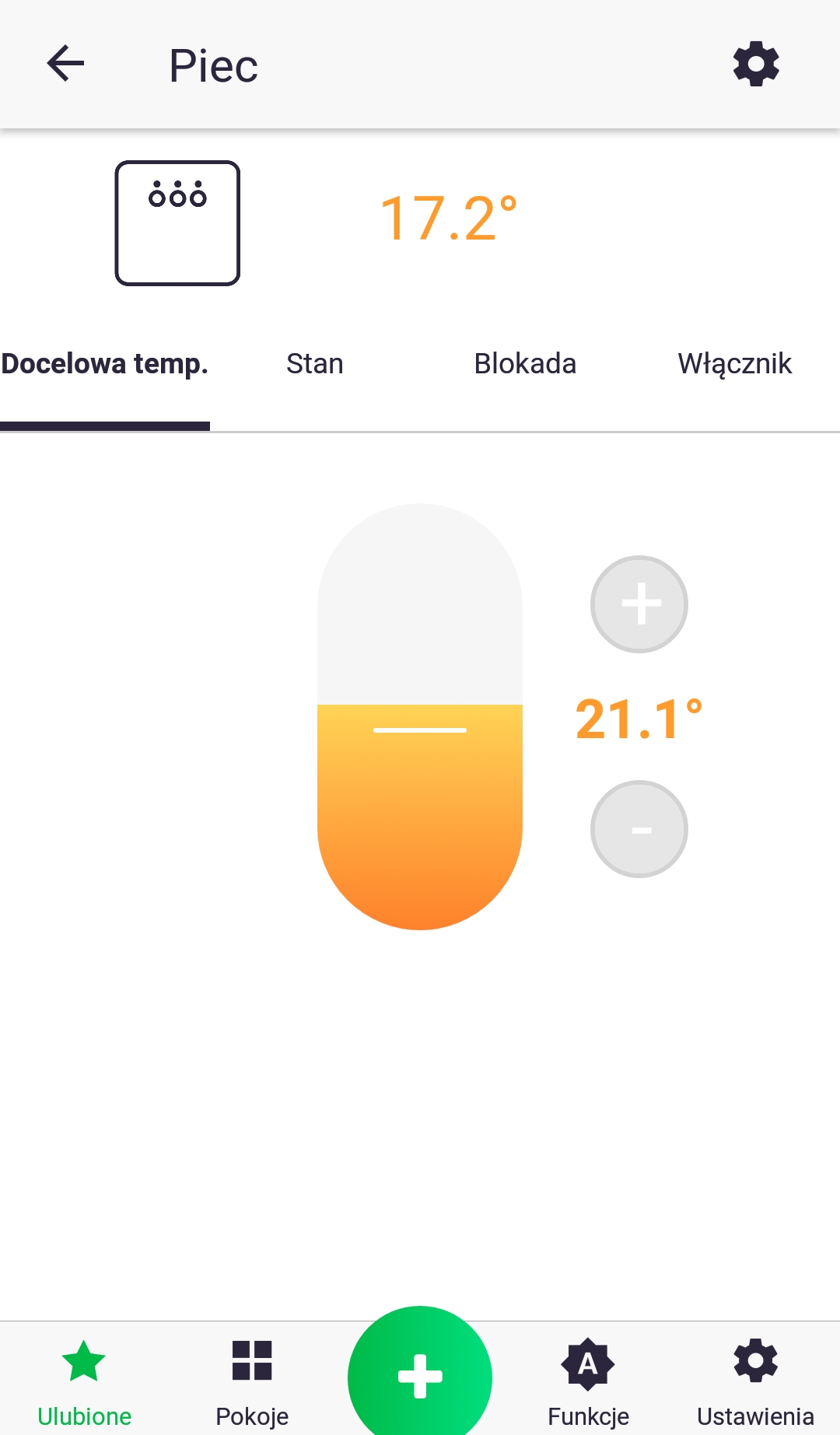
The AURATON Heater Controller is paired with the AURATON Pulse control unit just like with other devices (as described in the section on pairing devices). The only difference is that pairing mode is activated on the control unit through the app by pressing the green plus sign at the bottom of the screen and then clicking the "Devices" icon. Details are described in the app's user manual. The image below shows the device control screen in the app, which displays the following parameters: current temperature, target temperature, device status (on/off), button lock (the device cannot be controlled locally), and a switch for direct relay control. The last three parameters can be changed in separate tabs, which are accessed by pressing the icons with their corresponding names.
The Heater Controller thermostatic heater control unit is primarily designed to work with the Heat Monitor regulator and the Radiator Controller thermostatic head. The app allows you to easily link the AURATON Heater Controller to the thermostat by creating two "Group" functions. One function should group the current temperature, and the other the target temperature. Any changes to each device will then be sent to the other devices. If the system is installed in a home where the heater is switched on by the AURATON Heater Controller, it is possible to link all installed heaters to the heater using the "Heating" function. This function means that if the radiator valve opening of any of the connected heaters is above 0%, the heater will be turned on. The "Heating" function can also be used if you have multiple heaters in your home (without Radiator Controller heaters) and want to control the heater with them. In this case, if any of the rooms with the thermostat is too cold, the heating will be turned on.
Technical data
| Operating temperature range: | 0 – 45 °C |
| Temperature measurement range: | 0 – 45 °C |
| Temperature control range: | 0 – 40 °C |
| Additional features: | FrostGuard/Low-spark contact engagement |
| Maximum load current of relay contacts: | 16A, 250VAC |
| Operating status check: | LED diodes, sound signal |
| Maximum number of paired devices: | 3 |
| Power supply |
230V AC ±10%, 50Hz, 1.5W |
| Cooperation with the Internet switchboard | AURATON Pulse |
| Degree of protection | IP20 |
| Radio frequency: | 868.150 MHz 868.450 MHz |
| Radio signal strength: | 11 dBm |
| Radio receiver category: | 2 |
| Range of action: | in a typical building, with standard wall construction – up to 30 m in open space – up to 300 m |
Disposing of the device
O
Devices are marked with a crossed-out waste bin symbol. In accordance with European Directive 2012/19/EU and the Waste Electrical and Electronic Equipment Act, this marking indicates that this equipment, after its useful life, must not be disposed of with other household waste.
Users are obligated to dispose of it at a collection point for used electrical and electronic equipment.