

User manual ver. 20260130
This document collects information on the safety, installation and use of the AURATON PIR Sensor device for the SUPLA system.
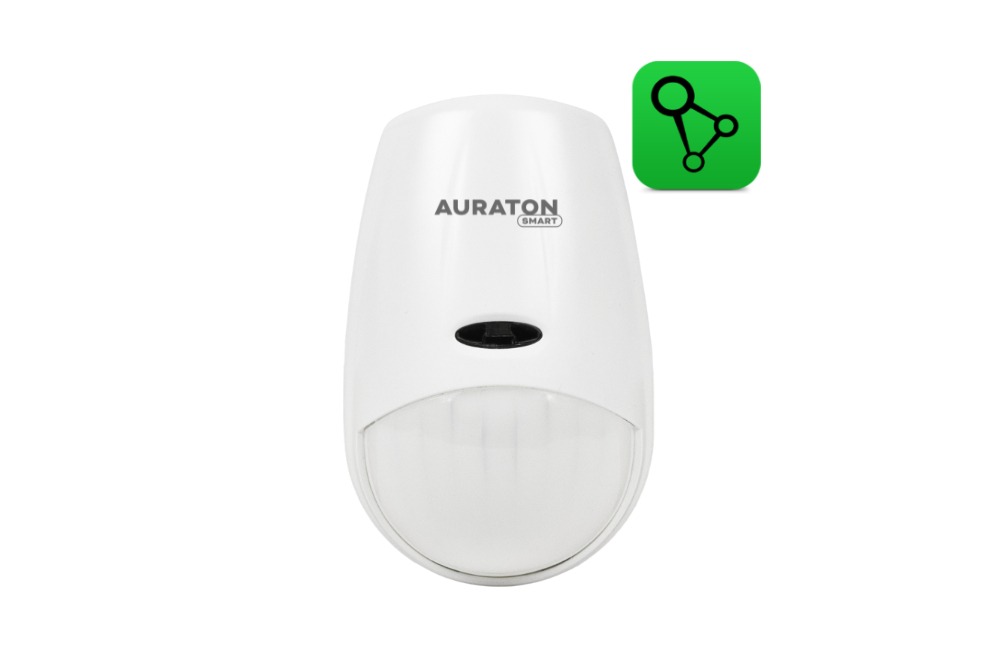
Wireless motion sensor AURATON PIR Sensor
The AURATON PIR Sensor wireless motion sensor, when used with any relay (e.g., AURATON Heater Controller, AURATON Switch ONE), is designed to support functions such as "intelligent circulation" of the DHW circuit or switching on lights. A circulation pump connected to any relay output is activated only when the AURATON PIR Sensor detects user activity in the DHW room (e.g., bathroom). The circulation pump only activates for a pre-set period of time (e.g., 1 minute). After this period, a pre-configured pause period (e.g., 5 minutes) occurs, during which motion detected by the AURATON PIR Sensor motion sensor does not activate the relay, and therefore the circulation pump.
 |
The lithium battery used (CR 123A 3V) allows the motion sensor to operate continuously for many years. |
 |
Interference-free communication between devices. The AURATON PIR Sensor and the AURATON Box gateway communicate at 868 MHz. Very short, encrypted transmission packets (approx. 0.004 s) ensure efficient and interference-free device operation. |
Description of the wireless motion sensor AURATON PIR Sensor

- Front of the sensor
- LED diode
- Back of the sensor
- CR123A 3V battery
- Function button
- Back cover
- Handle attachment
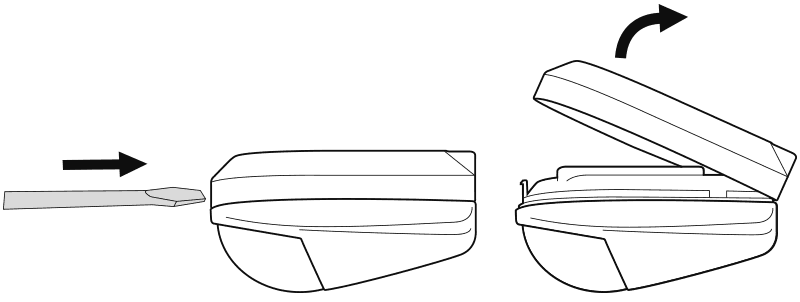
Removing the back cover of the sensor
Mounting the AURATON PIR Sensor to the wall
To attach the motion sensor to the wall:
- Drill two 5 mm diameter holes in the wall (measure the hole spacing using the mounting bracket – included in the Aquarius PIR kit).
- Insert the expansion plugs (included) into the drilled holes.
- Screw the mounting bracket to the wall.
- Place the motion sensor on the mounting bracket until it clicks into place.
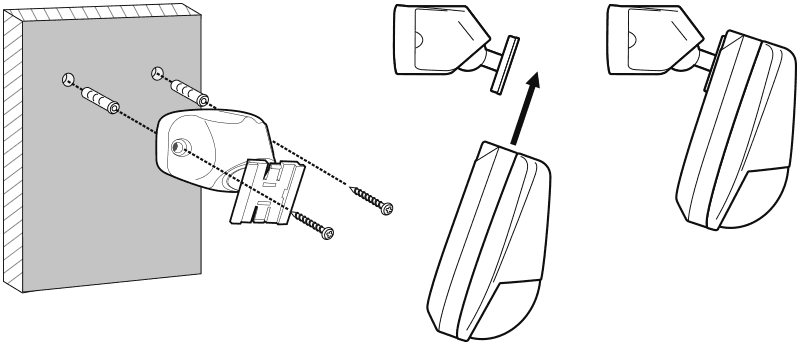
If the wall is wooden, there is no need to use expansion bolts. Drill 2.7mm holes instead of 5mm and drive the screws directly into the wood.
Choosing the right location for the AURATON PIR Sensor wireless motion sensor
The motion sensor should be mounted in a location that allows it to easily detect user movement. It should not be mounted behind obstacles or built into the wall. Avoid mounting too low (minimum 0.5 m above the ground). These sensors are typically mounted on the ceiling at a height of approximately 2.5 m.

Pairing the AURATON PIR Sensor with the AURATON Box gateway
Enabling pairing – AURATON PIR Sensor
To activate pairing, hold down the button on the back of the device. Release the button when the LED lights up green. The pairing process should begin, and the LED should flash.
Enabling pairing – AURATON Box gateway
Pairing the AURATON PIR Sensor motion sensor with the AURATON Box gateway can be done in two ways:
- On the AURATON Box gateway, briefly press the right "Auraton" pairing button (
 ) – the LED under the button will start flashing. Then, put the motion sensor into pairing mode.
or
- In Supla Cloud, enter the AURATON Box gateway channel and press the "Pair new devices or sensors" button – the LED under the right "Auraton" pairing button will start flashing. Then, put the motion sensor into pairing mode.
Device view in the application and in SUPLA Cloud
After pairing the AURATON PIR Sensor with the Auraton Box gateway, the device registers in the SUPLA Cloud as two channels: the PIR motion sensor channel and the thermometer channel. It is recommended to immediately name both channels in the Supla Cloud. By default, the device is named according to its model or intended use, e.g., "PIR Sensor," which can be confusing when using multiple devices of the same type. To facilitate identification, it is a good idea to give the device a unique name immediately after pairing, e.g., "Motion Sensor – Toilet." To do this, edit the "Channel Name" and confirm the changes by clicking "Save Changes."
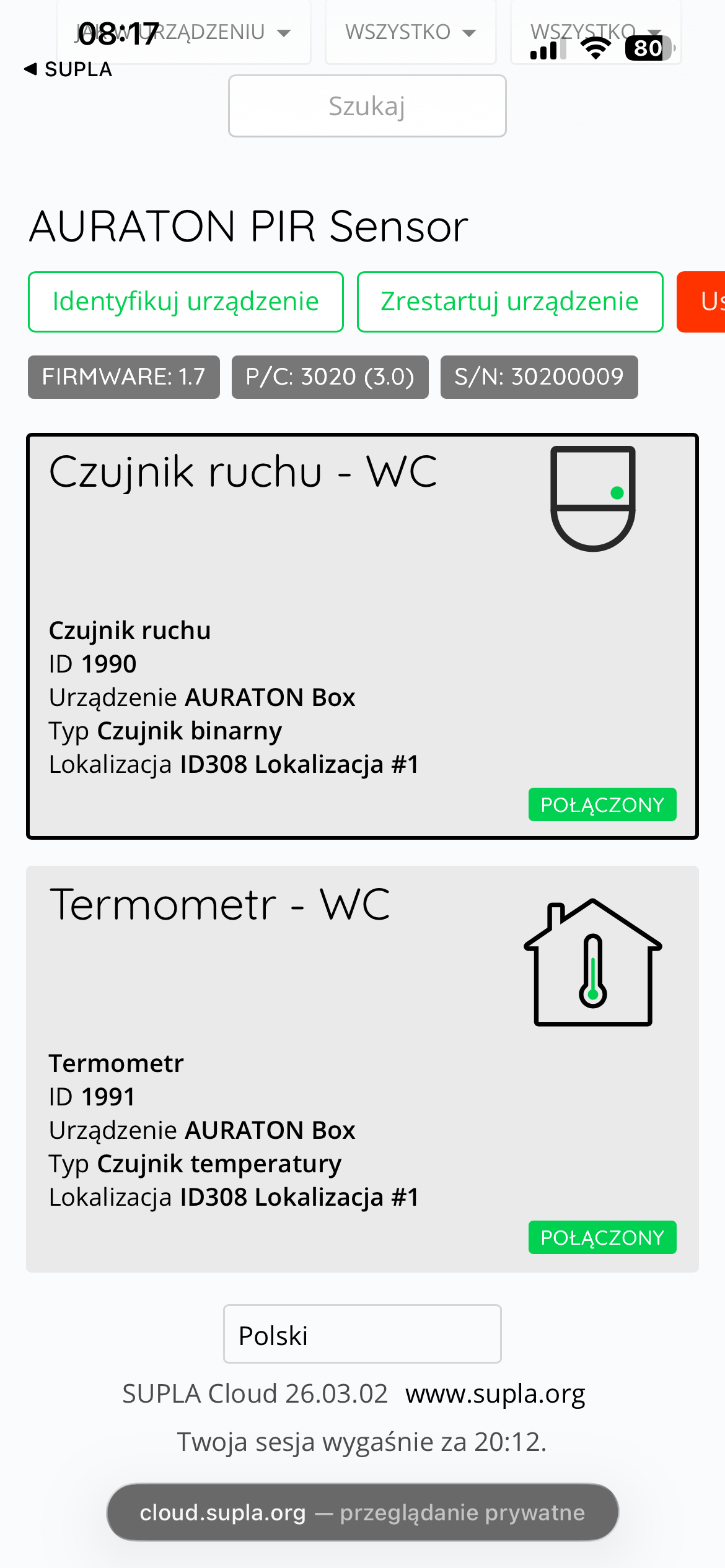
The figure at the top shows both channels in the SUPLA Cloud. The AURATON PIR Sensor device provides two independent channels in the SUPLA Cloud:
- Motion sensor channel (binary)
- Temperature sensor channel (thermometer)
PIR motion sensor channel in SUPLA Cloud
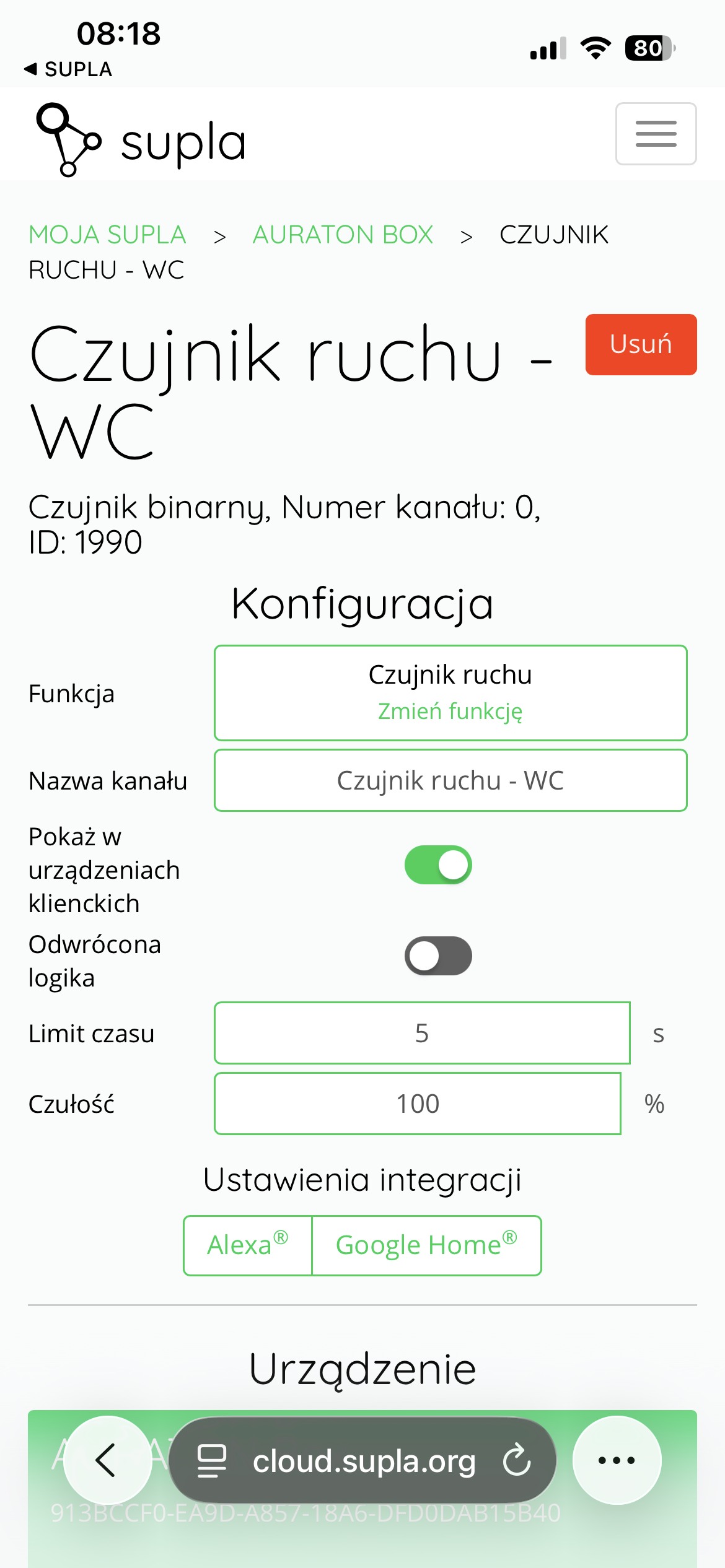
The figure at the top shows a view of the motion sensor channel responsible for motion detection (e.g. "Motion sensor – WC").
The following options are available in the configuration section:
- Function – specifies the channel type (Motion Sensor). The function can be changed.
- Channel name – any name given by the user, facilitating identification (e.g. sensor location).
- Show on client devices – enables/disables the visibility of the channel in SUPLA client applications.
- Inverted logic – changes the way the signal is interpreted (e.g. active state when there is no movement).
- Timeout [s] – time to maintain the active state after motion detection (in seconds).
- Sensitivity [%] – Motion detection sensitivity level expressed as a percentage. The range of values corresponds to four sensitivity thresholds:
- 1–25% – low sensitivity,
- 26–50% – medium-low sensitivity,
- 51–75% – medium-high sensitivity,
- 76–100% – high sensitivity.
Setting the value to 0 disables motion detection.
Additionally, integration settings with external systems (e.g. Amazon Alexa, Google Home) are available.
Thermometer Channel in SUPLA Cloud
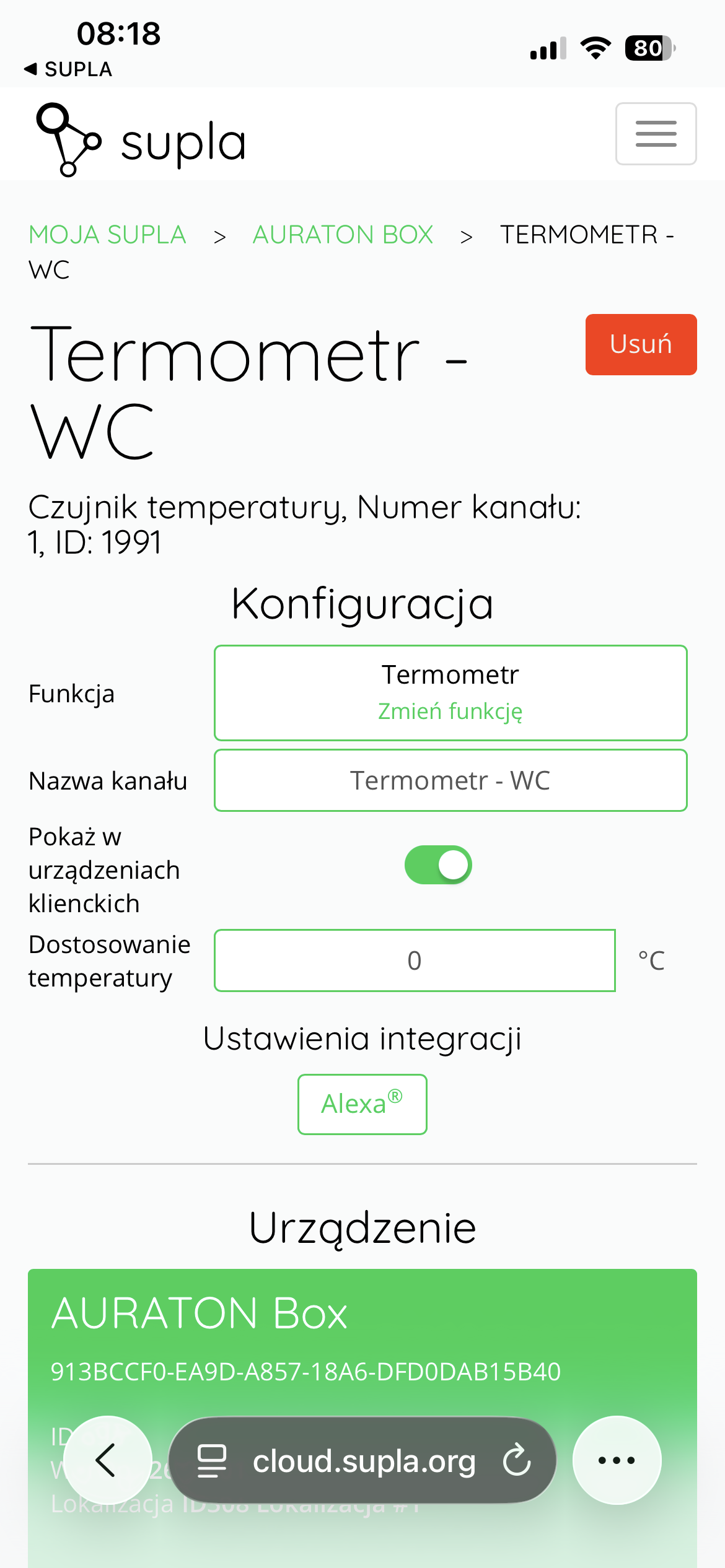
The figure above shows the configuration view of the channel responsible for temperature measurement (e.g. "Thermometer – WC").
In the configuration section the following are available:
- Function – set as Thermometer (function can be changed).
- Channel Name – the name assigned to the temperature channel.
- Show on client devices – controls the visibility of the channel in SUPLA applications.
- Temperature adjustment [°C] – allows you to calibrate the readings by adding or subtracting a correction value.
Integration with selected systems (e.g. Amazon Alexa) is also available.
The temperature sensor built into the AURATON PIR Sensor device can be freely used, for example as a temperature measurement to control heating devices (e.g. AURATON Radiator Controller heads, AURATON Floor Heating Controller underfloor heating strip, AURATON Heater Controller).
View in the SUPLA app
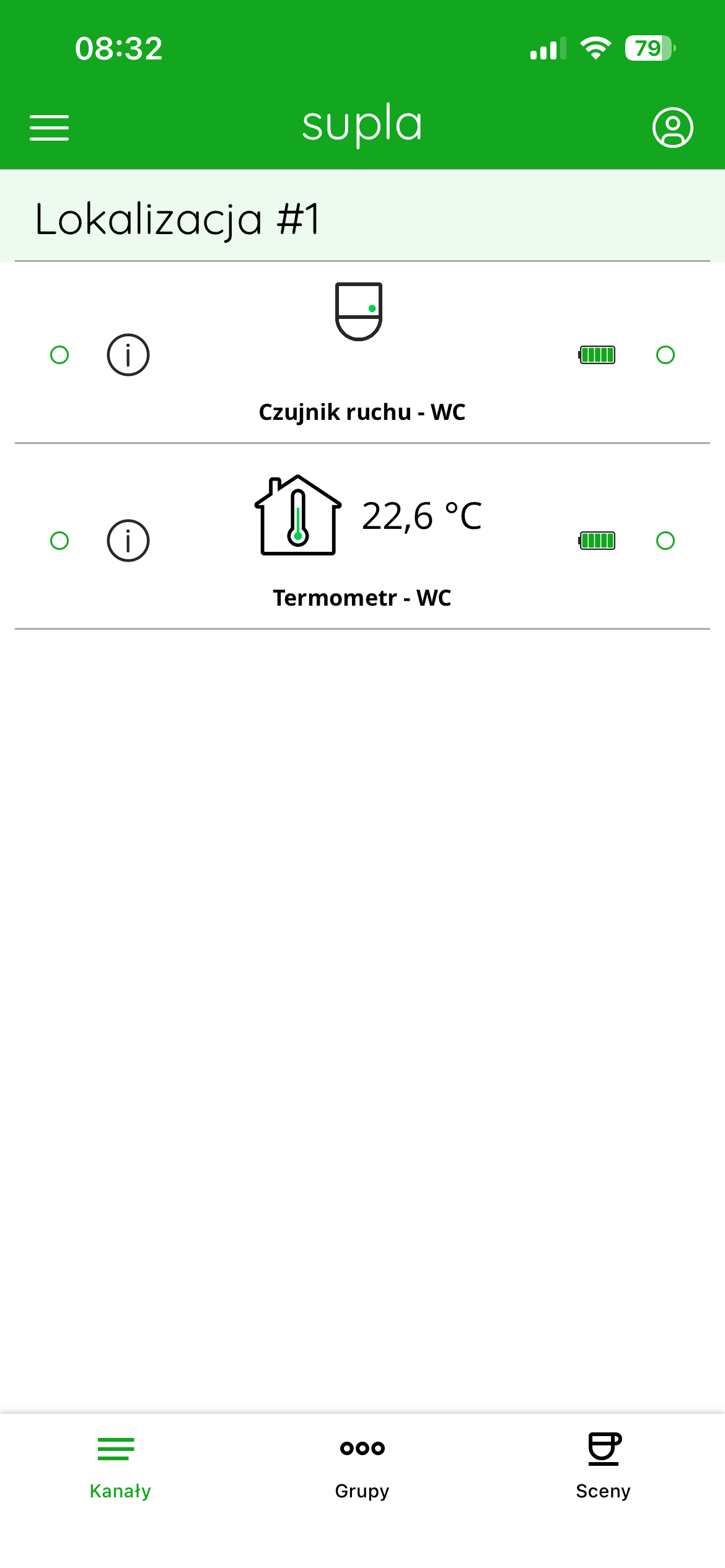
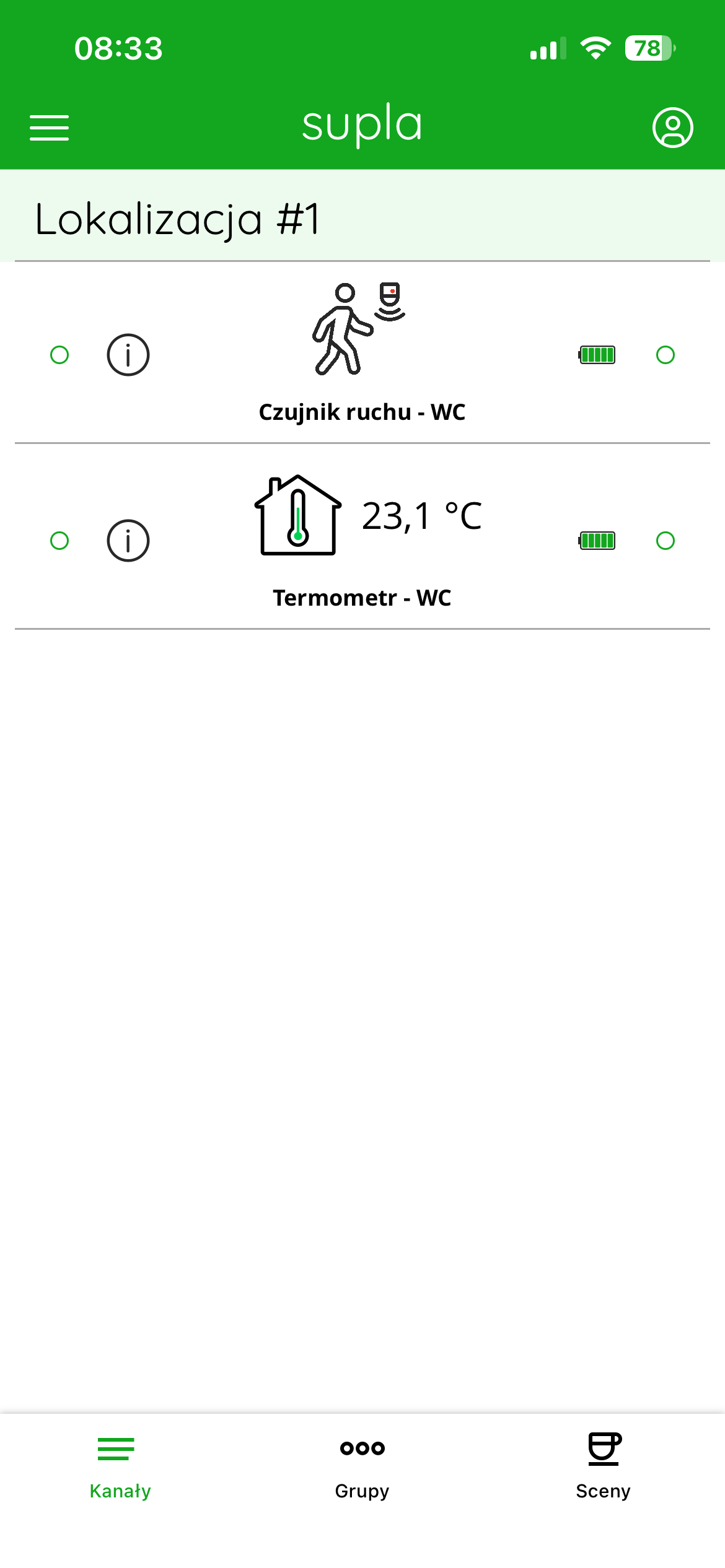
On the main screen of the SUPLA application, the AURATON PIR Sensor device is visible within the selected location (e.g. "Location #1") as two channels:
- Motion sensor
- Thermometer
Each channel is presented as a separate tile containing:
- an icon symbolizing the channel's function,
- channel name (e.g. "Motion sensor – toilet", "Thermometer – toilet"),
- current status or measurement value,
- battery icon indicating the battery charge level,
- connection status indicator (green dot indicates successful connection).
Resting state – no movement (figure at top, left)
In normal operation, the motion sensor does not detect activity. In this case:
- the standard sensor icon is displayed,
- no additional signs of movement activity,
- the channel remains inactive.
The temperature channel displays the current measured value (e.g. 22.6°C or 23.1°C).
Motion detection (figure top right)
When the sensor detects movement:
- the motion sensor channel icon changes (the motion detection symbol appears),
- the channel becomes active,
- this state is maintained for the time specified by the Timeout.
After the set time has elapsed, if no further movement is detected, the sensor automatically returns to its resting state.
Factory reset
To restore factory settings, hold the function button during normal operation (approx. 5 seconds) until the LED lights red. Release the button and briefly press it again within 3 seconds to confirm the operation. All information on the device will be cleared. If the device was previously paired with the AURATON Box after restoring factory settings, it must be removed from the SUPLA Cloud before pairing with the gateway again.
Cooperation with the SUPLA application
Use as a wireless controller of a circulation pump in a domestic hot water system activated by an AURATON PIR Sensor motion sensor
The AURATON PIR Sensor motion sensor, in conjunction with the AURATON Heater Controller, can serve as a wireless controller for a DHW circulation pump. The AURATON PIR Sensor motion sensor-activated controller is designed to support "intelligent circulation" of the domestic hot water system. The circulation pump, connected to an output, for example, the AURATON Heater Controller, is activated only when the AURATON PIR Sensor motion sensor detects DHW user activity in the room (e.g., bathroom) where the sensor is installed. The AURATON Heater Controller only activates the circulation pump for a pre-set time (operation time) set in the "Scene.".
After the circulation pump is turned off (after a set operating time), the AURATON Heater Controller will not turn the pump on despite receiving signals from the AURATON PIR Sensor for a period of time also previously set in the "Scene" (interval time). This is to prevent the DHW pump from turning on too frequently. Restarting will only occur after the interval time has elapsed and after receiving another motion signal from the AURATON PIR Sensor.
"Scene" Configuration
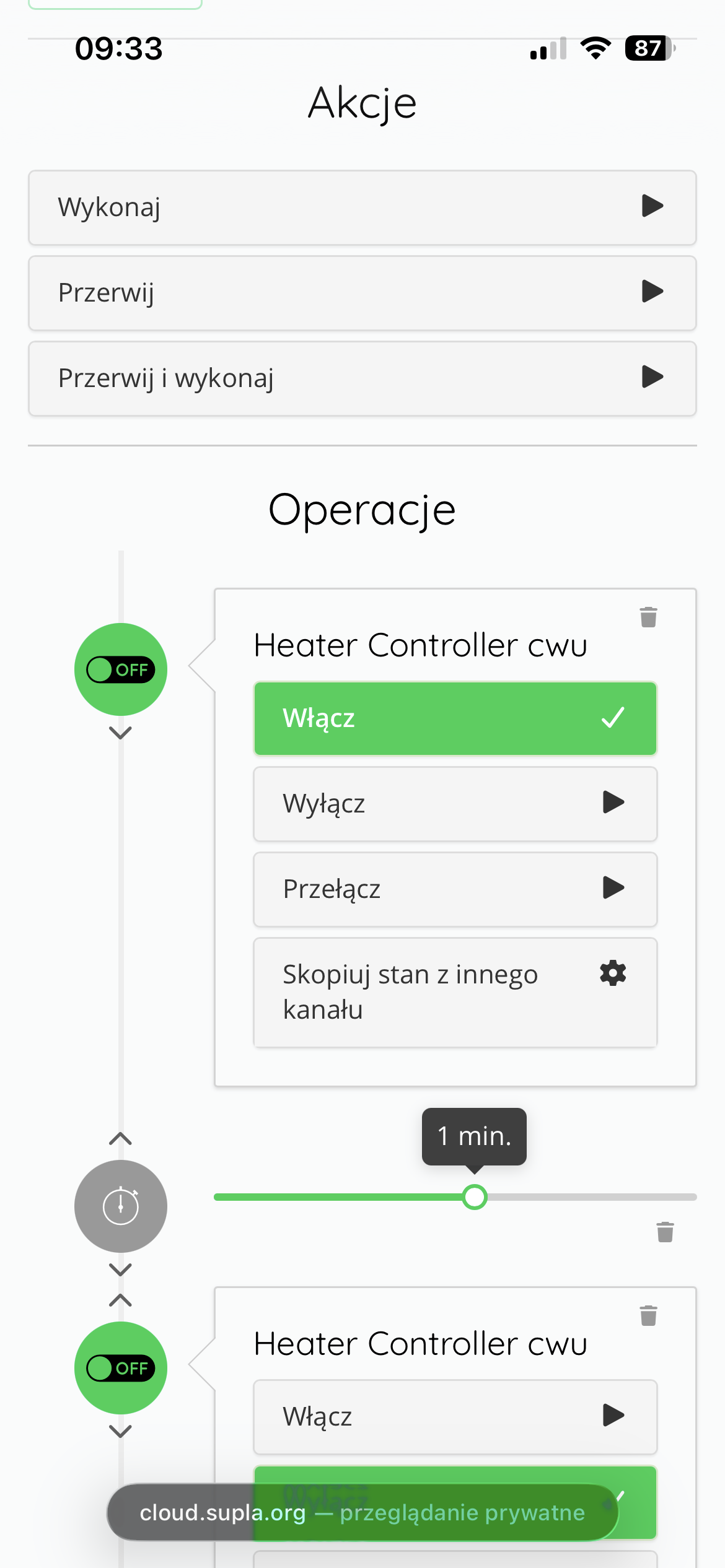
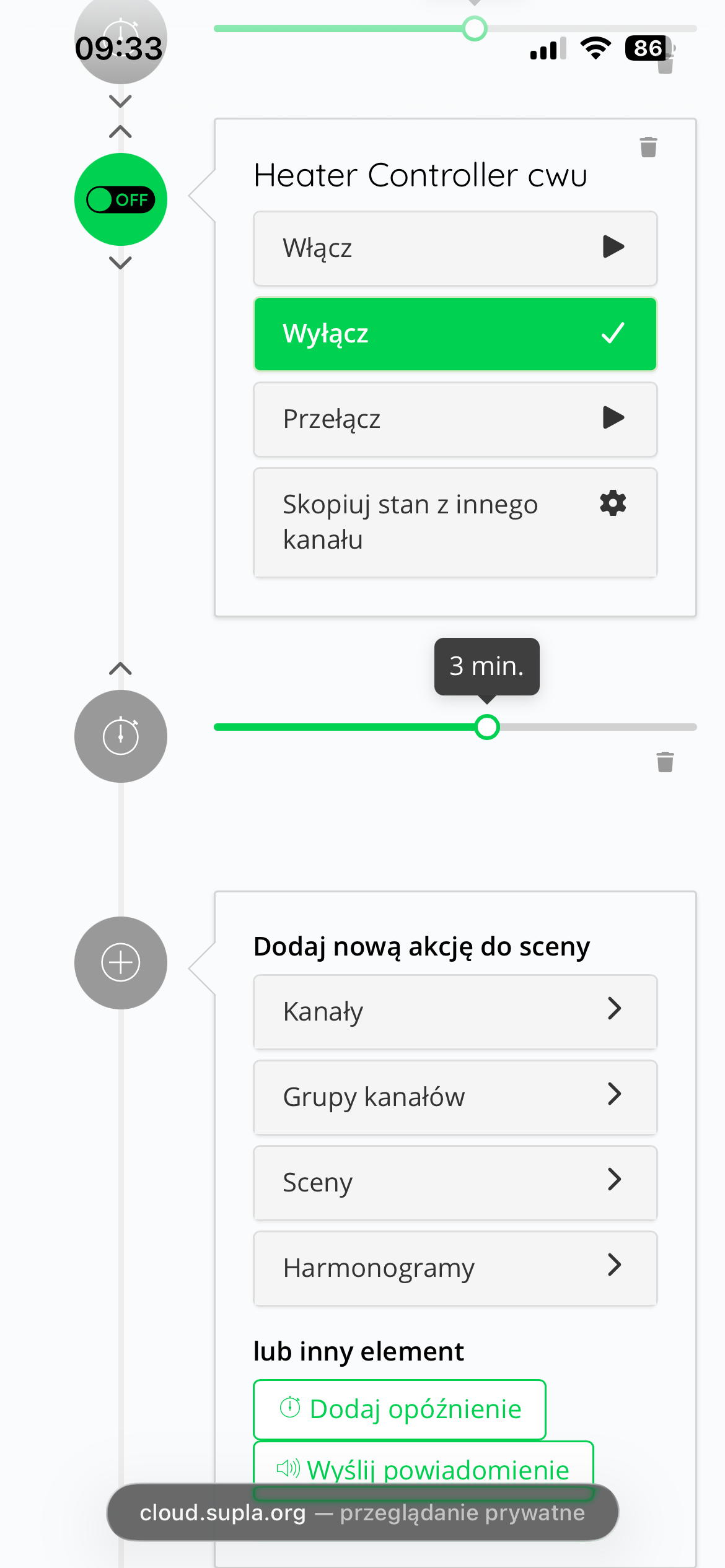
To configure the pump's operating time and pause time, create a "Scene" in SUPLA Cloud. To do this, log in to SUPLA Cloud via the app. Then, enter the AURATON Box gateway channel. Next, enter the relay channel, e.g., the AURATON Heater Controller, and change its function to "Power Switch," and then click the "Save Changes" button.
While in the same relay channel, press "Scenes" and then "Create new scene." Next, name the scene you're creating, e.g., "DHW," and set its conditions. The following figures show an example: the Heater Controller is to turn on the pump for 1 minute (operation time). After this time, the controller will turn off the pump and not turn it on for 3 minutes (break time), even if the AURATON PIR Sensor detects motion.
Once you have set the scene conditions, save everything using the "Save changes" button.
"Reaction" Configuration
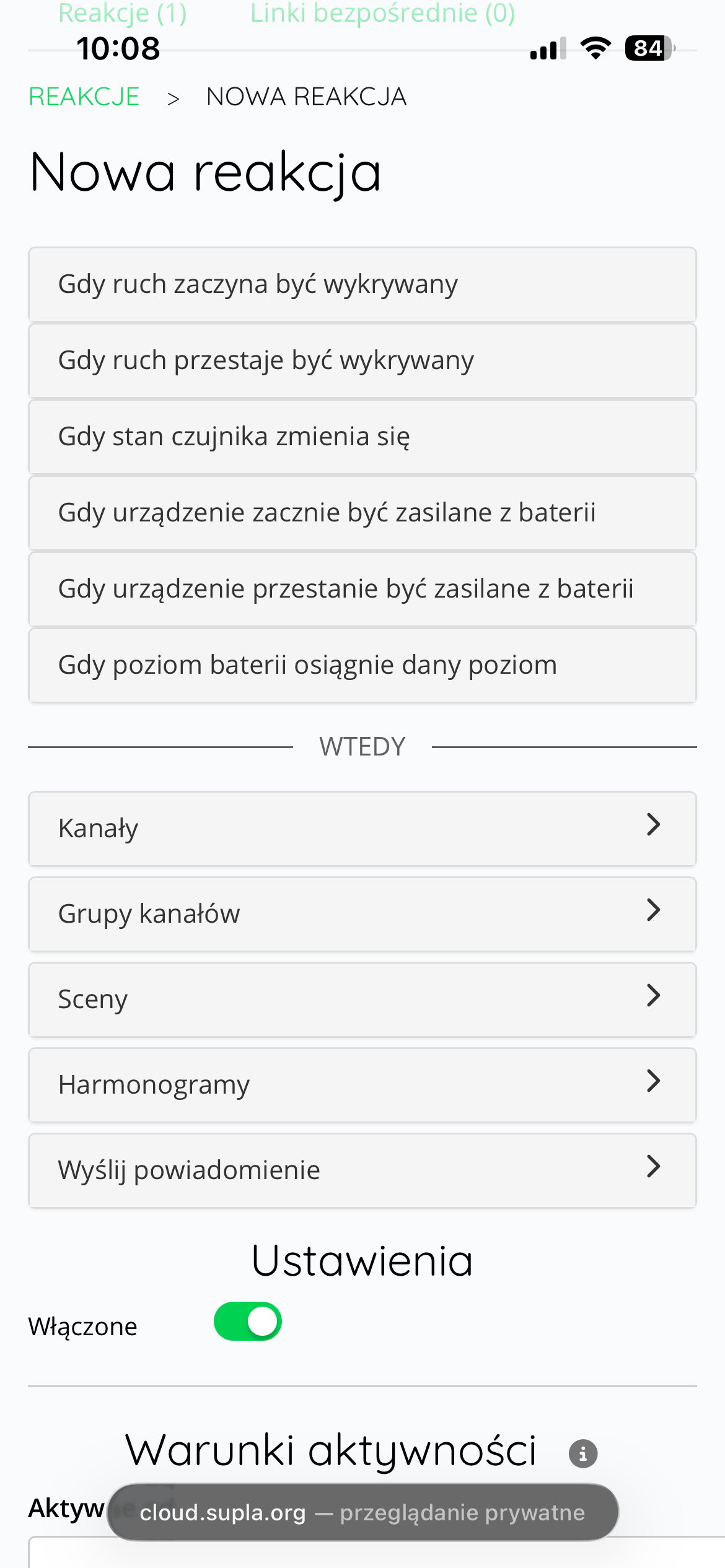
In the next step, we should create a "Reaction" in which when the motion sensor detects movement, the previously created scene will be triggered.
To do this, enter the AURATON PIR Sensor motion sensor channel in SUPLA Cloud, press "Reactions," and then "Create a new reaction." The figures below show an example of creating such a reaction.
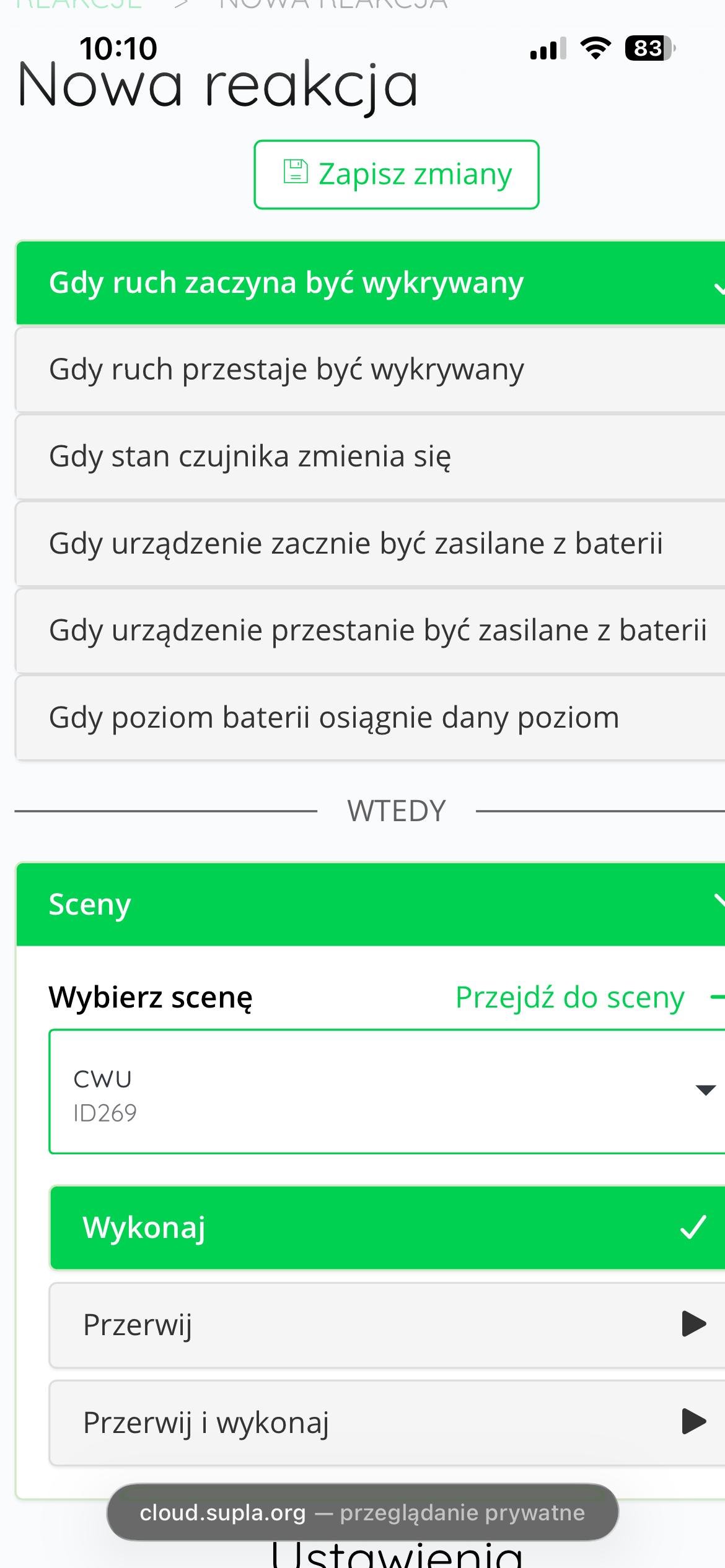
Finally, save the created reaction using the "Save changes" button.
From this point on – taking the example above into account – when the AURATON PIR Sensor detects movement, the AURATON Heater Controller will turn on the circulation pump for 1 minute (operation time), then turn it off and remain off for 3 minutes (break time), even if the motion sensor detects any movement during this time. The circulation pump will only be turned on again after the break time has elapsed and motion is detected again.
Using the AURATON PIR Sensor motion sensor to control an electrical device using, for example, the AURATON Switch ONE switch (e.g. turning on the light when motion is detected)
The AURATON PIR Sensor motion sensor can work with the AURATON Switch ONE switch, for example, and be used to turn on lights based on detected motion. To do this, log in to the SUPLA Cloud using the SUPLA app. Then, enter the AURATON Box gateway channel. Next, enter the AURATON PIR Sensor motion sensor channel you want to use to trigger the light. Next, click "Reactions" and then "Create a new reaction." Ultimately, you'll need to create two reactions:
- When the motion sensor detects movement, turn on the AURATON Switch ONE (turn on the light)
- When the sensor stops detecting motion – turn off AURATON Switch ONE (turn off the light).
The following figures show the configuration of both Reactions:
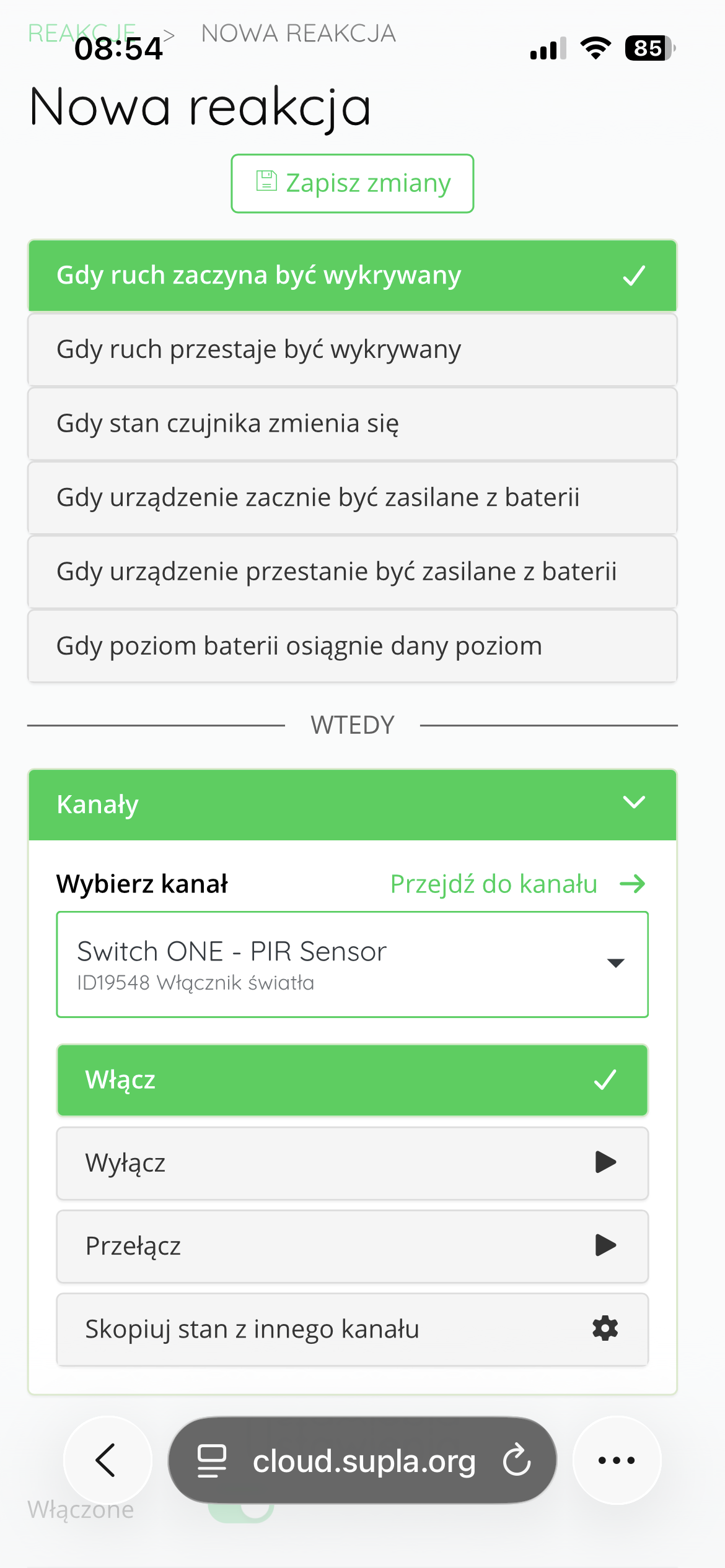
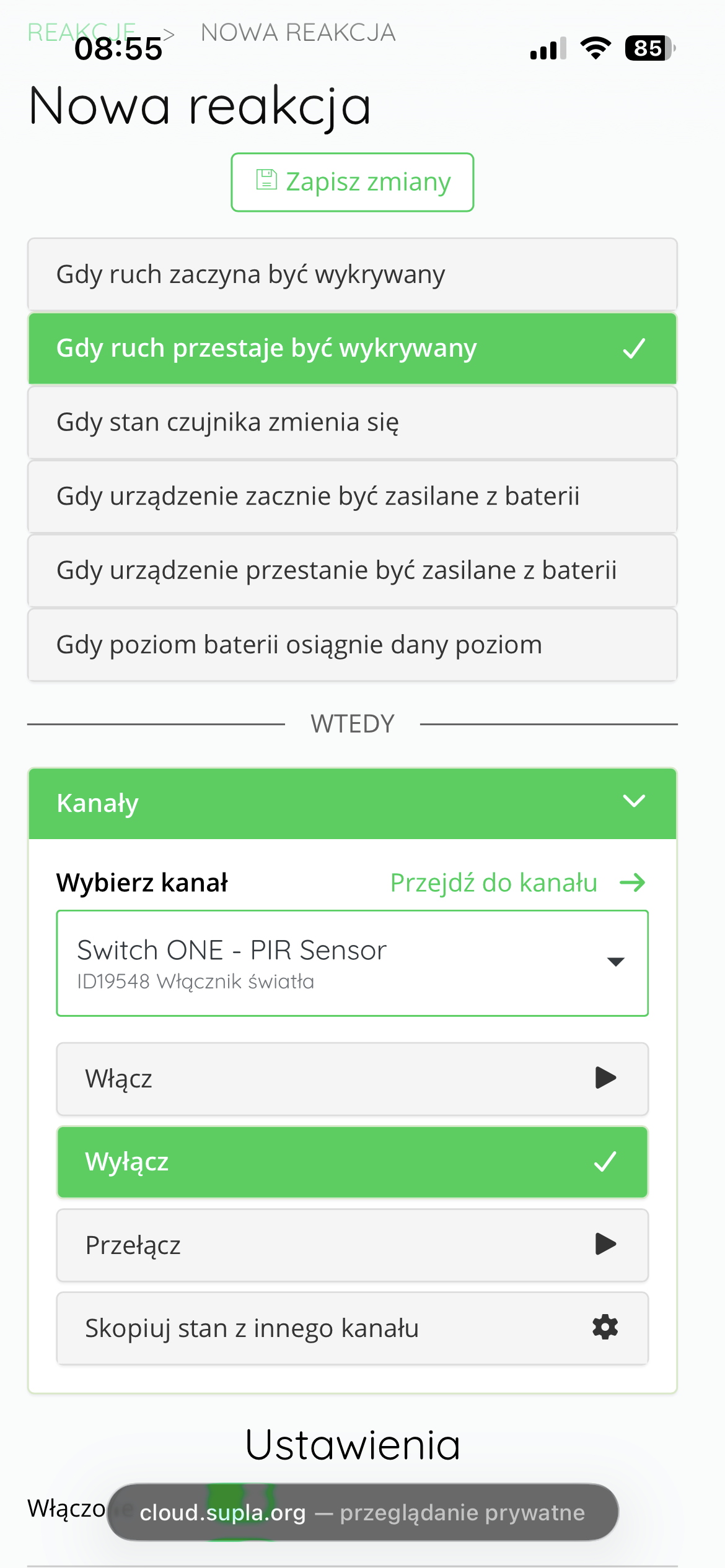
Each Reaction must be saved using the "Save changes" button.
From this point on – taking the data from the example above – when the AURATON PIR Sensor detects motion, the light connected to the AURATON Switch ONE will turn on for the pre-set time. The time is set in seconds in SUPLA Cloud, in the AURATON PIR Sensor motion sensor channel, in the "Configuration" frame, "Timeout" parameter.
Using a motion sensor to automatically regulate the temperature
The AURATON PIR Sensor can be integrated with the heating system, allowing it to automatically adjust room temperature based on occupant presence. This increases comfort and reduces energy consumption.
Within an automation scenario, you can set:
-
when motion is detected, the sensor sends a command to the thermostat, which will raise the room temperature to a comfortable value, e.g. 21°C,
-
If no motion is detected for a specified period of time (e.g. 60 minutes – this time can be freely changed in SUPLA Cloud, in the motion sensor channel, in the "Configuration" frame, "Timeout" parameter), the system will automatically lower the temperature to an economical level, e.g. 18°C.
This solution works particularly well in places where rooms are used periodically, e.g.:
-
in guest rooms,
-
in apartments for rent,
-
in offices and meeting rooms.
Automatic temperature control based on occupancy allows you to maintain thermal comfort only when needed, while reducing unnecessary heating of empty rooms.
To complete the above sample configuration, log in to the SUPLA Cloud using the SUPLA app. Then, enter the AURATON Box gateway channel. Next, enter the AURATON PIR Sensor motion sensor channel you want to use to control the temperature. Next, click "Reactions" and then "Create a new reaction." Ultimately, you'll need to create two reactions:
- When the motion sensor detects movement, set the temperature to 21°C on the thermostat (temperature controller).
- When no motion is detected for an hour, set the thermostat to 18°C.
Each reaction should be saved using the "Save changes" button.
The following figures show the configuration of both Reactions:
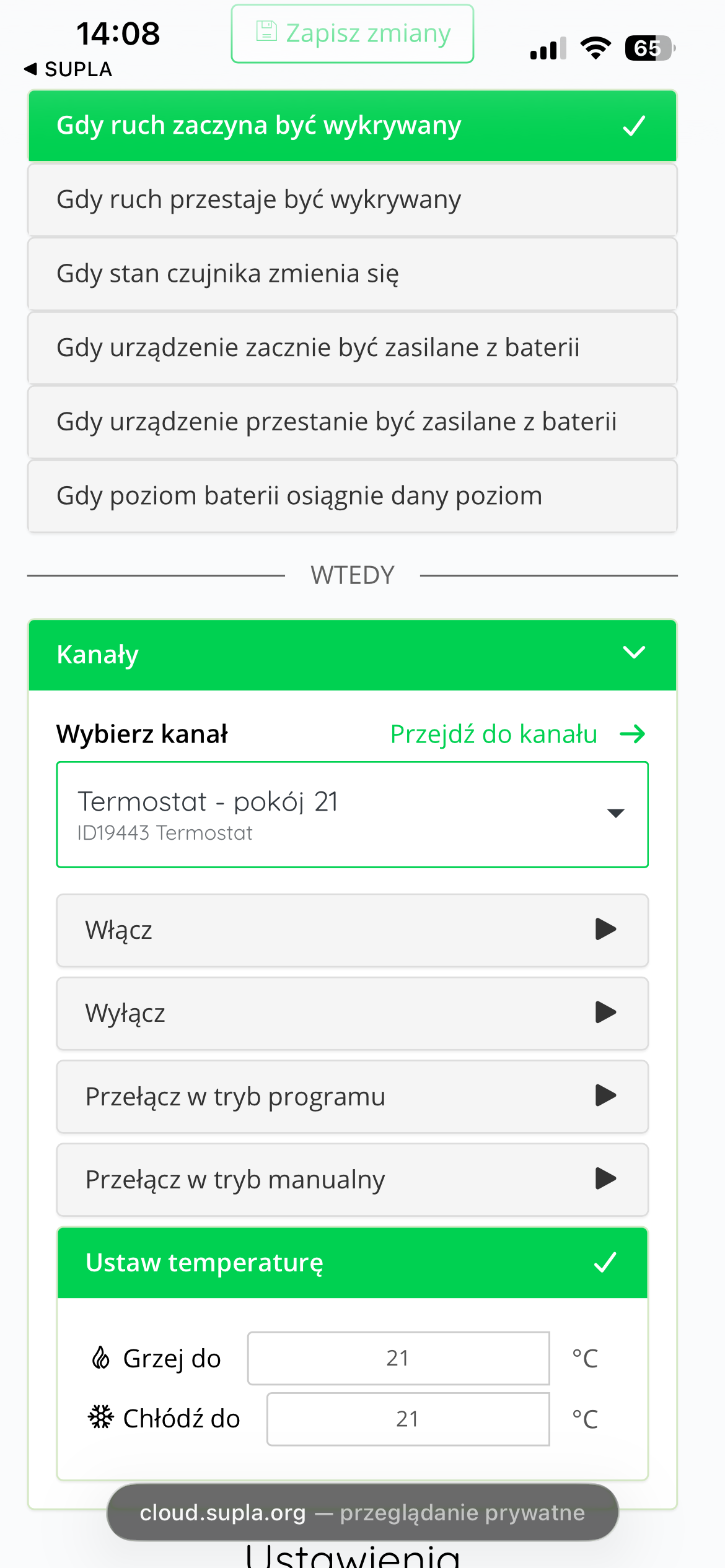
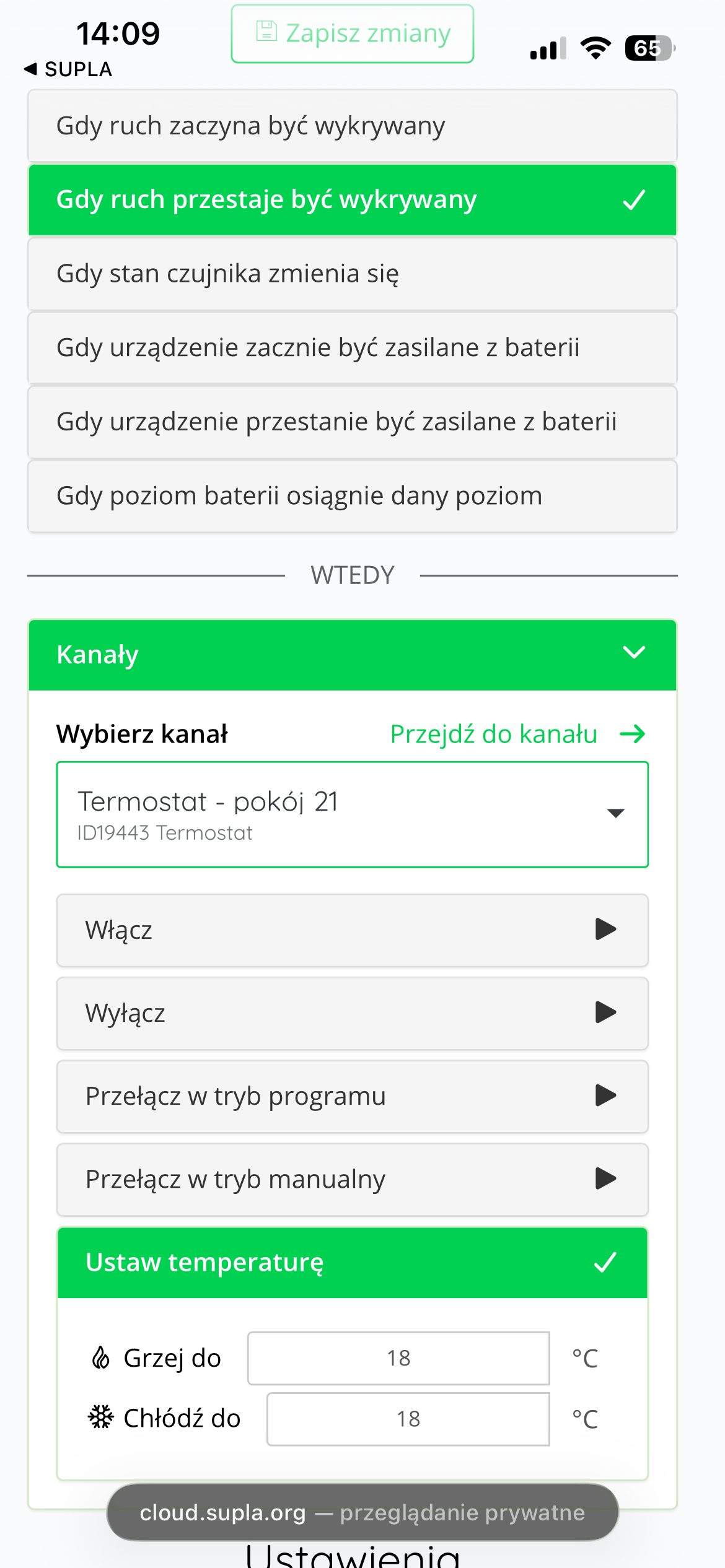
Additional information and notes
- Data is transmitted from the AURATON PIR Sensor to the AURATON Box gateway whenever motion is detected in the room. If no motion is detected, the AURATON PIR Sensor transmits data every 5 minutes.
- Description of LED signaling during normal device operation:
Cleaning and maintenance
- Clean the exterior of the device with a dry cloth. Do not use solvents (such as benzene, thinner, or alcohol).
- Do not touch the device with wet hands.
- Do not expose the device to excessive smoke or dust.
- Avoid contact of the device with liquids or moisture.
Technical data
| Operating temperature range: | 0 – 40 °C |
| Cooperation with the Internet Gateway: | AURATON Box (SUPLA) |
| Operating status check: | LED diodes |
| Power supply: | CR123A 3V lithium battery (included) replaceable battery |
| Degree of protection: | IP20 |
| Humidity: | ≤85% non-condensing |
| Radio frequency: | 868.850 MHz 869.000 MHz |
| Range of action: | in a typical building, with standard wall construction – approx. 30 m; in open areas – up to 300 m |
| Signal strength: | up to 11 dBm |
| Dimensions [mm]: | 60.89 x 94.84 x 50.72 |
Disposal of the device
O
Devices are marked with a crossed-out waste bin symbol. In accordance with European Directive 2012/19/EU and the Waste Electrical and Electronic Equipment Act, this marking indicates that this equipment, after its useful life, must not be disposed of with other household waste.
Users are obligated to dispose of it at a collection point for used electrical and electronic equipment.
LARS Andrzej Szymański hereby declares that the AURATON PIR Sensor radio device type complies with Directives 2014/53/EU and 2011/65/EU. The full text of the EU declaration of conformity is available in the download section below.
Manufacturer's address
Lars
ul. Świerkowa 14
64-320 Niepruszewo
Poland
www.auraton.pl